

Dog Applicability
Update your K9 settings so you only complete exercises relevant to your dog.
When training at a group event, there may be exercises that don’t apply to your dog. For example, the event might include a detection exercise but you have a patrol dog. Perhaps there’s a patrol tracking exercise but your patrol dog doesn’t track.
PackTrack’s K9 type attributes let you specify the types of exercises that apply to your dog. All other exercise types will be automatically ignored.


How to configure your dog’s types
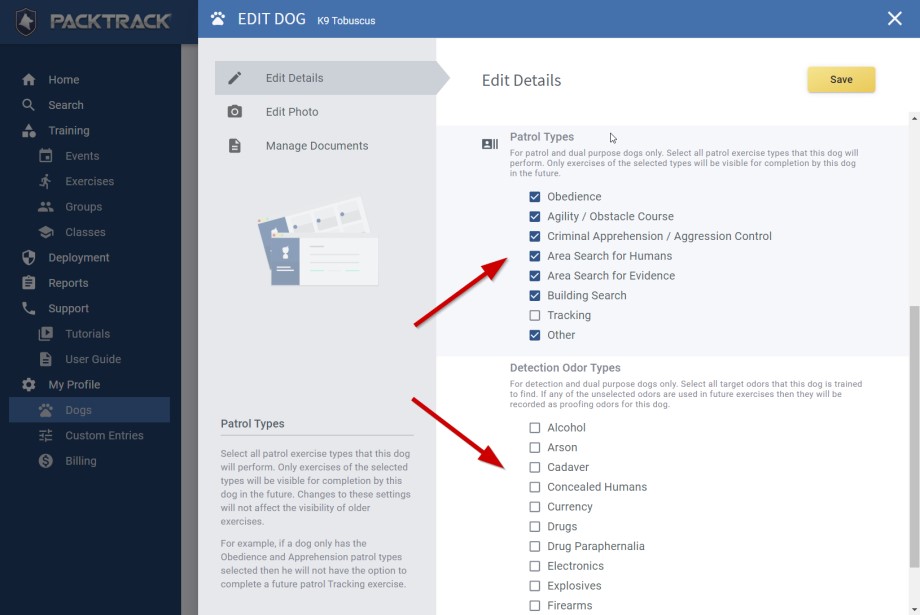
From the Dogs page, click the Edit icon for each of your dogs to open the editor interface. Choose the Edit Details option and scroll down in the right pane to select any Patrol Types and Detection Odor Types that apply.
Only exercises of the types that you select will be visible for completion by this dog in the future. However, changes to these settings will not affect the applicability of past exercises that you’ve completed.
How applicability works
These settings affect both patrol and detection dogs. For example, if a patrol dog only has the Obedience and Apprehension patrol types selected, they will not have the option to complete a future patrol Tracking exercise or any detection exercises.
This applies to exercise target odors for detection dogs as well. For example, if a detection dog only has the Drugs odor type selected, they will not have to complete exercises at future events which only contain Explosive type target odors.
They also won’t have to complete any patrol exercises. If you want your dog to complete all exercise types at every event, select all of the patrol and detection odor types for each of your dogs.
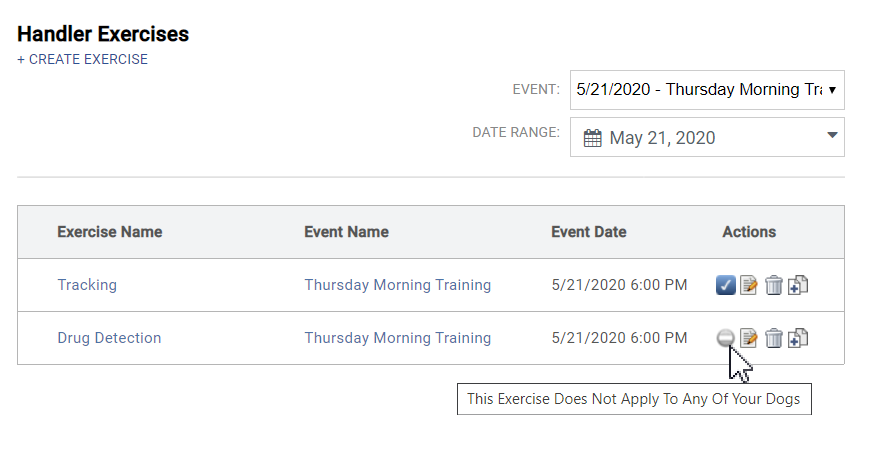
Once all of your dog’s types are set, PackTrack will only require you to complete a training record for the specific dogs that match the exercise type. If you have no dogs that match an exercise type, the exercise will show in the list with an icon indicating that the exercise doesn’t apply.
Frequently Asked Questions
What happens to exercises that don’t apply to my dog?
They appear in the list with an icon indicating they don’t apply. You won’t be required to complete them.
Will changing these settings affect my past records?
No. Changes to dog type settings only affect future exercises.
Can I change my dog’s types later?
Yes. Update the settings at any time from the Dogs page. Changes apply to future exercises only.
Does this work for both patrol and detection dogs?
Yes. You can configure patrol types, detection odor types, or both depending on your dog’s role.

Still need help?
Can't find what you're looking for? Message the PackTrack team from the chat inside the app, or reply to any PackTrack email.
