

Target and Proofing Odors
When creating a detection exercise, PackTrack lets you specify target odors (drugs, currency, explosives) and proofing odors (packaging or distractor odors like cardboard, plastic wrap, paper).
Dogs should alert to the target odors and ignore the proofing odors. This works great if all of the dogs at an event are of the same detection odor type.


Exercises with multiple detection dog types
If different detection dog types, such as a drug dog and a currency dog, are in an exercise that uses both drug and currency odors, the drug dog should use drugs as the target odor and currency as the proofing odor. The currency dog would use currency as the target odor and drugs as the proofing odor.
PackTrack automatically categorizes each odor in the exercise as target or proofing based on each dog's detection odor type configuration. You only need to create one exercise no matter how many different detection dog types attend the event.
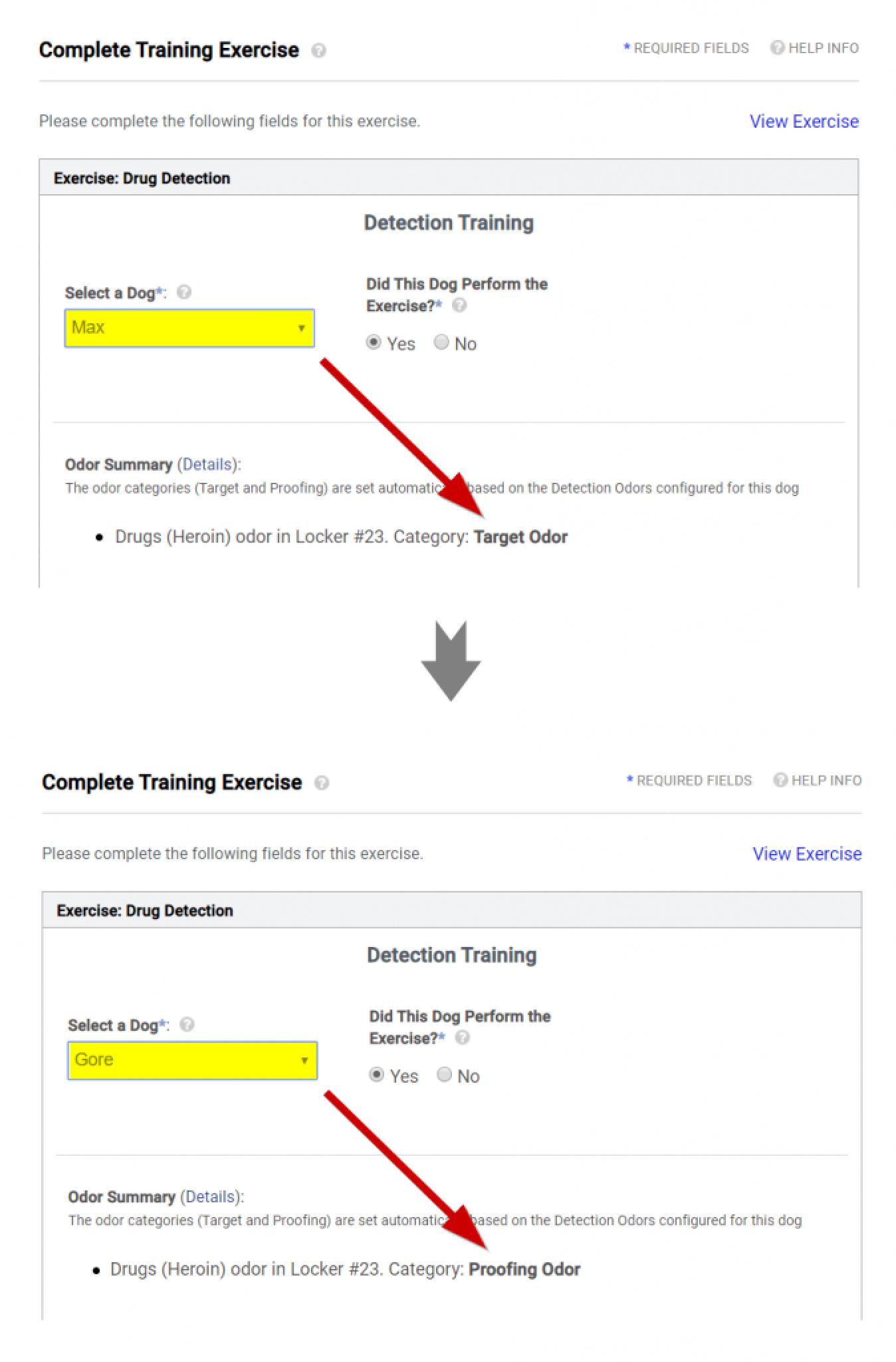
For example, two K9s completing the same drug detection exercise would see the drug odor categorized as a target odor for drug dog "Max" and as a proofing odor for currency dog "Gore."
How to set up each exercise type
Simple exercises: Nothing special is needed. Record your target odors in the exercise and PackTrack handles the rest.
Proofing odors only (blank / controlled negative): Check the Blank / Controlled Negative checkbox when creating the exercise. This ensures that all detection dogs have to complete it.
Mixed target and proofing odors with different dog types: When creating the exercise, explicitly specify the proofing odors that all detection dogs should ignore (towels, cardboard, etc.). Then enter all of the odors that will be target odors for at least some of the dogs. PackTrack categorizes the odors as target or proofing for each dog based on their attributes.
For example, you might add drug and currency odors to an exercise. When a drug dog completes this exercise, the drug odor is categorized as the target and the currency odor as proofing.
A currency dog completing the same exercise has the currency odor categorized as the target and the drug odor as proofing. Both dogs continue to see any explicitly added proofing odors (dog toy, cardboard, etc.) categorized as proofing.
Viewing odor categorization
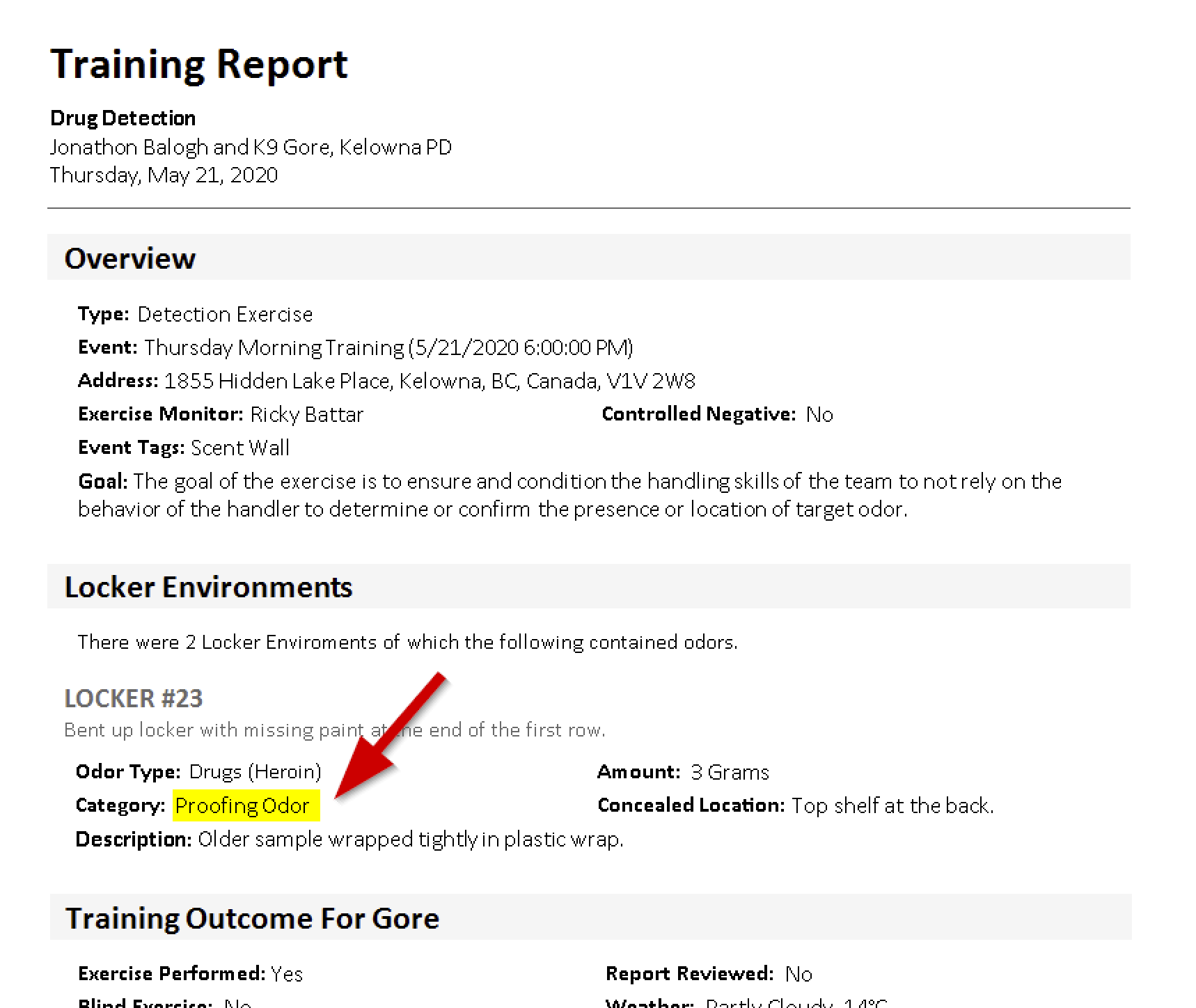
Information about how the exercise odors are categorized is displayed when completing a training record to help with writing an accurate narrative. The odor category is also shown in exercise reports.
Frequently Asked Questions
Do I need to create separate exercises for different detection dog types?
No. Create one exercise and PackTrack automatically categorizes the odors based on each dog's detection type.
How does PackTrack know which odors are target vs. proofing for each dog?
It uses the detection odor type configured in each dog's settings. Make sure your dog's detection type is set correctly on the Dog Settings page.
What if my exercise only uses proofing odors with no target odors?
Check the Blank / Controlled Negative checkbox when creating the exercise so all detection dogs are required to complete it.
Where can I see how odors were categorized?
Odor categories appear when completing a training record and in the exercise report.
Do I need to manually tag each odor as target or proofing?
Only proofing odors need to be explicitly specified. Enter all odors that apply to at least some of the dogs as target odors and PackTrack handles the rest.

Still need help?
Can't find what you're looking for? Message the PackTrack team from the chat inside the app, or reply to any PackTrack email.
