

Solo Quick Training
Record a training session on your phone in a few taps, then add the details whenever it suits you.


Record a training session on your phone in a few taps, then add the details whenever it suits you.
Training alone does not need a mountain of forms. Solo Quick Training captures the essentials of a session while you are still in the field, and creates the event and exercise records for you.
What it is
Solo Quick Training is built for patrol handlers who are not training in a group. It captures the relevant training information on your phone as you work through the exercise. When you are done you can either complete the exercise with details on how your dog performed, or save the record and finish it later. Either way, the event and exercise records are created automatically.
The form captures the minimum data needed to define the activity. If you have ever used the Five Ws to gather information, the fields will look familiar. There are four:
- Location Name: where
- Date and Time and Duration: when
- Dog: who
- Patrol Type: what
Your narrative covers the why, and you add that when you complete the exercise.
Where to find it
Open the PackTrack mobile app, go to the Records page, and tap the Plus menu. Solo Quick Training is the first option.
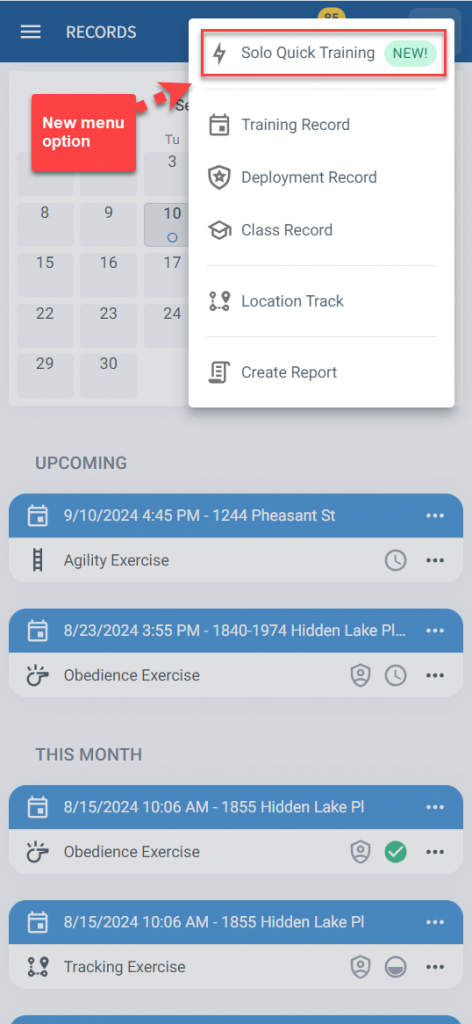
This one is phone only. It is designed for use while you are training, so it is not available on the mypacktrack.com website.
How it works
The fields sit under Training Settings. The form prepopulates based on the current time and location, plus what it knows about your past training. It might predict that you are doing 15 minutes of obedience training with your default dog. You can edit any field that is incorrect.
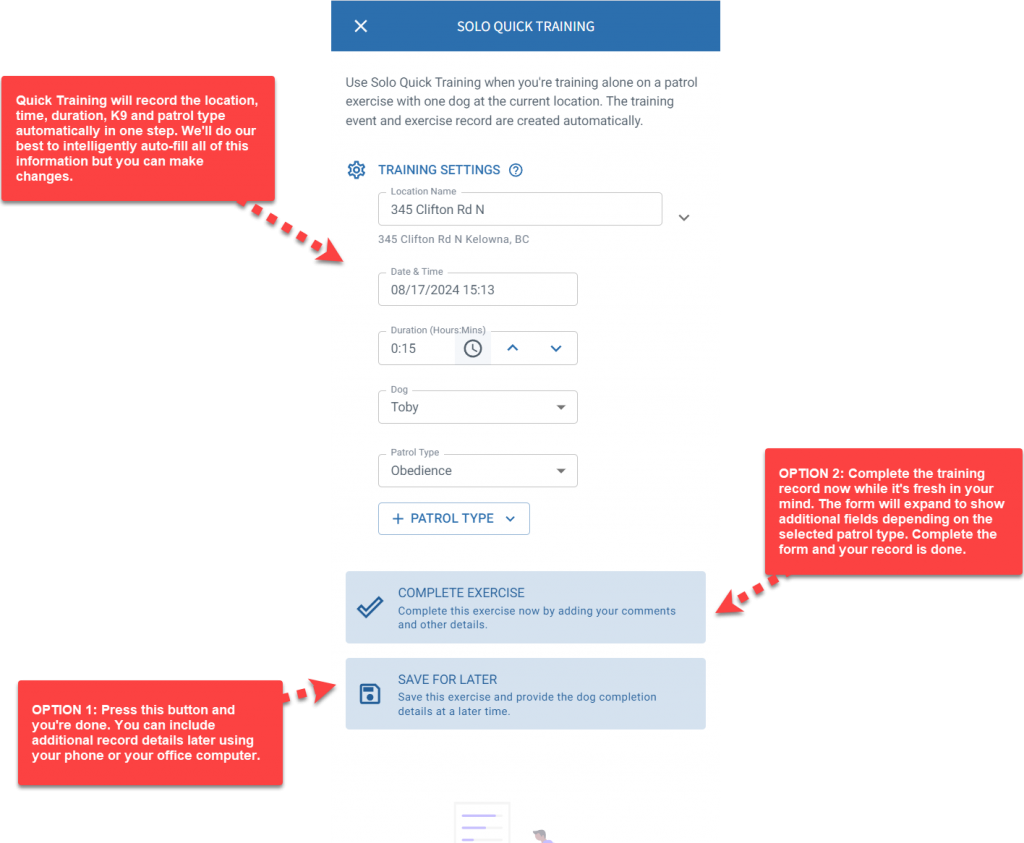
From here you have two choices.
Save for later
Tap Save For Later and you are done. PackTrack captures the time of day, duration of training, location, weather, type of training and which dog participated. You can complete the training a little later on your phone, or wait until you are back at your computer. At that point you will add the details explaining exactly how you trained and how your dog performed.
Complete the exercise now
Tap Complete Exercise instead and the completion form for the selected patrol exercise type is inserted below the current form, so you can finish on the same screen. An obedience exercise, for example, opens a list of obedience types to record against. Enter the exercise details, type out your comments, and you are done. The event, exercise and completion records are all created automatically.
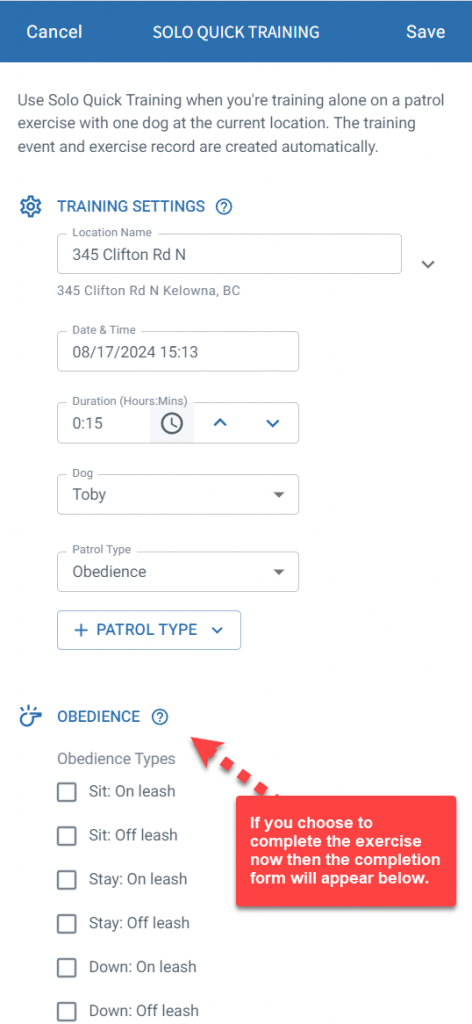
Recording more than one patrol type
Quick Training also supports exercises with multiple patrol types, known as scenarios. To record an exercise with both agility and obedience components, select the Agility patrol type, tap the Plus Patrol Type button, then select Obedience. The completion form includes a section for each patrol type along with a single comments field.
What it does not cover
Solo Quick Training has deliberate limits:
- It can only be used when you are training alone with a single dog.
- Group training is not supported.
- K9 detection exercises are not supported.
- It is only available in the PackTrack mobile app.
Fast, but still complete
Quick Training is fast and convenient. It is not an excuse to cut down on the depth or quality of your records.
Comprehensive records with detailed comments, which incorporate feedback from trainers and others, are essential for growing your skillset, improving your performance, and protecting yourself and your agency from potential liability. Review the exercise and completion data when you are done, to make sure you have defined clear exercise goals and properly explained how you worked to achieve them.
Frequently Asked Questions
Can I use Solo Quick Training on the website?
No. It is only available in the PackTrack mobile app. It is meant to be used on your phone while you are training.
Can I use it for group training?
No. It can only be used when you're training alone with a single dog.
Can I use it for detection exercises?
No. K9 detection exercises aren't supported by Solo Quick Training.
What if the prefilled fields are wrong?
You can edit any of the fields that are incorrect before you save.
Do I have to complete the record right away?
No. Tap Save For Later, then complete the training a little later on your phone or wait until you're back at your computer.
What gets created automatically?
The event and exercise records. If you choose Complete Exercise, the completion record is created as well.
Can I record two types of training in one session?
Yes. Select the first patrol type, tap the + Patrol Type button, then select the second. The completion form includes a section for each, with a single comments field.

Still need help?
Can't find what you're looking for? Message the PackTrack team from the chat inside the app, or reply to any PackTrack email.
