
Practical guidance for K9 handlers, trainers, and supervisors
For handlers, trainers, and supervisors who need documentation that stays consistent and easy to work with.
Articles cover training and deployment logging, supervisor review, reporting habits, and the small process choices that make records easier to trust later.
Featured blog posts
System Update
0
min read
Updates to Streamline Your Records
We’re always working to make PACKTRACK faster and more user-friendly for handlers, trainers, and supervisors. Today, we’re excited to highlight several new improvements designed to save you time and improve communication across your team.
We’re always working to make PACKTRACK faster and more user-friendly for handlers, trainers, and supervisors. Today, we’re excited to highlight several new improvements designed to save you time and improve communication across your team.
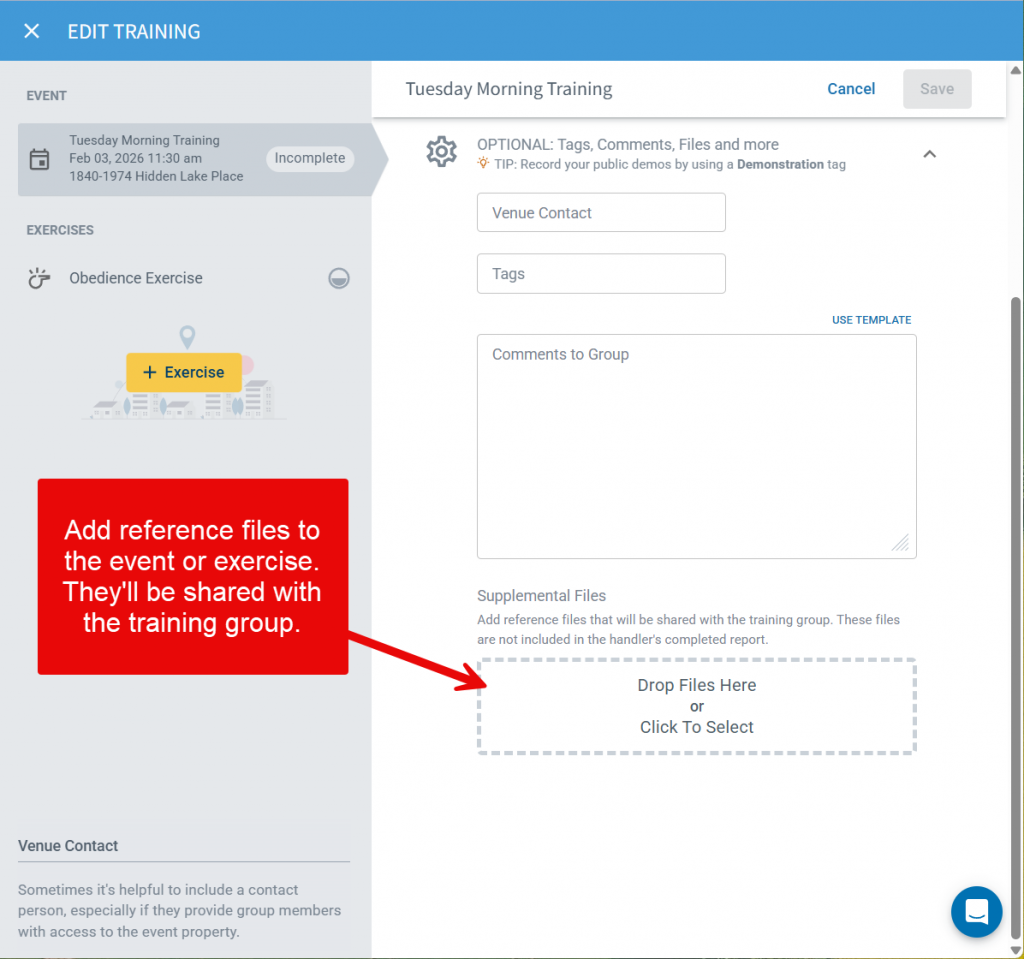
Attach Documents to Events and Exercises
You’ve always been able to upload documents to individual exercise completions — but now you can include them directly in Events and Exercise definitions as well. This update gives handlers and trainers more flexibility to provide supplemental materials such as training outlines, reference documents, maps, diagrams, etc. Adding documents at the event or exercise level ensures everyone starts with the same information and supports more consistent, well-documented training.
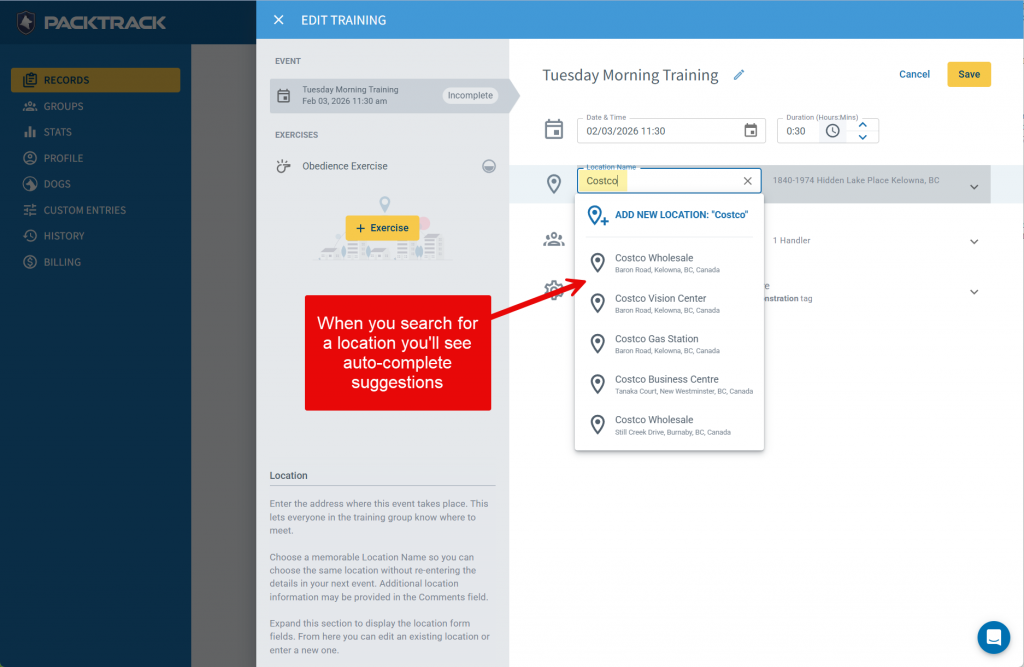
Faster Data Entry with Autocomplete Locations
Recording where an event or deployment occurred is now even faster. PACKTRACK’s training and deployment forms now include Google-powered location autocomplete. Just start typing a name or address and nearby matching suggestions will appear. Select the correct option, and PACKTRACK will automatically fill in the relevant location fields for you. This means less typing, fewer mistakes and more accurate location data.
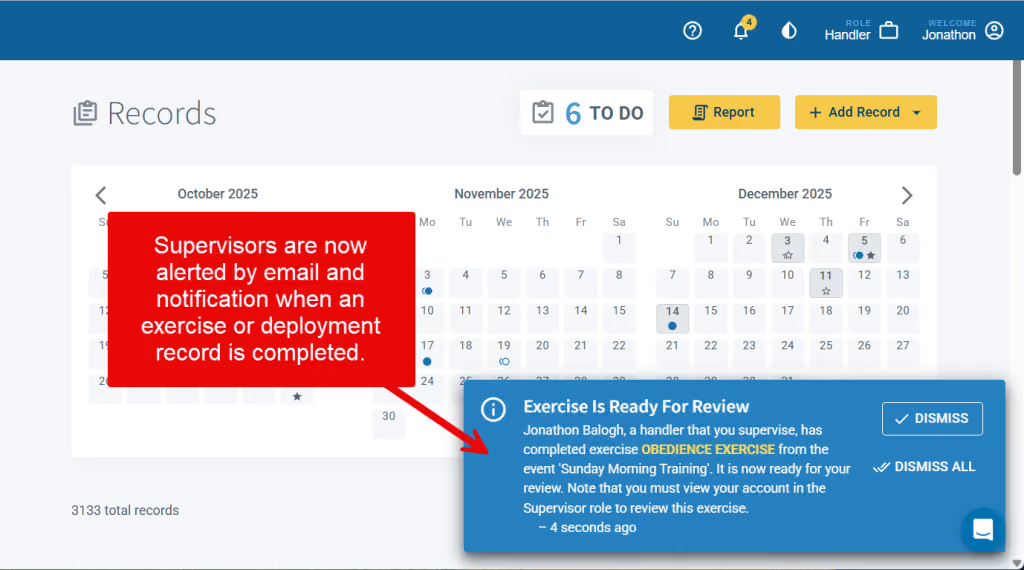
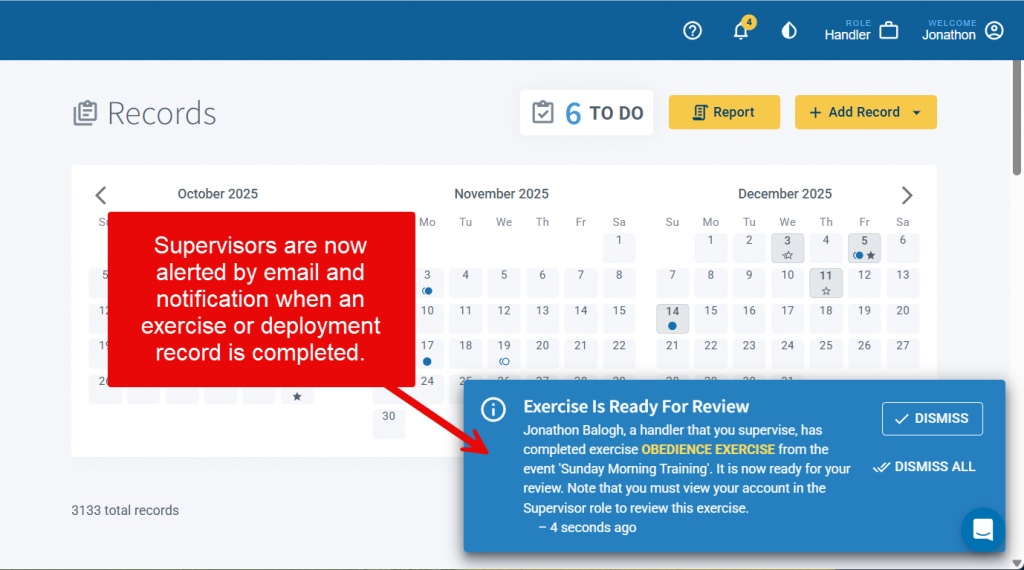
Supervisor Notifications for Completed Records
Supervisors can now choose to receive notifications whenever a handler they oversee completes a training or deployment record. This gives them a heads-up to review the new records. Notifications are sent by email as well as within PACKTRACK, keeping supervisors informed without requiring constant manual review. Supervisors can configure their preferences in the Notifications section of their Profile page, choosing whether to receive training record completion alerts, deployment record completion alerts or both. Note that these alerts are off by default. This feature enhances accountability and ensures important activity never gets overlooked.
Cleaner, More Modern Email Styling
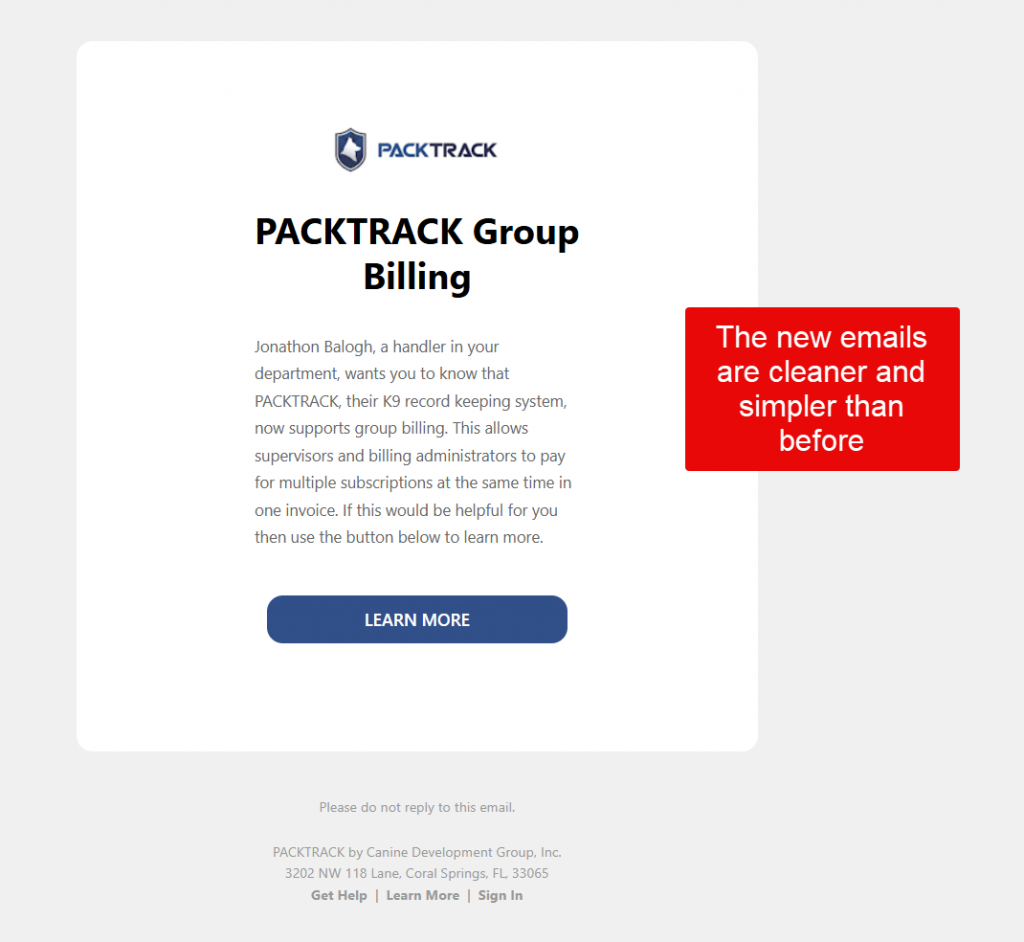
PACKTRACK emails just got a major upgrade. All system emails are now sent using clean, modern looking HTML formatting — with improved colors, visual hierarchy, and clear action buttons. These updates make PACKTRACK emails easier to read and quicker to act on, whether you're on your phone or desktop.
Share the News About Group Billing
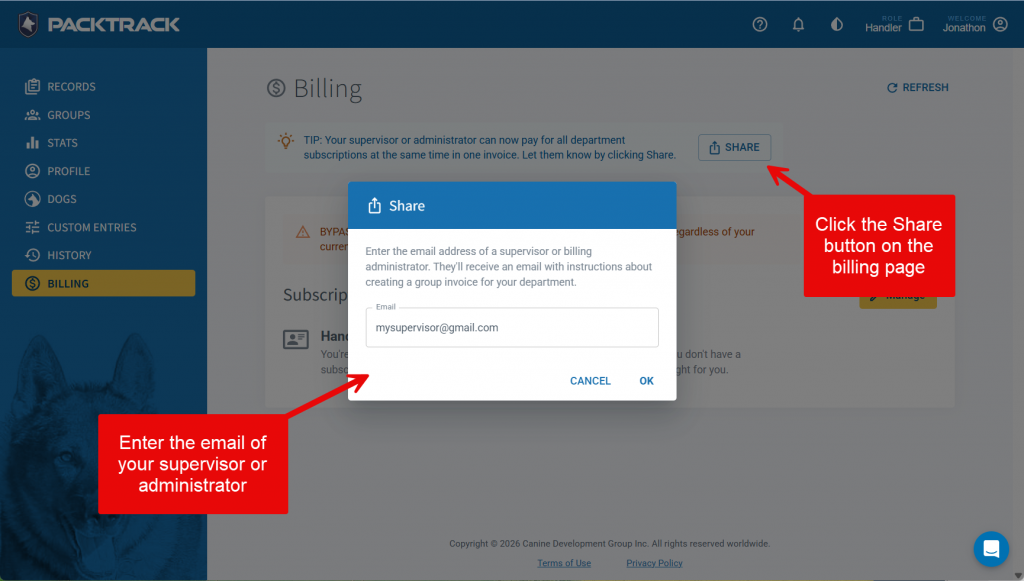
As of a couple months ago, your supervisor or administrator can use the new Group Billing feature to pay for all department subscriptions at the same time in one invoice. We now make it easy to share this feature with others. Visit your Billing page, click the Share button and then enter the email address of anyone in your department that should know about this. They'll get an email with a link to our Group Billing help article.
These features are part of our ongoing effort to make PACKTRACK the most intuitive K9 record-keeping platform available. As always, we welcome your feedback and look forward to sharing even more updates soon. If you haven’t explored these new features yet, log in and give them a try!
System Update
0
min read
Group Subscriptions
Managing multiple K9 handler subscriptions just got a whole lot easier. We’re excited to announce our newest feature - Group Subscriptions - designed to give department billing managers complete control over their team’s subscriptions, all under a single account.
Managing multiple K9 handler subscriptions just got a whole lot easier. We’re excited to announce our newest feature - Group Subscriptions - designed to give department billing managers complete control over their team’s subscriptions, all under a single account.
One Invoice, One Account, Total Control
With Group subscriptions, billing managers can now pay for and manage the subscriptions of multiple K9 handlers together. No more juggling individual invoices or tracking down renewals across separate accounts. Everything is streamlined into one centralized billing dashboard. Managing your team’s subscriptions is simple and flexible. First, invite the handlers in your department to join your group subscription. Next, purchase a license with the desired number of seats. That's it! If handlers join or leave the department, you can easily add, remove, or reassign seats at any time.
Why It Matters
For agencies with multiple K9 handlers, managing subscriptions individually can be time-consuming and confusing. Group subscriptions eliminates that friction, offering:
- Simplified billing – One invoice covers your entire team.
- Flexible management – Add or remove handlers as your team changes.
- Better oversight – Track your active users and seat usage in one place.
Step by Step Guide
Step 1: Get the Billing Manager role
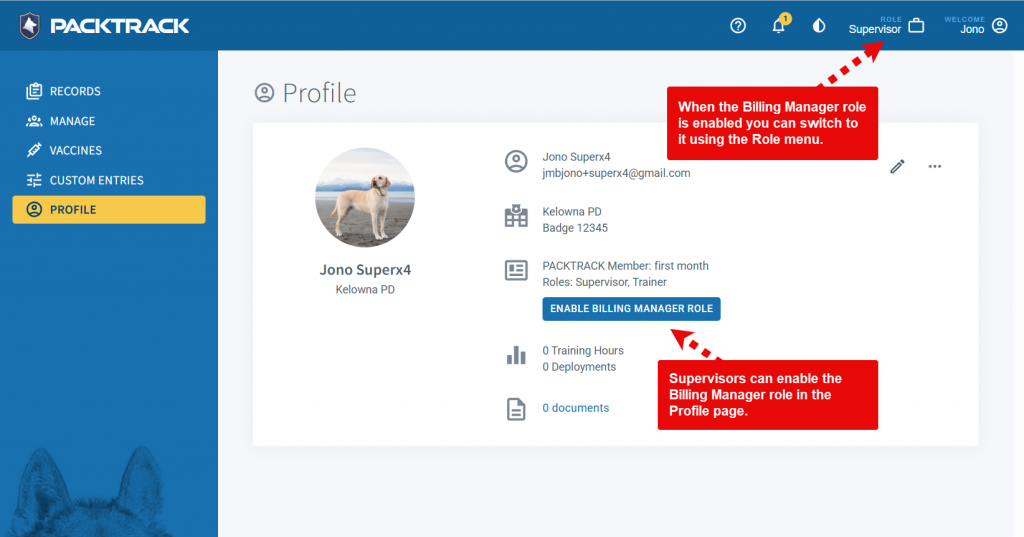
To access the group subscription feature you need to use the new Billing Manager role. A billing manager can be a handler, supervisor or administrator that's responsible for ensuring that everyone in the department has an up to date subscription. Only one person needs to do this for the department. You may select this role at
registration or, if you're currently a supervisor, then you can add the Billing Manager role from your Profile page. You may also ask for the role to be added to your account using our support chat.
Step 2: Choose handlers to be managed
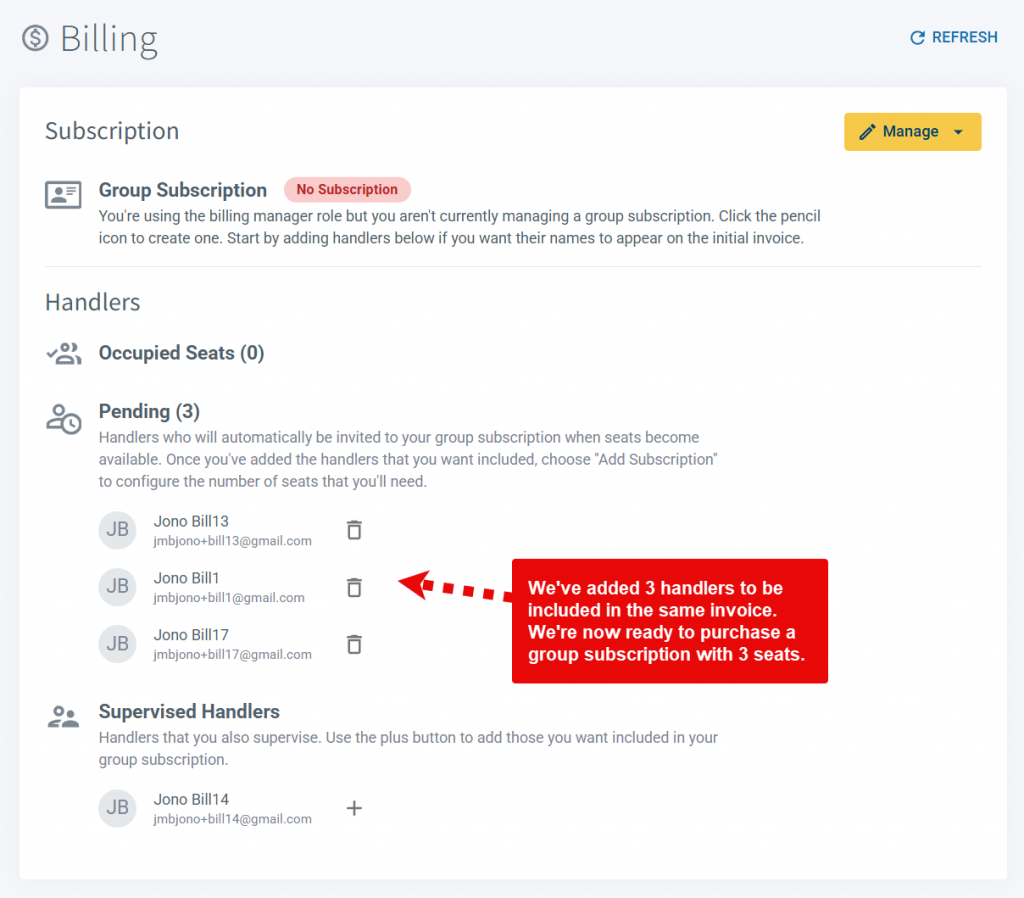
Switch to the Billing Manager role and choose the Billing tab. Here, you'll add the handlers that you want to include in your group subscription. Note that your invitations are queued in the Pending list and will be sent later. The goal is simply to identify the handlers that you want to be covered.
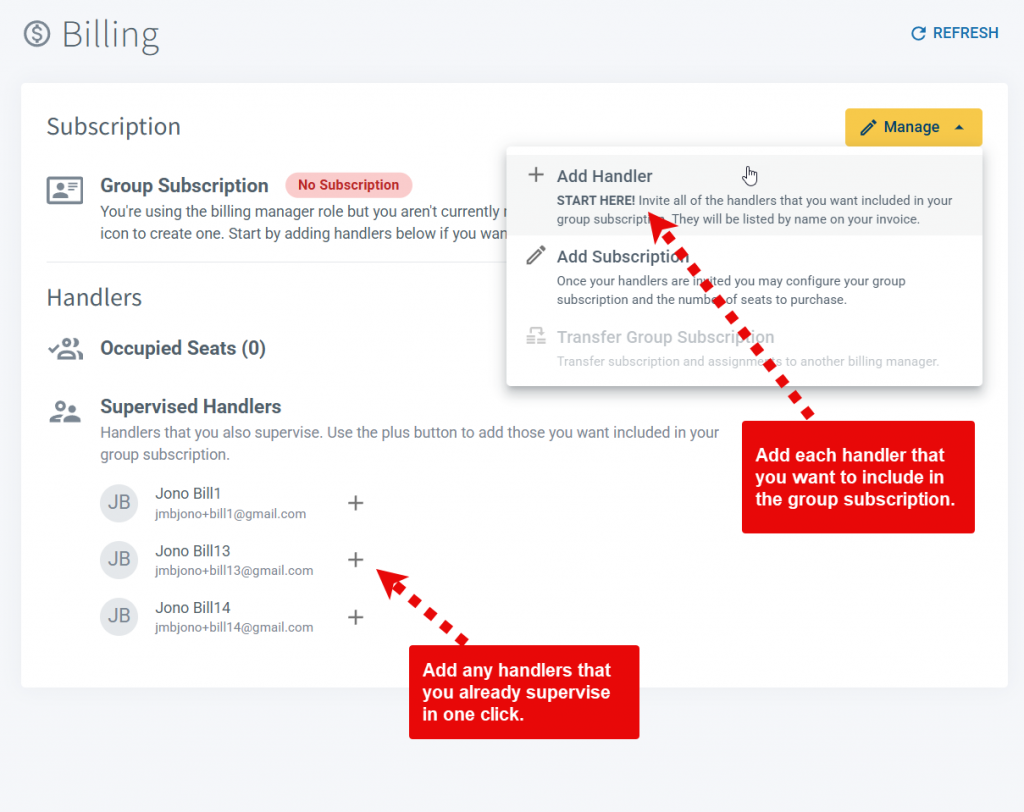
Use the Add Handler option in the Manage menu to provide the email address for each handler. If you already supervise handlers then they can be added by clicking the plus button next to their name in the Supervised Handlers list. If you add a handler that isn't a PACKTRACK member then they will receive an email asking them to sign up. This is a great way to onboard the handlers in your department with the PACKTRACK service. When they complete the registration they'll automatically be queued in the Pending list to be included in this group subscription.
Step 3: Purchase a group subscription
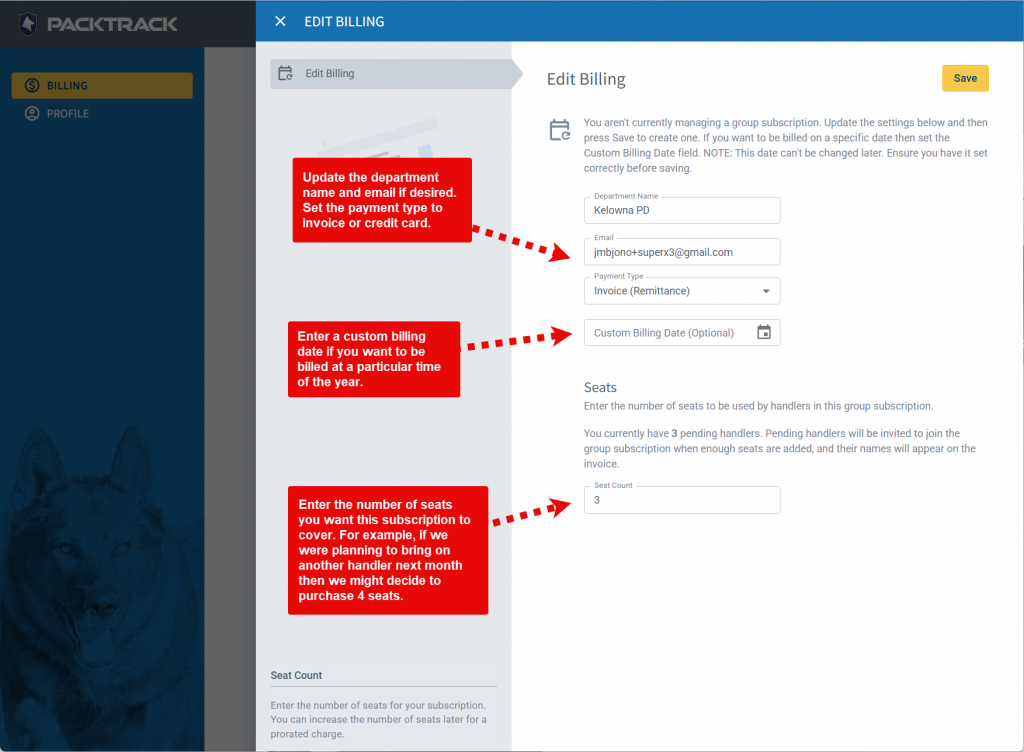
Now that you've identified the handlers that you want to include, you're ready to configure the group subscription. Click the Add Subscription option in the Manage drop down menu to open the billing editor. Adjust the department name and email address if desired, choose the desired payment type (invoice or credit card) and then enter the number of seats that you'd like to purchase. You also have the option of setting a specific billing date. If you want to be billed every year on January 1st then you'd enter that date here.
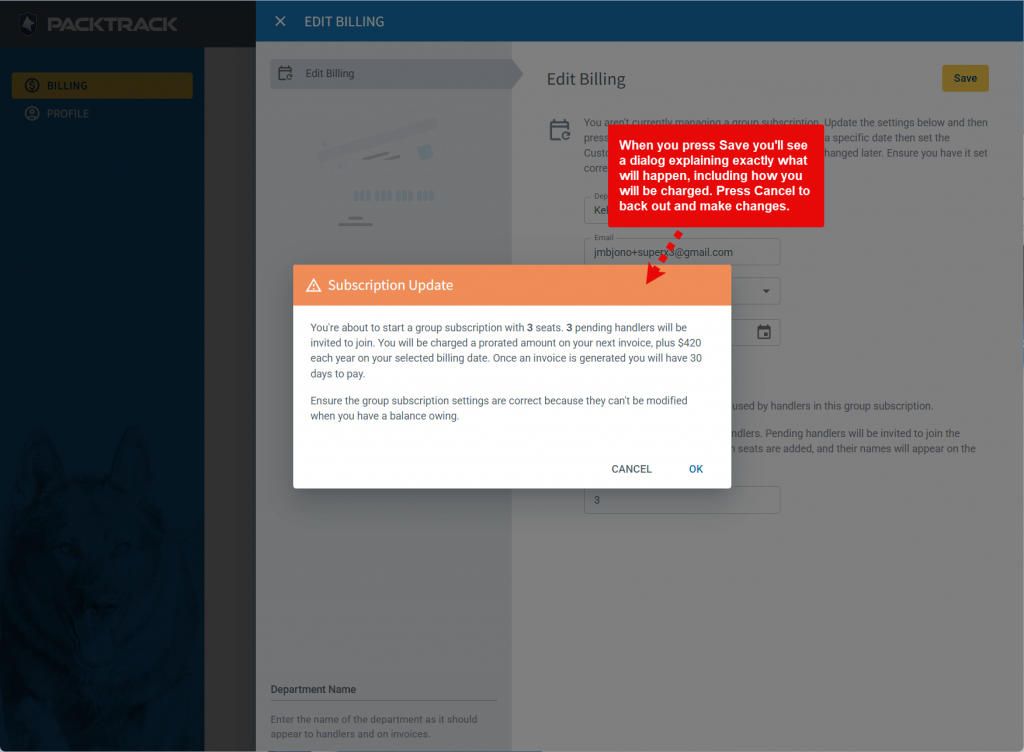
Once you purchase your subscription, the Billing page will update. Pending handlers will occupy the newly available seats and be invited to have their subscription paid for by the billing manager.
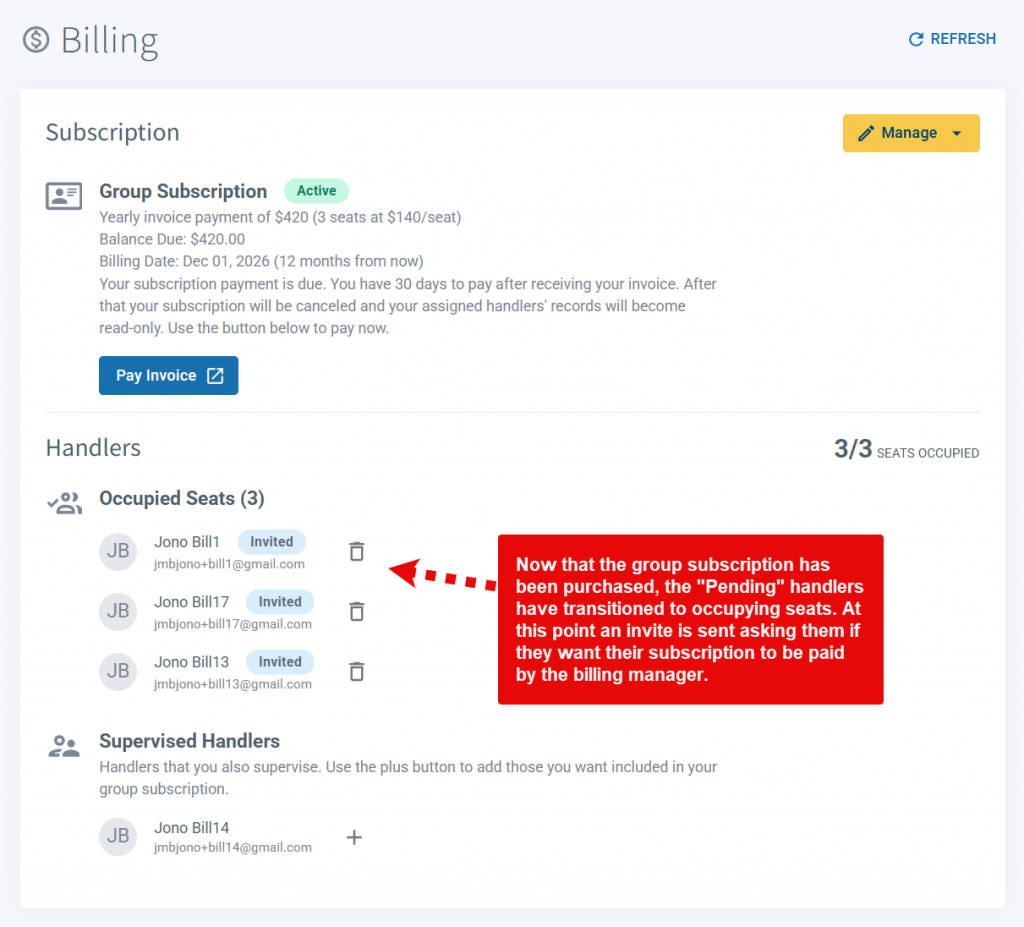
Handlers accept the invite and join the group subscription. Their previous subscription is cancelled. If there is paid time left on the handler's previous subscription then the unused portion will be credited to the billing manager's group subscription.
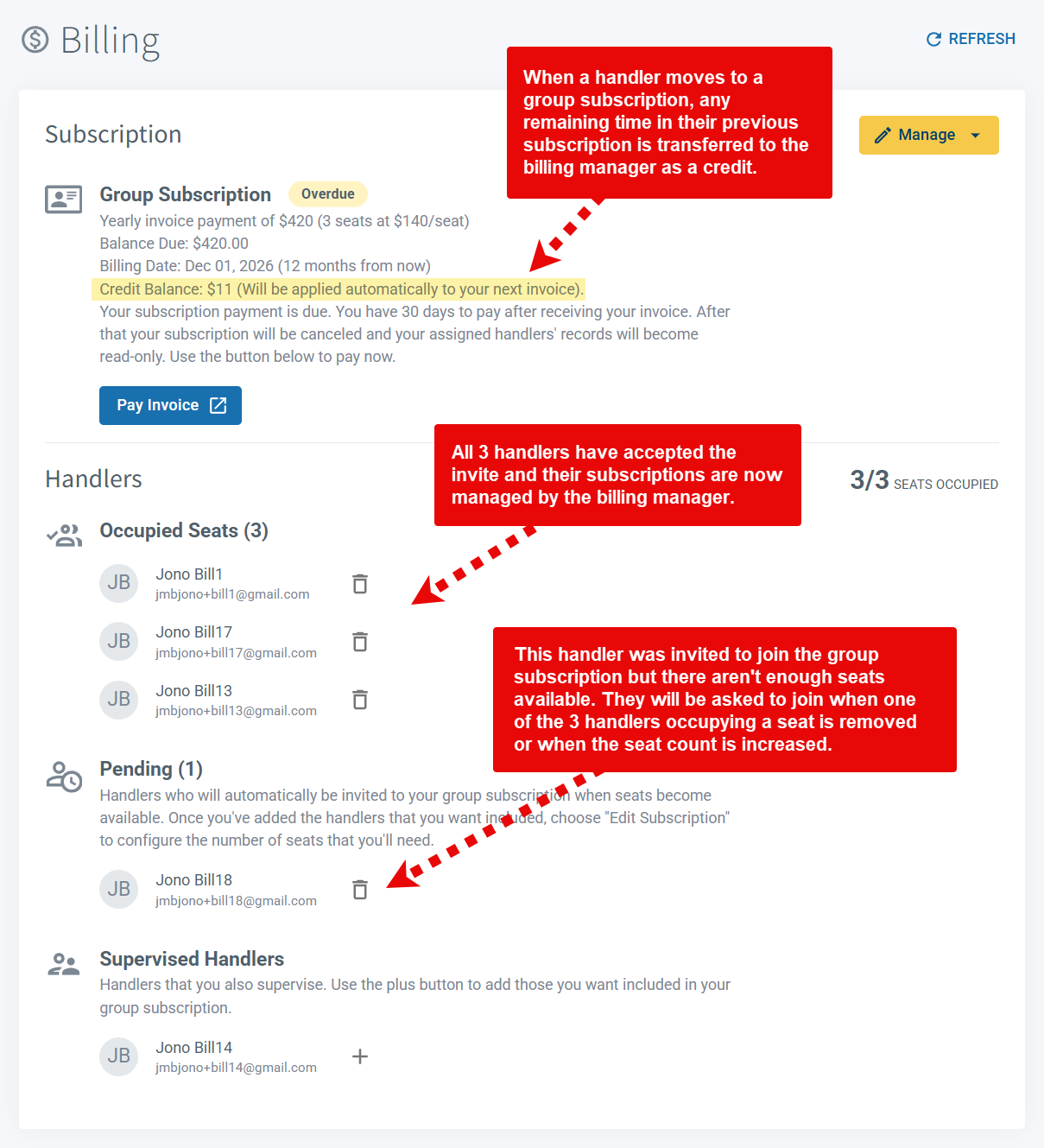
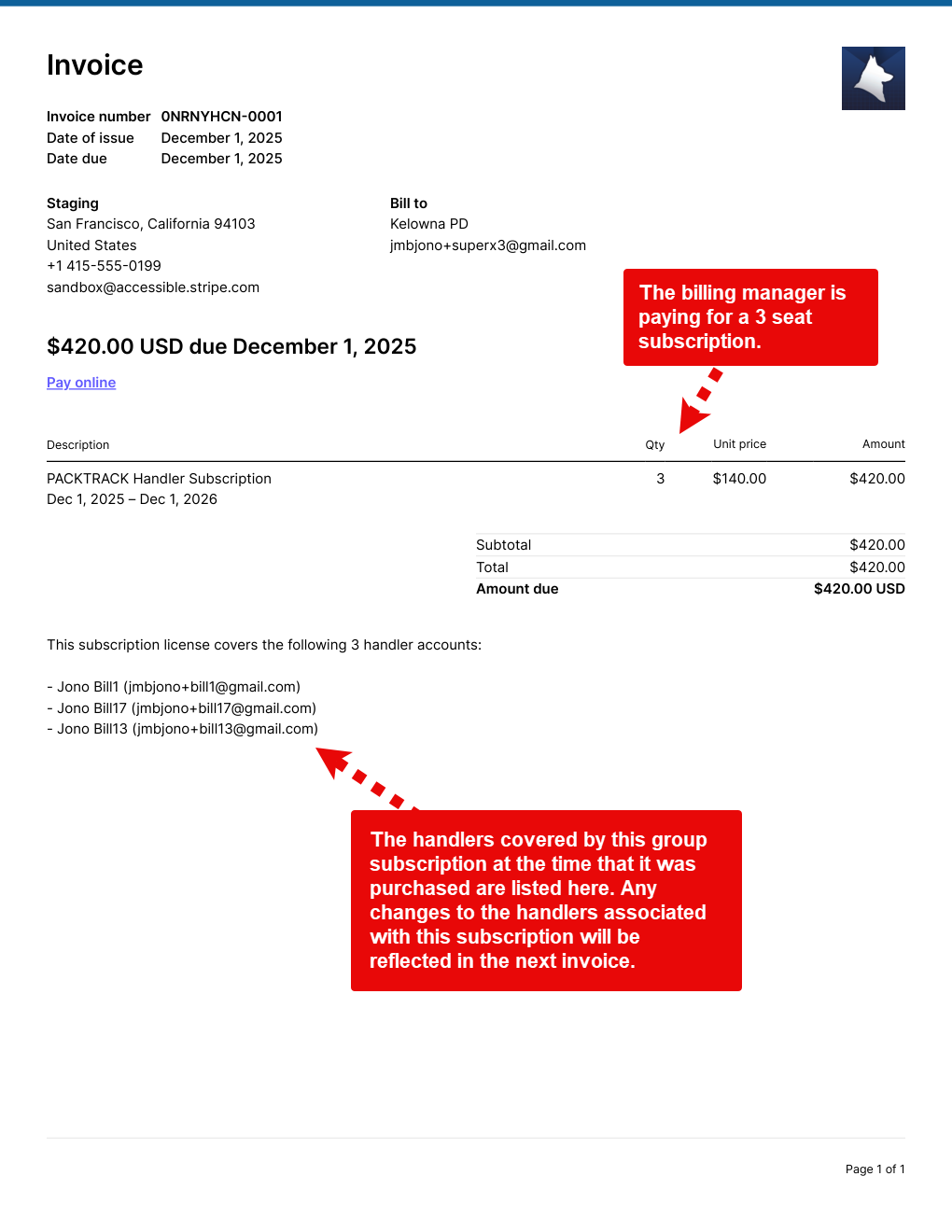
The billing manager receives an invoice based on the number of purchased seats. All handlers who occupy seats are listed on the invoice. This reflects the handlers assigned to this group subscription at the time that it was created. Future changes to the list of handlers will be shown on the invoice which is due at your next billing date.
Step 4: Make changes later
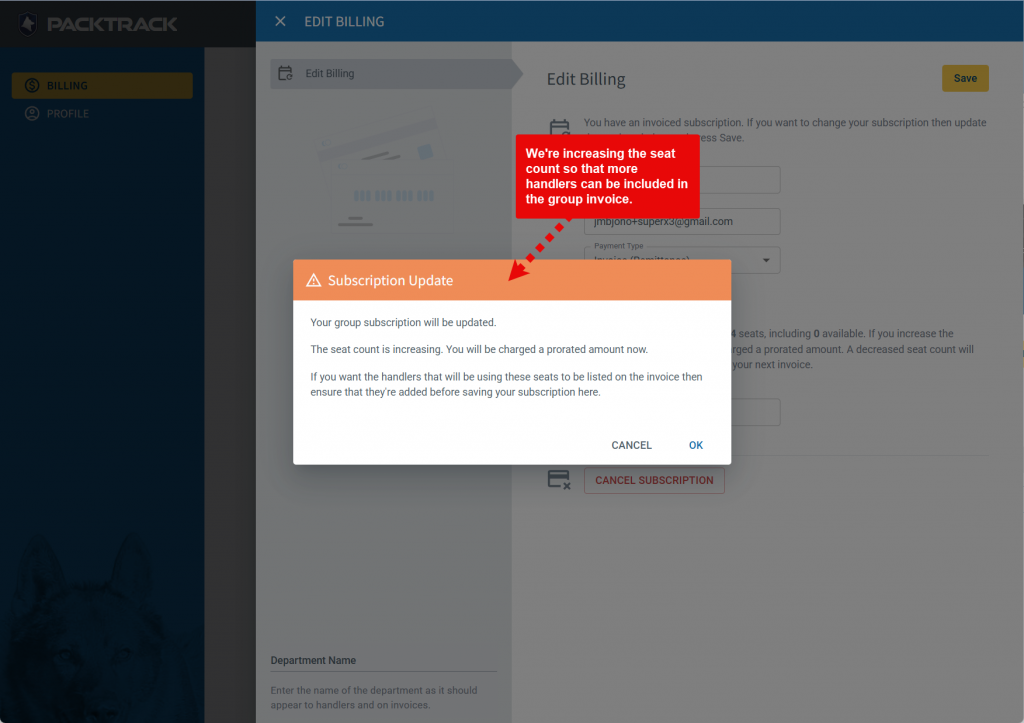
What happens if things change? Perhaps you need to swap out one handler for another or add/remove seats before the next billing date. You can remove assigned handlers using the trash can icon next to their names. Add new ones using the Add Handler option in the Manage drop down menu or select them from the Supervised Handlers list. If you need to adjust the seat count then use the Edit Subscription option in the Manage drop down menu and adjust the Seat Count field up or down. Increasing the count will result in a prorated charge based on the amount of time remaining in your subscription. Decreasing the count will lower the subscription cost shown on your next yearly invoice.
Group subscriptions are all about making life easier for K9 teams and their departments — freeing up more time for what really matters: supporting the dogs and handlers who keep our communities safe. We encourage departments of all sizes to use the group subscription feature to simplify billing. Consider forwarding this page to your department administrator to let them know about this feature. We're constantly updating and improving the PACKTRACK experience and we'd love to hear your feedback.
System Update
0
min read
Single Sign-On Is Here!
The new Sign in with Microsoft feature provides a simple and secure way to sign into PACKTRACK using your Microsoft work account. Note that this feature won't work if you try to sign in using a personal Microsoft account. Instead, select this login option if your department uses single sign-on (SSO) through Microsoft Entra ID (formerly Active Directory). Once configured, you'll be able to login to PACKTRACK using your department email address. This makes logging in easier but it also increases security. This feature works in both the web browser and in the PACKTRACK app (v5.2.0 or above). You must have an active PACKTRACK account. Note that if your department uses SAML technology for single sign-on then that isn't yet supported. Reach out to your IT department to confirm this feature is right for you. They can help you get set up.
The new Sign in with Microsoft feature provides a simple and secure way to sign into PACKTRACK using your Microsoft work account. Note that this feature won't work if you try to sign in using a personal Microsoft account. Instead, select this login option if your department uses single sign-on (SSO) through Microsoft Entra ID (formerly Active Directory). Once configured, you'll be able to login to PACKTRACK using your department email address. This makes logging in easier but it also increases security. This feature works in both the web browser and in the PACKTRACK app (v5.2.0 or above). You must have an active PACKTRACK account. Note that if your department uses SAML technology for single sign-on then that isn't yet supported. Reach out to your IT department to confirm this feature is right for you. They can help you get set up.
Connect Your Microsoft Account
1. Click the Sign in with Microsoft button.
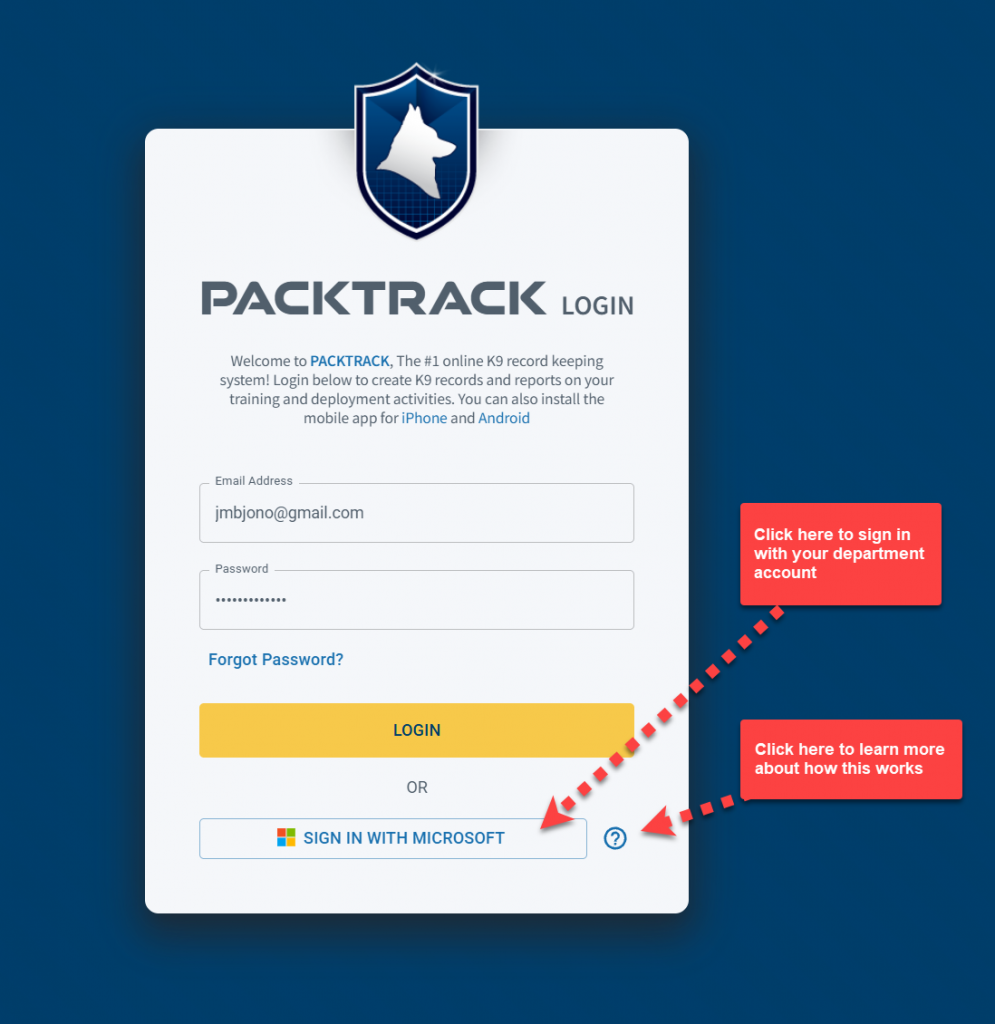
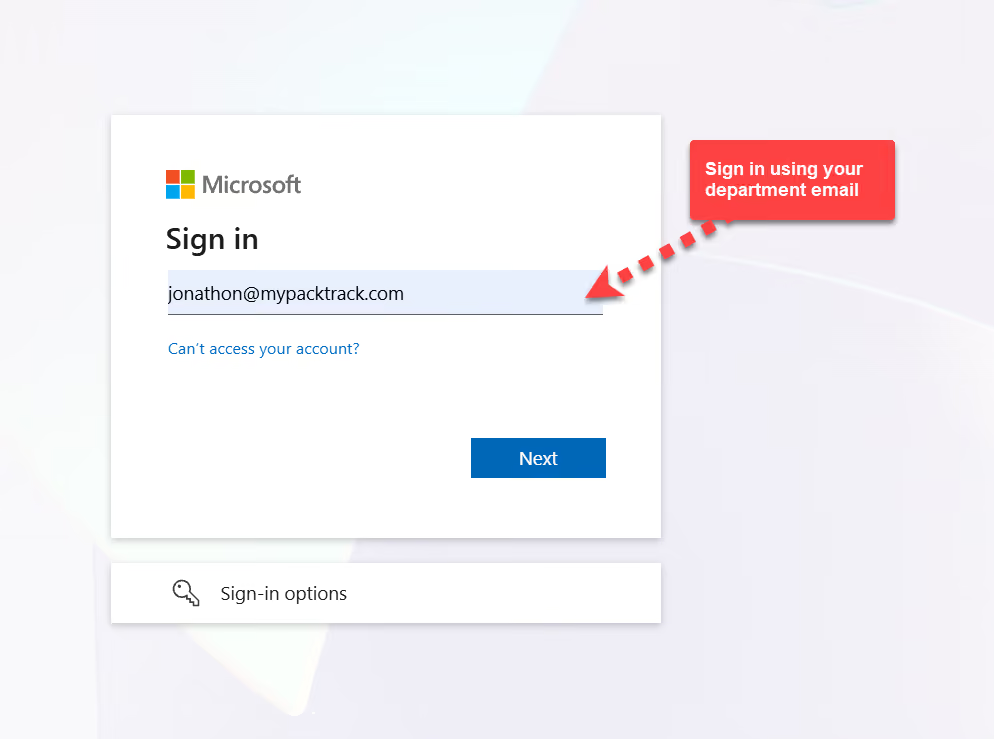
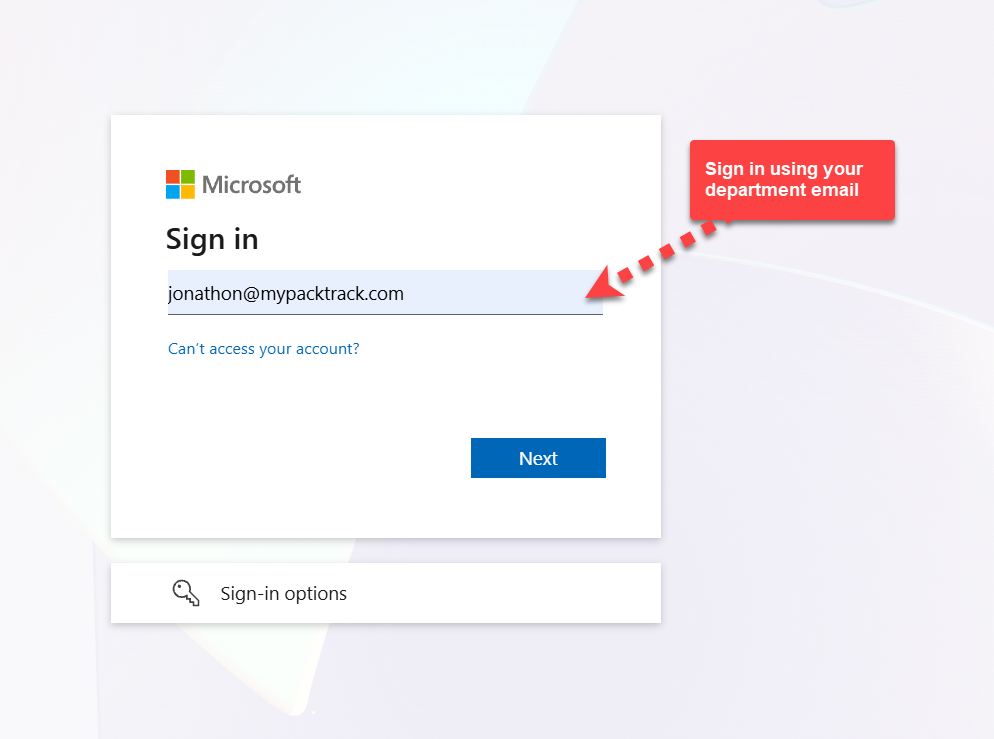
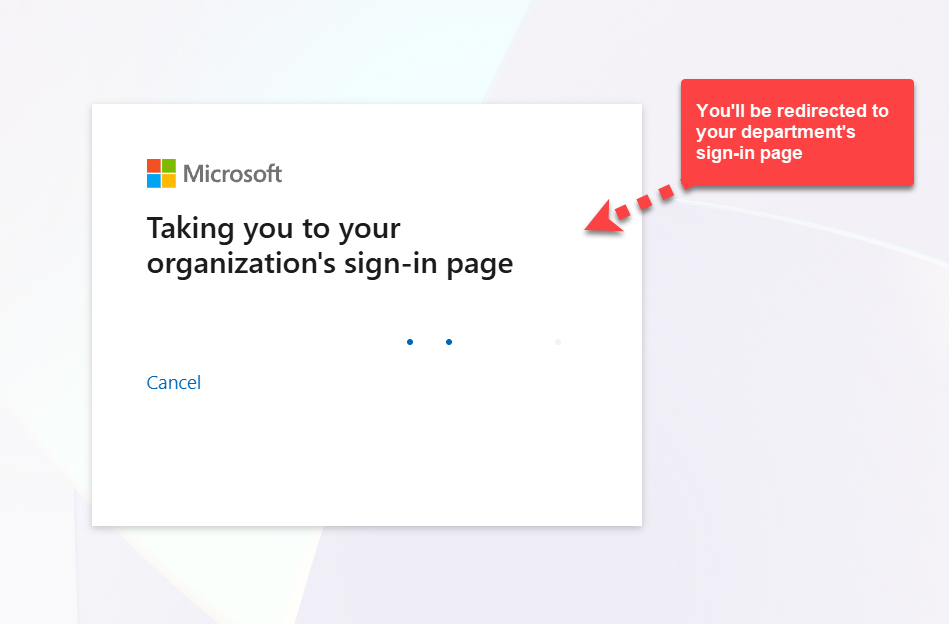
2. Enter your department email and then wait to get redirected to your department login. Once there, type in the department email address and password associated with your Microsoft account or select it from the list. You may also have to verify yourself using 2 factor authentication.
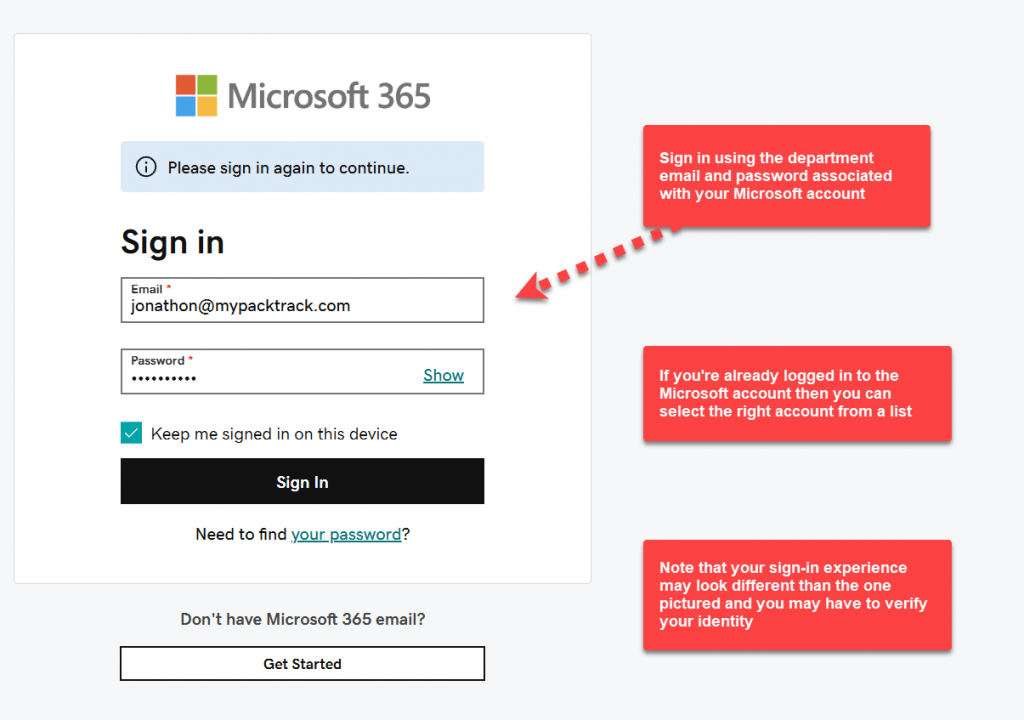
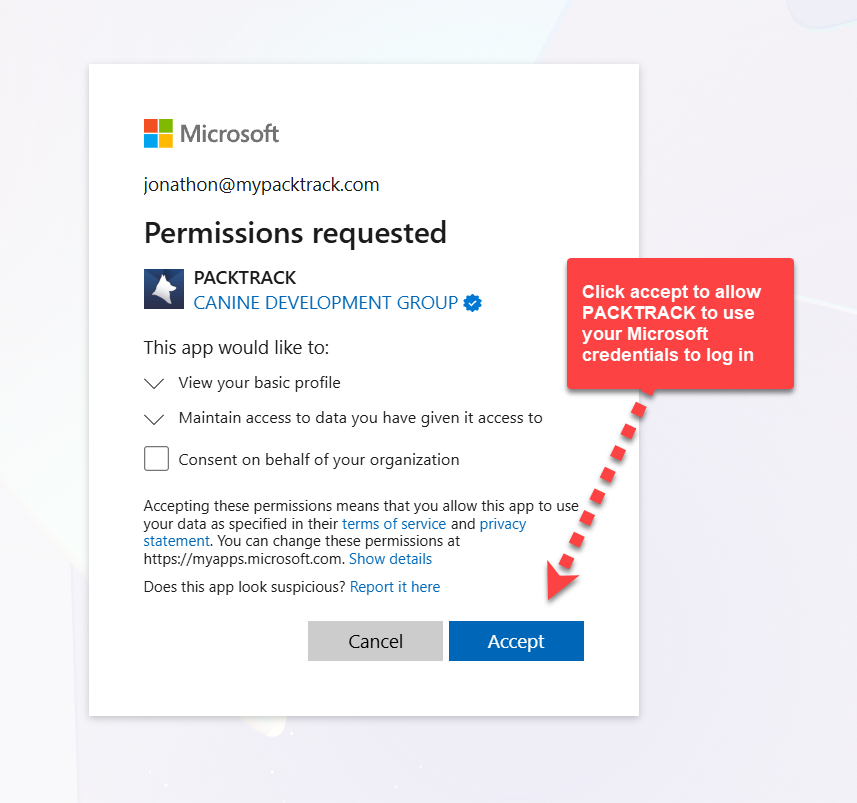
3. Click Accept on the permission screen to allow PACKTRACK to use your Microsoft account credentials to log in.
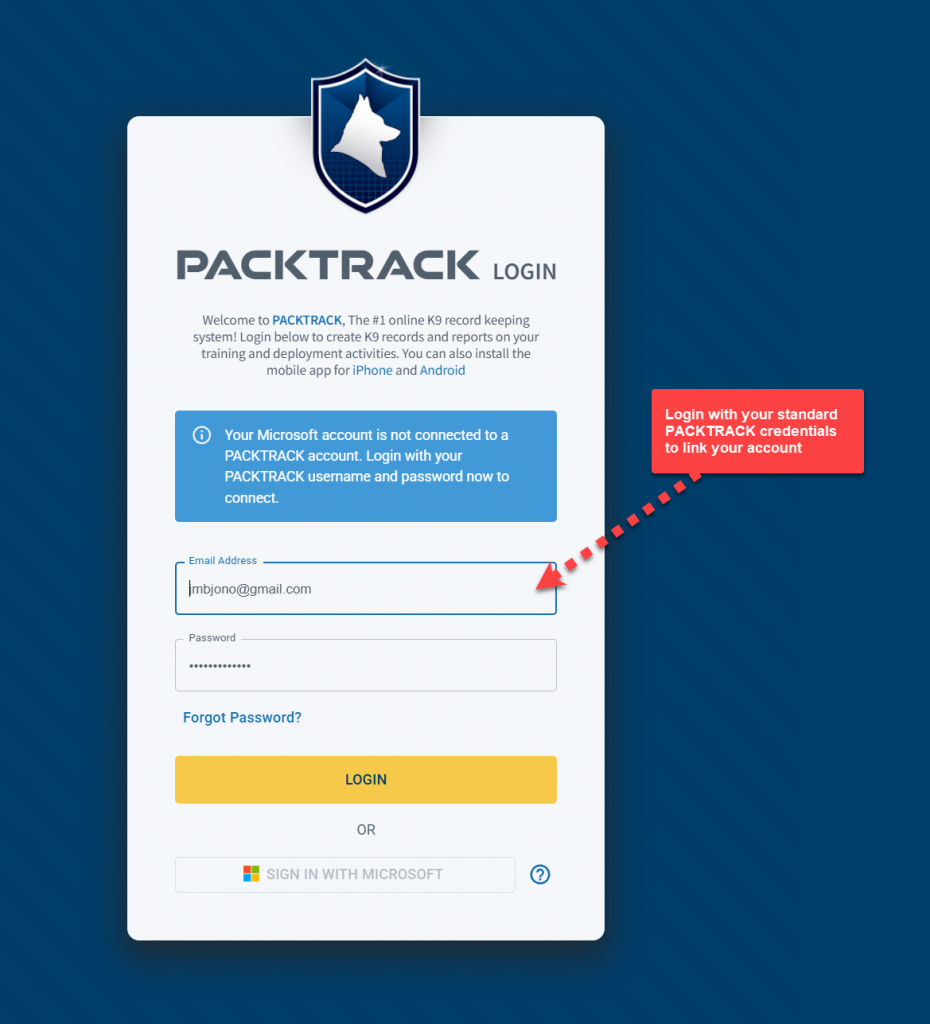
4. You should now be back at the login page and see a note asking you to link your PACKTRACK account. If you don't see this then try reloading the page. Type in your PACKTRACK email address and password.
5. You're all set. The next time you press the Sign in with Microsoft button you'll just need to enter your department credentials. As an alternative, you can also configure Single Sign-On after you're logged in. Simply visit the Microsoft Account option in your Profile page and click the Connect Microsoft Account button.
Disconnect Your Microsoft Account
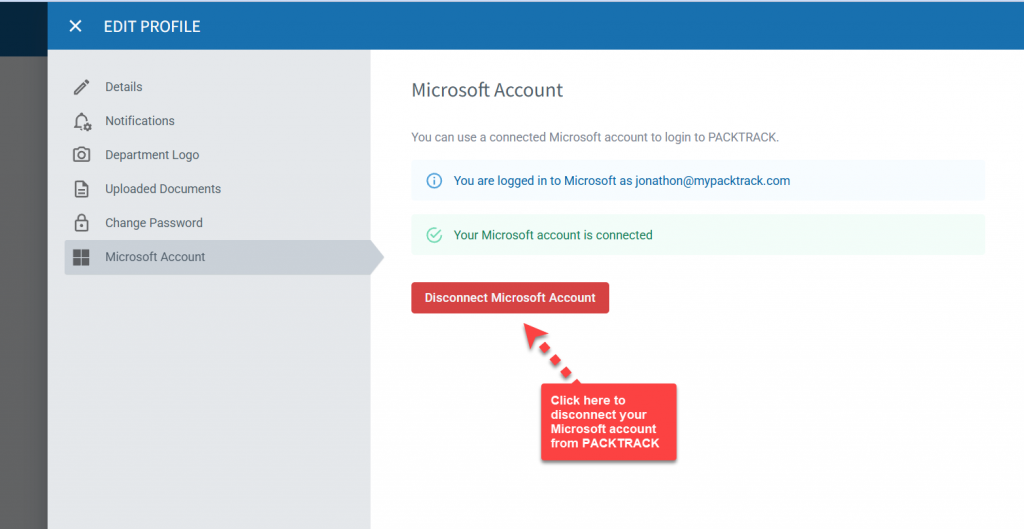
If you connected the wrong account or just want to remove your Microsoft account from PACKTRACK then use the disconnect option. Click the Profile link in the main menu then select the Microsoft Account option. This will open the editor as shown below. Click the Disconnect Microsoft Account button.
Technical Note (For Entra ID administrators only)
In some situations it may be desirable to approve the PACKTRACK app for SSO across all users of your department. This can be especially helpful if there are restrictions on who can add service principals to your Entra ID configuration. Admins that are authorized to consent on behalf of the department can use
THIS LINK to grant tenant-wide admin consent to the PACKTRACK application. Learn More about how this works. When this is complete, the PACKTRACK service principal is added to your Enterprise Applications list in Entra ID. This allows all department users to access the application without explicitly providing consent. Note, however, that they must still link their department credentials to PACKTRACK the first time that they use SSO.
Browse all articles
Explore the full library of PACKTRACK articles covering K9 record keeping, reporting, and more.
System Update
0
min read
K9 App Improvements
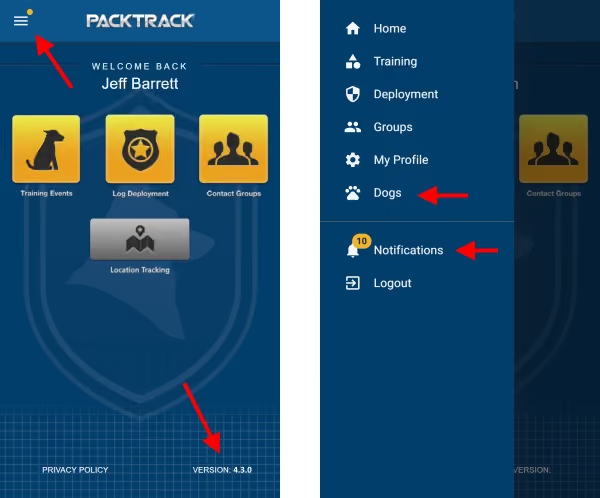
The latest release brings the new PACKTRACK interface to our iPhone and Android apps. All of the previous K9 record keeping features in the mobile app are still available, including K9 tracking, training and deployment records. But we've also made a few additions. The first thing you'll notice is that the navigation tabs have been moved from the bottom of the screen into a new side menu which is accessed by tapping the button in the upper left. This frees up vertical space and gives us room to add more options.
The latest release brings the new PACKTRACK interface to our iPhone and Android apps. All of the previous K9 record keeping features in the mobile app are still available, including K9 tracking, training and deployment records. But we've also made a few additions. The first thing you'll notice is that the navigation tabs have been moved from the bottom of the screen into a new side menu which is accessed by tapping the button in the upper left. This frees up vertical space and gives us room to add more options.
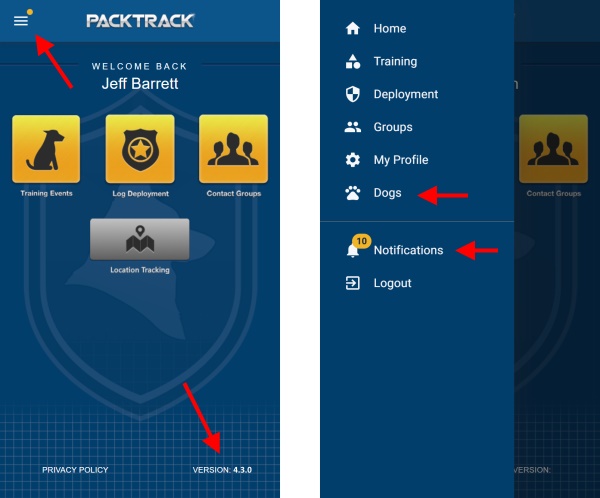
If you see any issues, make sure to update your mobile app to the latest version available from
Google Play or the iOS App Store. You can check the version of your installed PACKTRACK app on the bottom right of the home page. You'll need version 4.3.0 or greater. The Dogs page is another addition to the new mobile app. It's based on the same layout as the PACKTRACK desktop site and should look immediately familiar. From here you can access all of the same Dog configuration settings as are available on the main PACKTRACK site. Upload photos and documents directly from your phone, change dog settings or set a new dog profile picture. You can even drag and drop K9 documents between categories using your finger. Try it out!
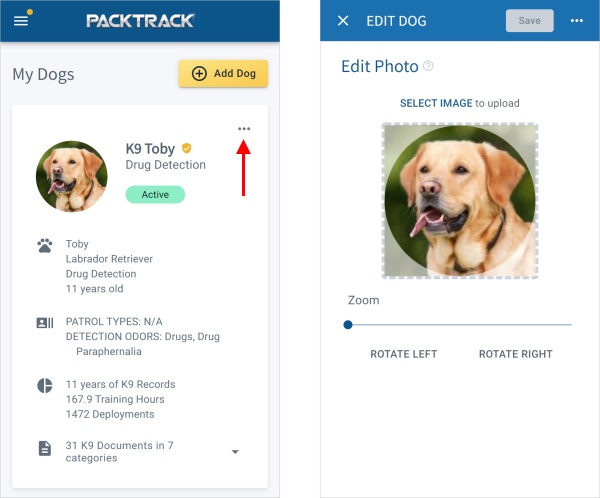
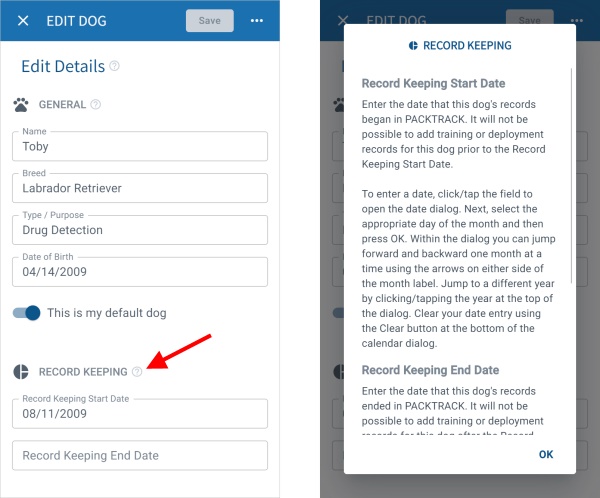
This set of changes is just the first step. Over the coming months we'll be introducing new screens and additional functionality that work the same on the desktop and in our mobile apps. As with the desktop site we've ensured that help information is always available. Tap a question mark in the app to get relevant help whenever you need it.
There are lots of other changes here as well. For example, you can (finally) delete a dog if you're just using it for testing. Also, search results on the main site are much improved when a specific dog is selected. Lastly, we've addressed over a dozen bug fixes and refinements to improve how PACKTRACK works. We really appreciate your feedback as we enhance our K9 training and deployment software to be robust and comprehensive yet easy to use. Let us know what is (or isn't) working for you.
System Update
0
min read
Smarter K9 Training Records
Welcome to another PACKTRACK release. It's a big one! This update includes significant refinements to the way PACKTRACK works and new interface changes aimed at making the service easier to use.
Welcome to another PACKTRACK release. It's a big one! This update includes significant refinements to the way PACKTRACK works and new interface changes aimed at making the service easier to use.
New Dog Settings Interface
We're in the process of updating the PACKTRACK interface, step by step, to improve the experience for everyone. In this release we've introduced a modernized Dogs page with more features and a layout that adapts across all devices - from phones to desktop computers. Dogs are now listed on summary "cards" which provide a clear overview of their configuration and a summary of their training and deployment activity. The card view is interactive and has options for changing the dog image, viewing documents or editing dog details. The menu button (3 horizontal dots) in the upper right of each dog card shows a drop-down menu with additional options.
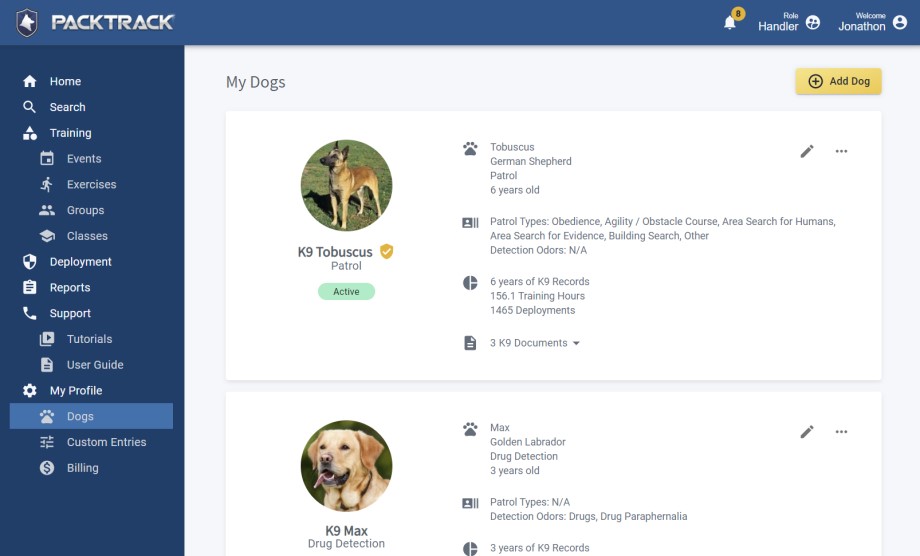
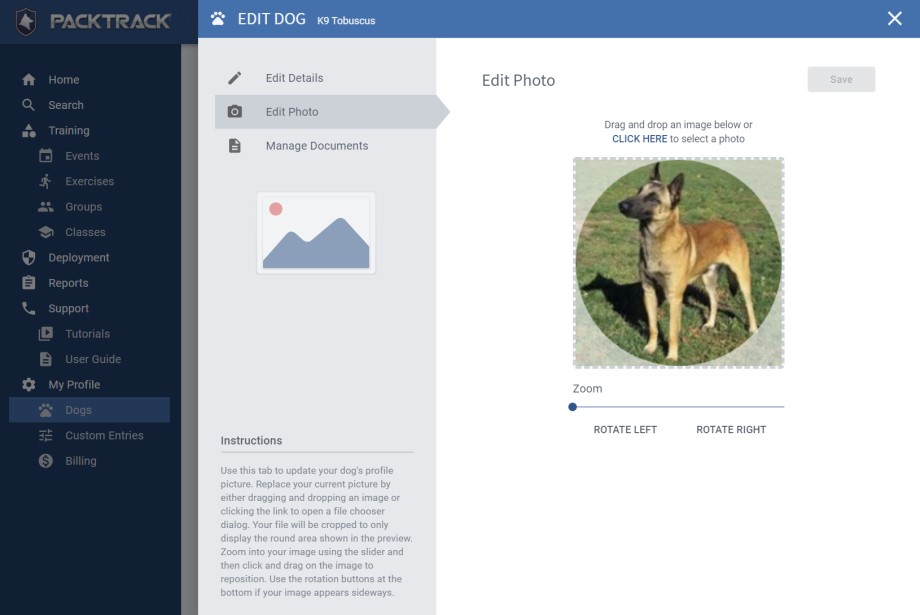
Choosing to Add or Edit a dog shows a panel on the right side of the page. There are 3 options in the upper left of this panel for managing your dog's information: Edit Details, Edit Photo and Manage Documents. Feel free to explore some of the new functionality. For example, the Edit Details option shows new dog configuration fields including settings for your dog's Patrol Types and Detection Odor Types. Information on how these new dog type settings are used is covered in the sections below. The Edit Photo screen now supports drag and drop and provides additional image editing options like zoom and rotation. Managing documents for your dogs is easier than ever. In addition to supporting drag and drop to upload new files, you can now rename your files and organize them into categories. If you have questions about how these new screens work then check out the instructions shown in the bottom left.
Ignore Exercises That Aren't Applicable To Your K9
When training at a group event, there may be exercises that don't apply to your dog. For example, the event might include a detection exercise but you have a patrol dog. Or perhaps there's a patrol tracking exercise but your patrol dog doesn't track. In the past, you would need to complete all exercises at an event for each of your dogs in PACKTRACK. For each exercise that doesn't apply to a specific dog you would select the option "Did Not Perform - Not Applicable to Dog". With this release we're introducing K9 type attributes. These new settings allow you to specify the types of exercises that apply to your dog. All other exercise types will be automatically ignored.
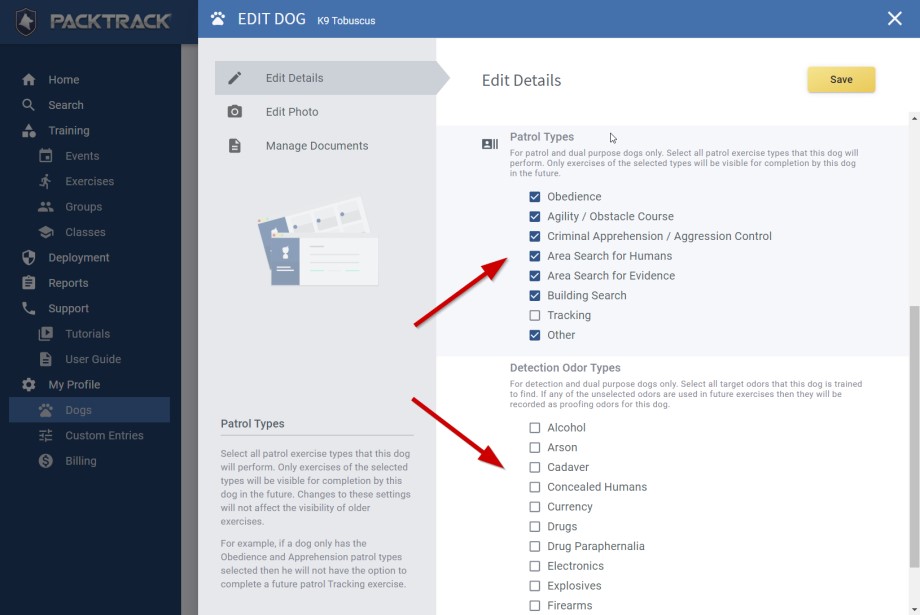
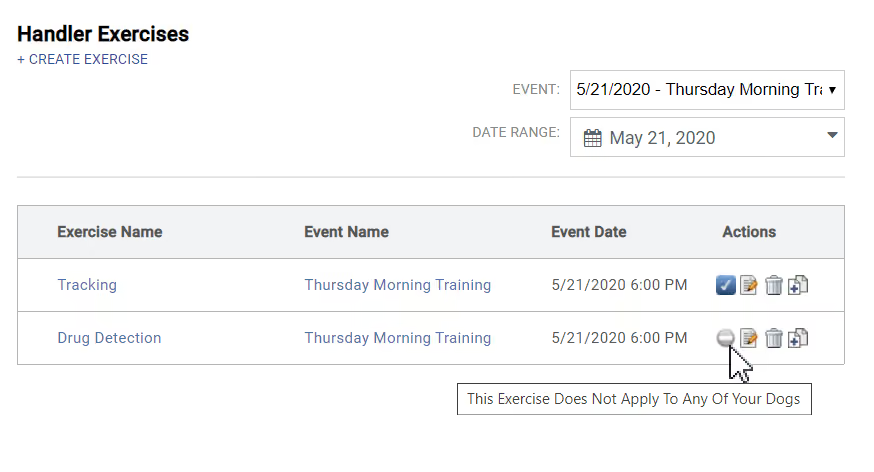
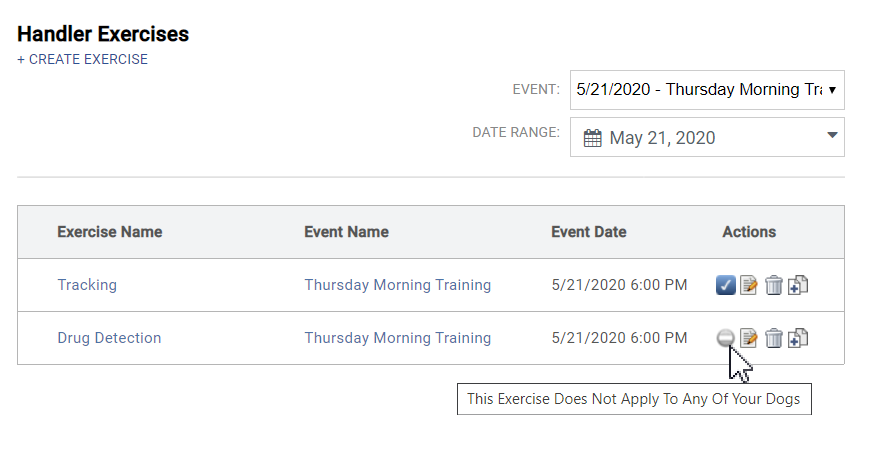
When you first log in after this update you'll be asked to review your dog configuration. From the new Dogs page, click the Edit icon for each of your dogs to open the editor interface. Choose the Edit Details option and scroll down in the right pane to select any Patrol Types and Detection Odor Types that apply. Only exercises of the types that you select will be visible for completion by this dog in the future. However, changes to these settings will not affect the applicability of past exercises. These changes affect patrol and detection dogs. For example, if a patrol dog only has the Obedience and Apprehension patrol types selected then they will not have the option to complete a future patrol Tracking exercise or any detection exercises. This applies to exercise target odors for detection dogs as well. For example, if a detection dog only has the Drugs odor type selected then they will not have to complete exercises at future events which only contain Explosive type target odors. They also won't have to complete any patrol exercises. If you want your dog to complete all exercise types at every event then feel free to select all of the patrol and detection odor types for each of your dogs. Once all of your dog's types are set, PACKTRACK will only require you to complete a training record for the specific dogs that match the exercise type. If you have no dogs that match an exercise type then the exercise will show in the list with a new icon indicating that the exercise doesn't apply. In the example below, a handler with a patrol tracking dog does not have to complete the detection exercise from the same event.
Automatically Categorize Odors As Target Or Proofing
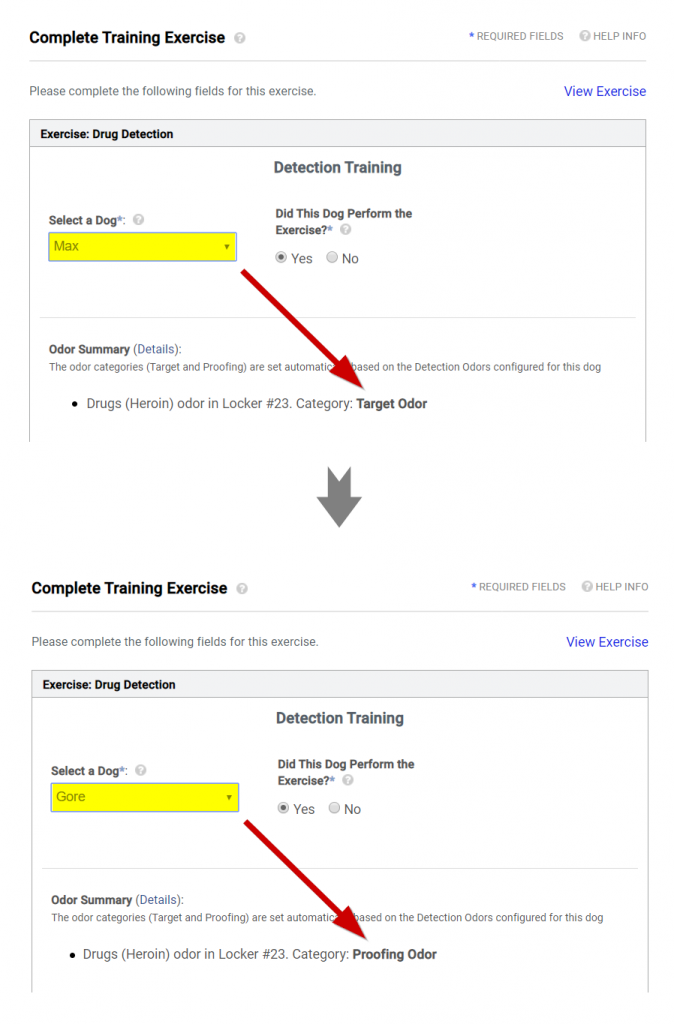
When creating a detection exercise, PACKTRACK enables you to specify target odors (drugs, currency, explosives, etc.) as well as any proofing odors (typically packaging or distractor odors such as cardboard, plastic wrap, paper, etc.) that may be used. Your dog should alert to the target odors and ignore the proofing odors. This works great if all of the dogs at an event are of the same detection odor type. However, if different detection dog types, such as a drug dog and a currency dog, are in an exercise that uses both drug and currency odors then things get more complicated. In this case, we want the drug dog to use drugs as the target odor and currency as the proofing odor. The currency dog would use currency as the target odor and drugs as the proofing odor. In the past, adding this type of training required you to create 2 separate exercise records in PACKTRACK - one for each dog. Each exercise would specify different target and proofing odors. With this release we've made the process much simpler. Now you only have to create one exercise no matter how many different detection dogs may attend the event. PACKTRACK will automatically categorize each odor in the exercise as target or proofing based on your dog's detection odor type configuration. In the screenshots below, two K9s completed the same drug detection exercise. However, the drug odor was categorized as a target odor for drug dog 'Max' (top screenshot) and a proofing odor for currency dog 'Gore' (bottom screenshot).
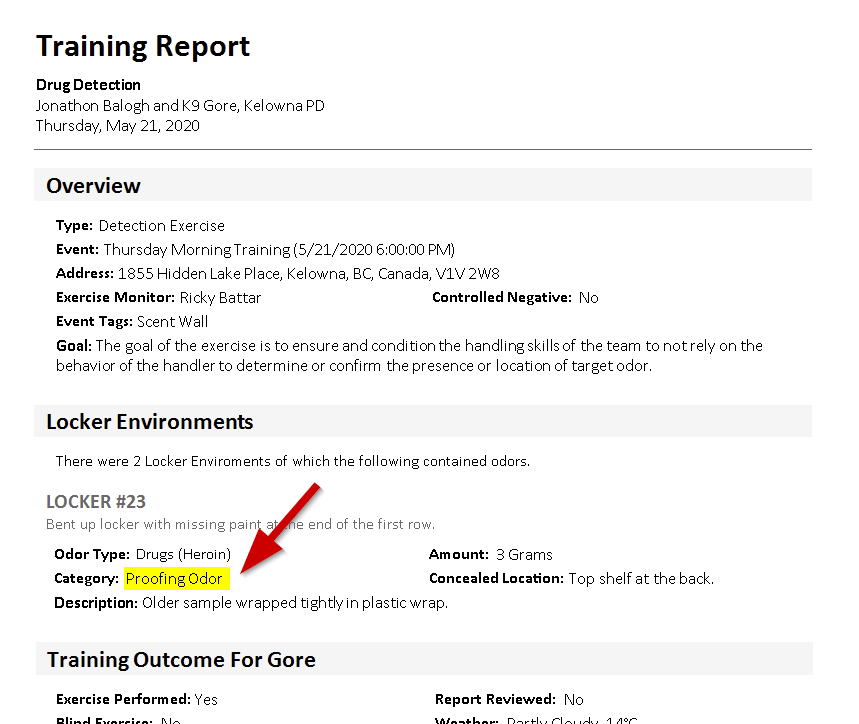
How does this work in practice? For simple exercises nothing should change. Record your target odors in the exercise and you're set. If you're running an exercise that only contains proofing odors then make sure to set the Blank / Controlled Negative checkbox when you create the exercise. This ensures that all detection dogs have to complete it. If the exercise contains both target and proofing odors or there are different types of detection dogs at the event then these changes should make things easier for you. As in the past, when creating the exercise you should explicitly specify the proofing odors which you want all detection dogs to ignore (towels, cardboard, etc.). Next, enter all of the odors that will be target odors for at least some of the dogs. That's it - PACKTRACK should take care of categorizing the odors as target or proofing for each of your dogs based on their attributes. For example, you might add drug and currency odors to an exercise. Now, when a drug dog completes this exercise they will have the drug odor categorized as the target and the currency odor categorized as proofing. A currency dog completing the same exercise will have the currency odor categorized as the target and the drug odor categorized as proofing. Of course, both dogs will continue to see any explicitly added proofing odors (dog toy, cardboard, etc.) categorized as proofing. Information about how the exercise odors are categorized is displayed when you complete your training record to help you write an accurate narrative (see previous screenshots). The odor category is also shown in your exercise report. The report screenshot below shows that drugs were categorized as a proofing odor for currency dog 'Gore'.
Conclusion
We're really excited about this update. The new Dogs interface extends the design which started earlier this year with a modernized site layout and interactive handler home page. We're eager to migrate other areas of PACKTRACK to this new design over the coming months to enable new features and make the system easier to use. The new dog type settings are aimed at making the system smarter and more automated. With this change we expect there will be fewer occasions where you'll need to complete a training record by specifying that the exercise didn't apply to your dog. Meanwhile, automatic odor categorization streamlines how exercises are created for detection dogs. All dogs completing the same exercise will have odors categorized as target or proofing automatically based on their detection odor settings. Let us know what you think of these changes. We'd love to hear from you.
System Update
0
min read
PACKTRACK Has a New Look
We're continually updating PACKTRACK to fix bugs, add new features and refine how things work. Our goal is to make K9 record keeping as easy as possible while providing robust and helpful tools to give you the activity tracking you need. With this update we've begun a new initiative to rework PACKTRACK's online interface to be simpler, more modern and flexible enough to be used on any device. Over the next year we're planning to integrate several new technologies and add exciting new features to the system. We also intend to increase the functionality of our mobile K9 tracking apps so you can do more on the go.
We're continually updating PACKTRACK to fix bugs, add new features and refine how things work. Our goal is to make K9 record keeping as easy as possible while providing robust and helpful tools to give you the activity tracking you need. With this update we've begun a new initiative to rework PACKTRACK's online interface to be simpler, more modern and flexible enough to be used on any device. Over the next year we're planning to integrate several new technologies and add exciting new features to the system. We also intend to increase the functionality of our mobile K9 tracking apps so you can do more on the go.
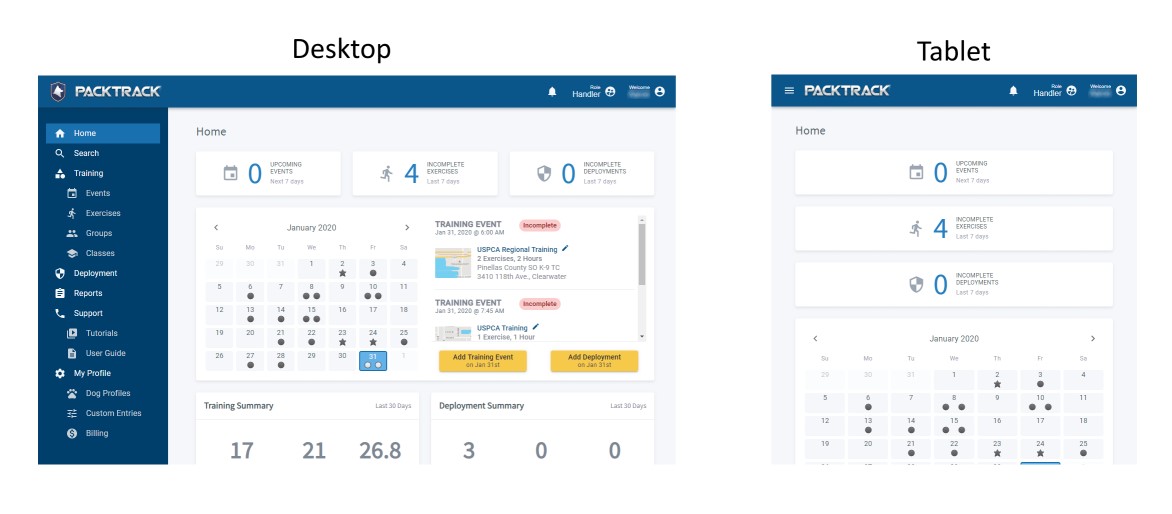
The first change you'll notice is that the menus look different. This updated layout offers a more contemporary design but also provides PACKTRACK with more flexibility to adapt to different device sizes. We expect handlers that login to the PACKTRACK site on their phones and tablets to have a significantly better experience with these changes. It's recommended to download the
iPhone and Android apps if you want to use PACKTRACK on your phone. However, if you need to access the full mypacktrack.com website in the field then it's nice to know that you can login from your phone's web browser.
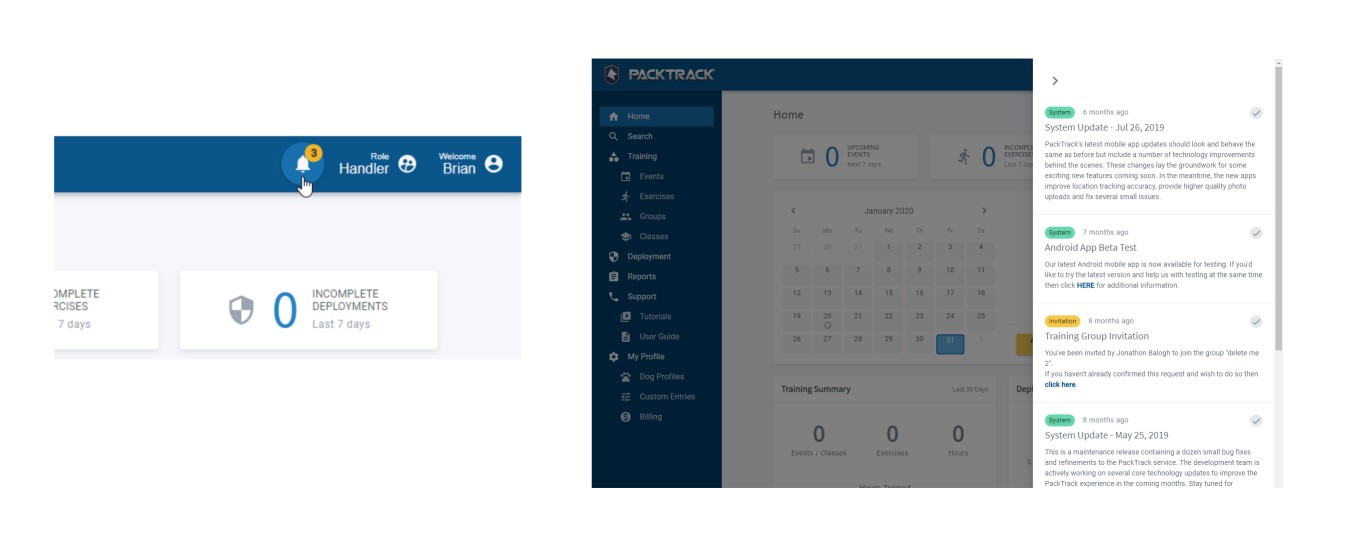
PACKTRACK has always had a notification system to alert you to important events including invites, system updates and billing warnings. We've moved system notifications to a dedicated bell icon in the title bar at the top of the page which tells you when there are unread messages. Click the bell icon to expand your notification list and click outside of the notification list to hide it. Once you've read a message and wish to dismiss it simply click the notification's check mark.
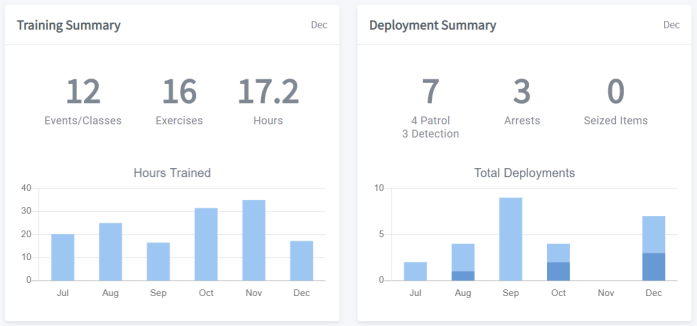
There's now a new home page for K9 handlers. The banner statistics at the top provide a convenient place for K9 officers to track incomplete exercise and deployment records as well as upcoming training events. Click any of these banners to see a list of associated canine records. At the bottom of the page are graphs and metrics which provide a nice overview of your monthly training and deployment activities. The graphs show monthly totals across the last 6 months for your training hours and deployment counts. The large numbers above the graphs summarize your statistics for the Last 30 Days. To view your metrics for any month just click on the bars in the graph. Reset the metrics back to the Last 30 Days by clicking the title bar above the numbers.
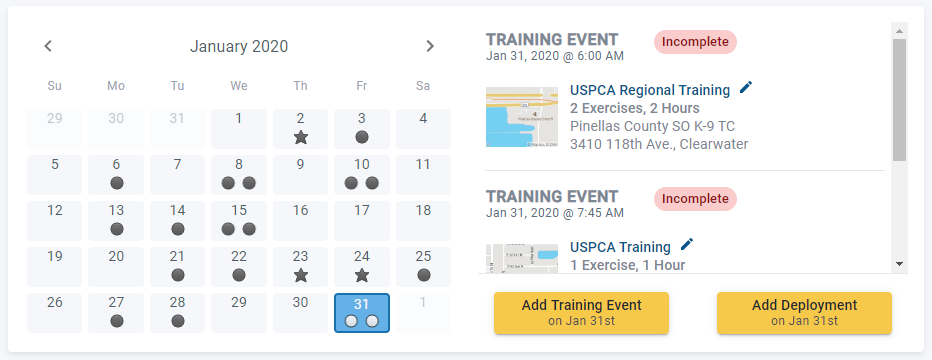
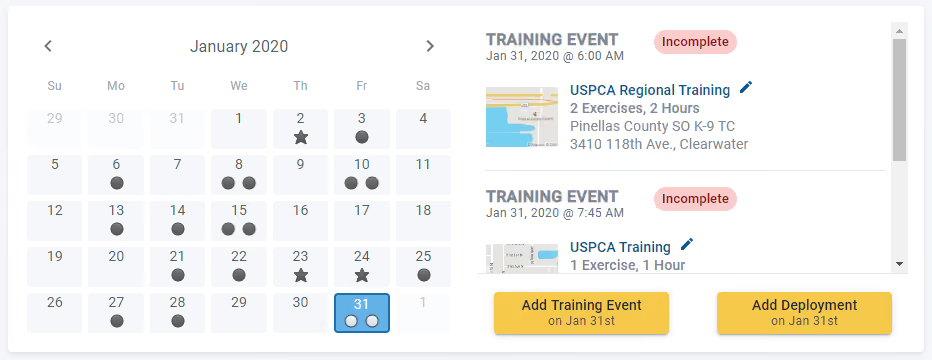
There's also a new calendar view displayed in the middle of the handler home page. This provides a new way to review, edit and add new records to PACKTRACK, but it's completely optional. Each calendar date displays a star for K9 deployments and a circle for your training events. If the star or circle is an outline only (not filled in) then the record is incomplete. This gives you a bird's eye view of your dog's activities each month. Clicking a calendar date will show a list to the right of the calendar with any deployments or training events that occurred on that date. Click the links in the list to view your K9 reports or edit your records. You can also add new records from the home page. Simply click the appropriate date in the calendar and then press the Add Training Event or Add Deployment button. This will take you right to the data entry form where you can add a new record for that date. We've been working on these changes for a while and we're really excited to share them with you. This is only the start. We plan to continue to refine the PACKTRACK interface to make it easier to use and more informative. Let us know what you think!
System Update
0
min read
Improved Exercise Location Tracking
Last month we reworked how K9 location tracking works on the iOS and Android mobile apps. This new update makes it significantly easier to both lay and follow tracks without having to configure everything ahead of time.
Last month we reworked how K9 location tracking works on the
iOS and Android mobile apps. This new update makes it significantly easier to both lay and follow tracks without having to configure everything ahead of time. For the best results, please update to the latest mobile app version (4.2.x or later). Important Note For iPhones: iOS 13 changes how location permissions work. Even if you've said yes to the prompts which ask for location permissions you should still open the Settings app and go to Privacy / Location Services / PACKTRACK and make sure the permission is set to ALWAYS. If this isn't set correctly then PACKTRACK won't be able to track your position in the background.
Lay tracks without a PACKTRACK account
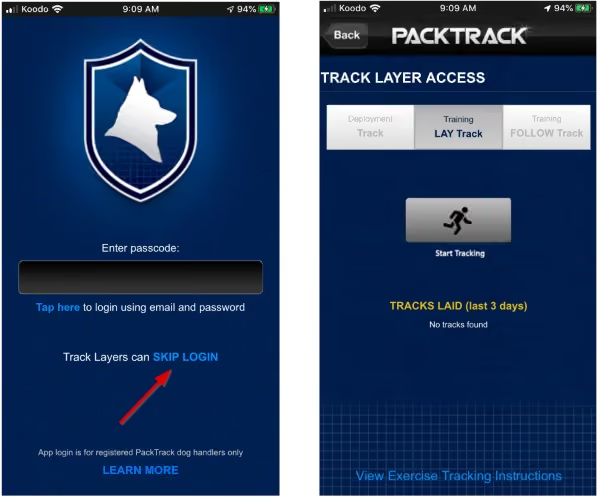
You no longer need to login to the mobile app with a PACKTRACK account in order to lay tracks. Anyone can install the app and, using the SKIP LOGIN option on the login page, jump right into track laying.
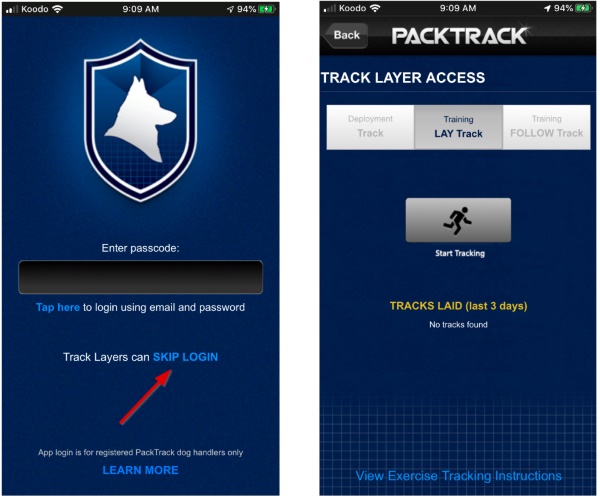
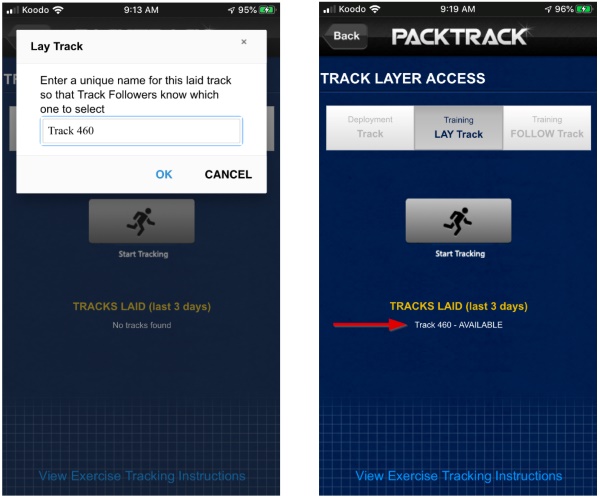
When the Track Layer taps the Start Tracking button they will see a dialog where they can enter a unique track name or accept the default. After tapping OK, the Track Layer should confirm that their location is updating before they begin the track. When the track is complete the app will show that this track is now AVAILABLE to be followed.
Follow tracks by scheduling a tracking exercise
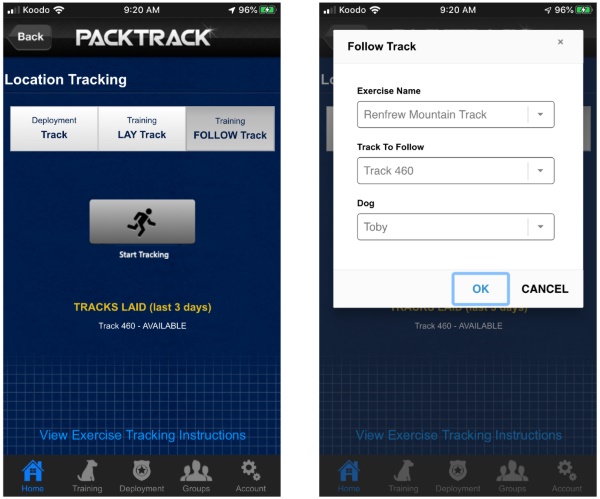
If you're comfortable with how tracking has worked in the past then you can continue to use the system as you always have. First, create an event, which defines the time, place and group members who will be attending. Next, add one or more location tracking exercises to the event. This process should be completed on the web site or mobile app before the event begins. Later, when you're at the event and ready to start following a track, simply select the FOLLOW Track mode at the top and then tap Start Tracking. Verify that the Exercise, Track Name and Dog are correct and then tap OK to start following the track. NOTE: If there's only one exercise or you only have one dog then those dropdown fields won't appear in the dialog.
Follow tracks by creating a tracking exercise automatically
You can now record training tracks "on the fly" without scheduling an event or creating an exercise ahead of time. If there's a laid track available within 500 yards of your current location then you'll see it displayed in the Tracks Laid list. Select the FOLLOW Track mode at the top of the location tracking page and then tap Start Tracking. Confirm that this is the track you want to follow by tapping OK in the dialog. You'll also have the option of choosing your dog if you have more than one.
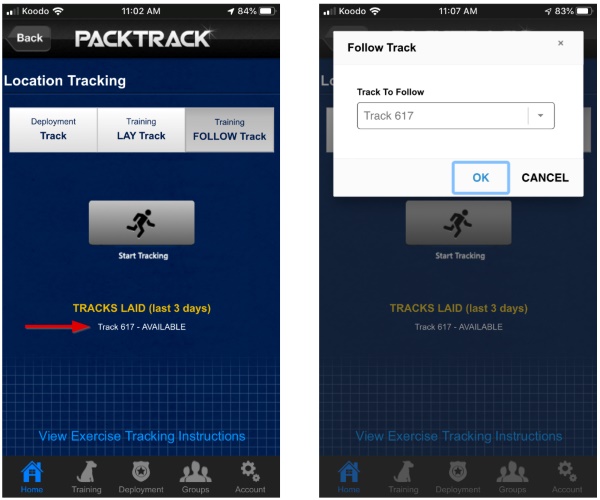
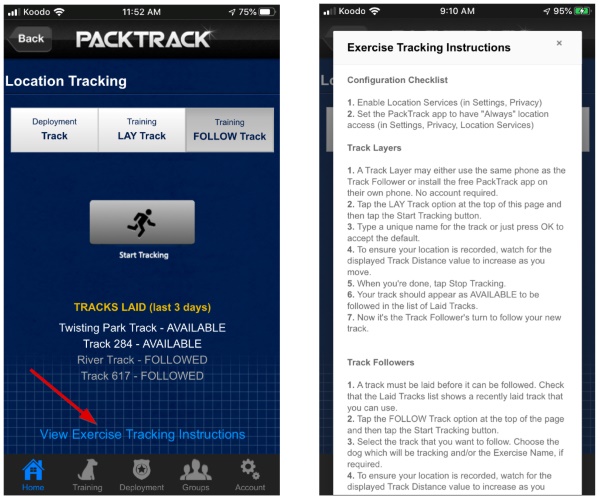
When the track is complete the status of the track in the Tracks Laid list will change from AVAILABLE to FOLLOWED. Tracking exercise records are created automatically and either 1) inserted into the current event (if there's already an event at this time and you're the only event member) or 2) added to a new event that will also be created automatically for you. We make certain assumptions when creating the event and exercise automatically. Always review these training records after completing your exercise to update any additional fields and ensure the information was captured correctly. If you need a reminder about how K9 tracking works there's an instruction link at the bottom of the Location Tracking page.

K9 Record Keeping
0
min read
The Double Blind Training Trap
I periodically receive questions asking if the PACKTRACK record keeping system collects "double blind training" data. I was recently contacted by a new supervisor who was attending a class where this was discussed. It was his impression that the instructor was advocating for double blind training and that this was a necessary requirement to prove reliability. I can't comment directly on the instruction as I wasn't there. However, I do have considerable experience in this area. I'm also quite familiar with the views expressed by a range of defense experts, podcast authorities and trainers.
I periodically receive questions asking if the PACKTRACK record keeping system collects "double blind training" data. I was recently contacted by a new supervisor who was attending a class where this was discussed. It was his impression that the instructor was advocating for double blind training and that this was a necessary requirement to prove reliability. I can't comment directly on the instruction as I wasn't there. However, I do have considerable experience in this area. I'm also quite familiar with the views expressed by a range of defense experts, podcast authorities and trainers.
It's easy to confuse the clinical definition of this topic with the practical application for police K9 training. In a double blind study, neither the participants nor the experimenters are aware of the test details. This helps eliminate bias and human influence. As a result, it's considered the "gold standard" for scientific research. So why wouldn't we use the same methodology for K9 training?
To properly explore this topic we need to start with a shared understanding of what "double blind" means in the context of police K9 training. Let's see how it would work. In this type of training neither the handler nor the trainer can know:
• If the target odor is present • Where the target odor is concealed • The intended purpose or goal of the training exercise
Think about what this might mean for the quality of training that you and your K9 receive. By applying this rigid model, the handler and trainer:
• Don't know if the final response was correct • Don't know if the target odor was missed • Don't know if the target odor was found using proper handling skills • Don't know why a target odor wasn't found (was it the dog, the handler, the environment?) • Can't take corrective action at the appropriate time to effectively train and condition the behavior of the dog or the handler
This isn't training, it's shared ignorance. The timing of actions taken by the handler to correct or reinforce the behavior of the dog is critical to properly conditioning the canine. How are the handler, trainer and K9 supposed to improve under these conditions?
Rewarding or correcting a detection canine in an effective manner simply isn't possible in a "double blind training" environment. Our goal is to train with intention and purpose. We want to correct or reinforce behaviors in a timely manner and push the handler and canine beyond their comfort zones. This is how we grow confidence and proficiency.
Please don't misunderstand. I'm not against "double blind testing". This is a very real activity that may be needed depending on the circumstances. However, "double blind training" just isn't a thing. If you want to test yourself or your teams then please do so. Just don't call it training.
K9 Record Keeping
0
min read
How to Write K9 Training Records for Detection Dogs
While the canine law enforcement profession progresses, some parts remain very much the same. As a new canine handler I was advised to keep training records but to write as little as possible. Those that came before me explained that writing too much would only provide the defense attorney with more things to attack. Of course, this idea only had merit if the attorney didn't know anything about training drug detection dogs. It may have been partially true in the past but not today. Training logs should paint a picture for the reader. They should show how the training has progressed as the dog and handler work together. They should also detail the work that the handler did while training the dog. You’re painting a picture that illustrates the reliability of you and the dog as a team. So what should you write? First of all, training goals should always be clearly stated and directly addressed in the notes and comments section of your training logs. This is something that we emphasize for K9 training records in the PACKTRACK app and online software. While it's different for each canine and exercise, there are standard elements that you should include in your training comments. Below are some areas to consider.
While the canine law enforcement profession progresses, some parts remain very much the same. As a new canine handler I was advised to keep training records but to write as little as possible. Those that came before me explained that writing too much would only provide the defense attorney with more things to attack. Of course, this idea only had merit if the attorney didn't know anything about training drug detection dogs. It may have been partially true in the past but not today. Training logs should paint a picture for the reader. They should show how the training has progressed as the dog and handler work together. They should also detail the work that the handler did while training the dog. You’re painting a picture that illustrates the reliability of you and the dog as a team. So what should you write? First of all, training goals should always be clearly stated and directly addressed in the notes and comments section of your training logs. This is something that we emphasize for K9 training records in the PACKTRACK app and online software. While it's different for each canine and exercise, there are standard elements that you should include in your training comments. Below are some areas to consider.
- Target odors. If the dog finds the target odor then be sure to say so. Describe the behavior change and the final response. List what you see when the dog detects the target odor. For example: "There was a head turn, closed mouth, breathing increase, excited posture, tail wagging at a more rapid pace. The dog then bracketed the target odor, tracing the odor to its source. Once at the source of the odor the dog came to the ultimate and final response of a sit."
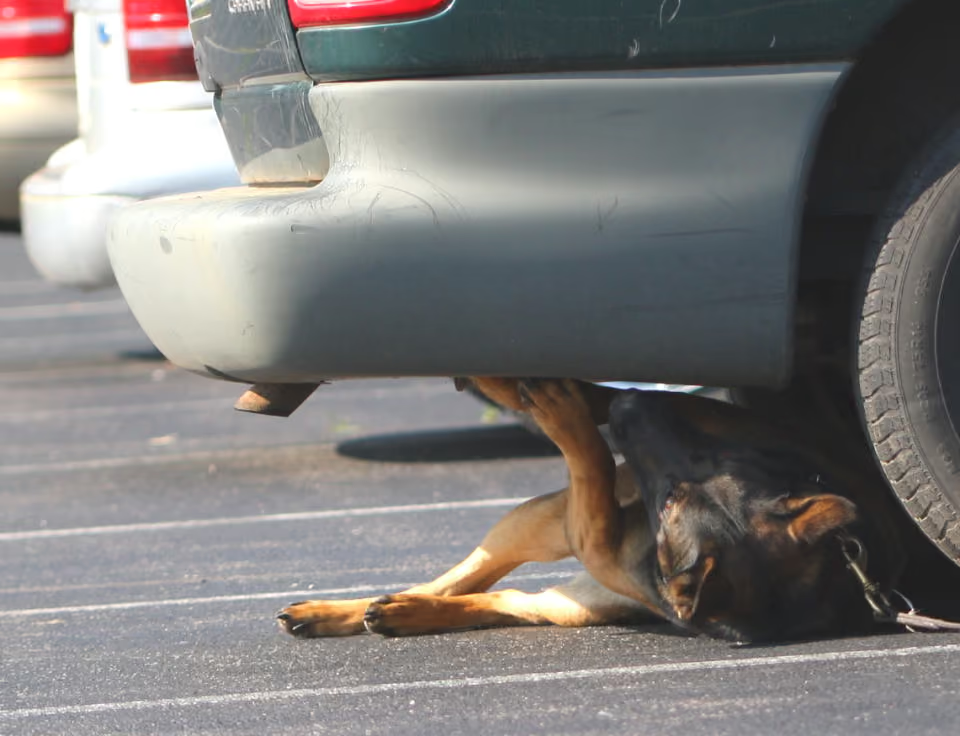
- No target odors. If there are blank areas (without target odors) in the exercise then be sure to note whether you determined that a target odor was present or not. For example, if an exercise has several vehicles but not all of them have target odors then you'll want to note the K9's response after smelling each car. If there was no behavior change then write that you knew, based on the dog's response and your training, that the vehicle was a blank and therefore moved on to the next car.
- Proofing odors. If there is a proofing or novel odor in an exercise then you should mention in your records that the dog smelled at the odor and did not respond.
- Blank or controlled negative. If the whole exercise is a blank or controlled negative then you should explain that your dog inspected the entire area and, based on your training and the dog's behavior, you determined that there was no target odor present.
- Similarity to real life deployments. Describe that you conducted the exercise as you would work the dog in real life. It can impact the dog and K9 handler's training if, for example, you work the dog on lead on vehicle exteriors in real life settings but in training you cut the dog off lead to inspect a car exterior. Explicitly mention that this exercise matches how you work the dog in deployment scenarios.
- Corrective training. When working on specific training issues your notes should explain how the exercise is intended to improve or fix the problem. Any weaknesses or problems that you observe during training must be noted in your records. As trainers we must have a plan for correcting these issues and then create exercises focused on improving behavior. Your training comments appropriately document the team's progress in each exercise and prove that the issue has been reliably corrected.
Documenting your training progress creates a complete picture of the quality of your training efforts and the reliability of your dog. These comments also show that you're improving as a handler. Clear and accurate documentation shows that you're educated about proper dog training techniques and diligent and competent in your profession. Defense experts prefer to separate out training activities to imply issues or mistakes. However, training records should be taken as a whole. The totality of the K9 team's records demonstrate the knowledge of the handler/trainer, the proficiency of the dog and the team's joint capacity to improve and work together reliably. A combination of the initial training and continued maintenance training, knowledge of the canine handler describing the training methods, and progress of the team proven through testing is needed testimony to paint a complete picture of reliability.

K9 Record Keeping
0
min read
Should We Record K9 Training Accuracy Statistics?
As the creator of PACKTRACK and an expert in the field I'm commonly asked about extending our K9 record keeping system to compute an accuracy percentage statistic during K9 detection training.
As the creator of
PACKTRACK and an expert in the field I'm commonly asked about extending our K9 record keeping system to compute an accuracy percentage statistic during K9 detection training. The requested method of calculating this statistic is simple. If the dog finds or "hits" the target odor then it's marked as correct. When the dog doesn’t find or "misses" the target odor then it's marked as incorrect. If the dog indicates that a target odor is present when it isn't (sometimes referred to as a "false alert") then it's also marked as incorrect. The statistic is calculated based on the percentage of correct responses. The request for this feature may come from a misunderstanding of the 2013 Supreme Court case of Florida v Harris or be based on advice received from a trainer. The US Supreme Court ruling in this case explicitly rejected an earlier Florida court ruling that favored "rigid rules" in favor of a "Totality of Circumstances" approach. The key problem with using an accuracy percentage calculation in deployments is that it's impossible to accurately say whether the dog was incorrect. The Supreme Court ruling went even further by stating that probable cause cannot be and has never been based on a "bright-line test" such as a statistical calculation. Probable cause is based on a "totality of the circumstances" analysis. Based on this decision, the idea of using an accuracy statistic for training would not be beneficial in court. Another problem with this idea is it presumes that the outcome of a training exercise provides confirmation that the training was done correctly. It seems logical to assume that hits are correct responses while misses and false alerts are incorrect responses. However, this simplification reads more into the data than is captured. The idea that we can equate locating a target odor (a hit) to a determination of whether the training was done correctly is absurd. It's like presuming that since no tangible substance was found after a K9 indication during a deployment that this indication must have been a false alert or somehow incorrect. Behavior modification in drug detection training is mainly done with positive reinforcement at the appropriate time. Handlers can inadvertently train canines to respond to a "cue", a behavior, sound, or action that the canine learns as a signal to respond in a positive way that a target odor is present. The canine learns this behavior over a series of exercises where the cue (an action taken by the handler) was done and the canine was rewarded in a positive manner. This cueing is consistently reinforced by the handler during training exercises and may cause what some call a "false alert". While this "false alert" will be correctly marked as an incorrect response by the dog, it is actually a red flag that there is a training issue. The real incorrect training exercises are those prior to the "false alert", when the handler performed the cue where target odor was concealed, and the canine was rewarded. During those exercises the canine was taught the cue. These exercises would be marked as "hits" with the presumption that the exercises were conducted correctly when in fact they were not. An accuracy statistic requires that we read too much into the outcome of an exercise. There is no way to provide this statistic and we shouldn’t try. Training time should be focused on finding and correcting the problems that we, as handlers and trainers, may have caused. Training is the time to push teams to their limits and beyond. Handlers should come to training feeling free to make and learn from their mistakes so they can prevent and correct them in future training. Exercises should condition handlers to perform proper technique while increasing their knowledge and perfecting the skill of dog handling. In using the proposed statistic handlers are forced to only work to the limit of correct performance. They will only do exercises that they know they can complete properly in order to maximize their accuracy percentage. Who would want to push themselves to the point of error if a statistic, which provides no explanation, will be used to gauge their reliability? My advice is to be careful if you quantify your hits, misses and false alerts as a percentage of accuracy. You are keeping records that can negatively impact the quality of your training and provide a false sense of proper training. And, if you're challenged in court, it's unlikely that this statistic will do much to help you win a reliability argument. There are better ways to train and document your records and we will talk about this in future posts. Stay tuned.
General
0
min read
PACKTRACK Pricing Change
We're planning a change to all PACKTRACK handler subscriptions. Prices will be increasing in the new year so that we can continue to enhance the service with great new features. The price for new and existing handlers will increase to $140 per year ($11.67/month) starting on Jan 1st, 2022. If you pay monthly then it will be $14 per month. If you've already paid for your subscription then this increase won't affect you until you renew. Free trainer and supervisor accounts are not affected. We recognize that this may be surprising considering how long we've been able to keep our price so low. This increase helps us ensure our long term commitment to providing a robust, easy to use K9 record keeping solution for handlers everywhere. These are the reasons we're moving forward with this change:
We're planning a change to all PACKTRACK handler subscriptions. Prices will be increasing in the new year so that we can continue to enhance the service with great new features. The price for new and existing handlers will increase to $140 per year ($11.67/month) starting on Jan 1st, 2022. If you pay monthly then it will be $14 per month. If you've already paid for your subscription then this increase won't affect you until you renew. Free trainer and supervisor accounts are not affected. We recognize that this may be surprising considering how long we've been able to keep our price so low. This increase helps us ensure our long term commitment to providing a robust, easy to use K9 record keeping solution for handlers everywhere. These are the reasons we're moving forward with this change:
- Our pricing has been unchanged since PACKTRACK was introduced over 10 years ago
- The costs associated with running this service have risen substantially over the years
- We continue to invest heavily in new features, refinements and bug fixes every month
- We're committed to a roadmap of quality improvements to give you the best possible experience
- Even after this change, at under $12/month, we still cost less than our competition
Thank you for your understanding. We don't make these decisions lightly and very much appreciate your support of this service. If you have any concerns at all please reach out and let us know. Thanks always, Andrew Weiman and Jeff Barrett
General
0
min read
Welcome to the Blog!
K9 handlers, trainers and supervisors have relied on us for almost 10 years to provide robust K9 record keeping software that's full featured and easy to use. We're thankful that you have trusted us to be your canine tracking solution. The K9 world is evolving rapidly and it can be tough to keep up. At PACKTRACK we're committed to sharing our knowledge to grow the community and help everyone be smarter and safer in the field. Starting today we're kicking off our blog. This is the place to come for all of the latest news about PACKTRACK, from feature updates to tips on how to get the most from the service. However, this page is about more than K9 training and deployment records. Together, we (
K9 handlers, trainers and supervisors have relied on us for almost 10 years to provide robust K9 record keeping software that's full featured and easy to use. We're thankful that you have trusted us to be your canine tracking solution. The K9 world is evolving rapidly and it can be tough to keep up. At PACKTRACK we're committed to sharing our knowledge to grow the community and help everyone be smarter and safer in the field. Starting today we're kicking off our blog. This is the place to come for all of the latest news about PACKTRACK, from feature updates to tips on how to get the most from the service. However, this page is about more than K9 training and deployment records. Together, we (
Andy Weiman and Jeff Barrett) have over 60 years of K9 handling experience. We teach, serve as expert witnesses, write, work on executive boards and remain in active duty as K9 handlers. We also run PACKTRACK and the HITS K9 Training and Consulting Seminar each year. This background gives us unique insights and opinions that may be of interest to other members of the law enforcement K9 industry. Our goal with this blog is to provide a place where K9 handlers can keep up to date with PACKTRACK while also receiving guidance, industry news and commentary about the police K9 industry. We're always learning and recognize that we don't have all of the answers. Your kind comments and constructive criticism helped us shape PACKTRACK into the #1 K9 record keeping system and we'd greatly appreciate your help here as well. Do you have an idea for a new post? Is there an aspect of K9 training that you'd be excited to read about? Are there PACKTRACK features that you'd like us to explain in more detail? Are you eager to write a guest post for the blog? If you're interested, then please reach out to us using the Contact Us form at the bottom of the page. We'd love to hear from you.
Andy Weiman and Jeff Barrett
Explore PACKTRACK
Get a closer look at record keeping, reporting, unit oversight, training groups, and integrated GPS track mapping, and see how it fits into your workflow.
