
Browse all articles in
System Update
System Update
0
min read
Track Your Account Changes
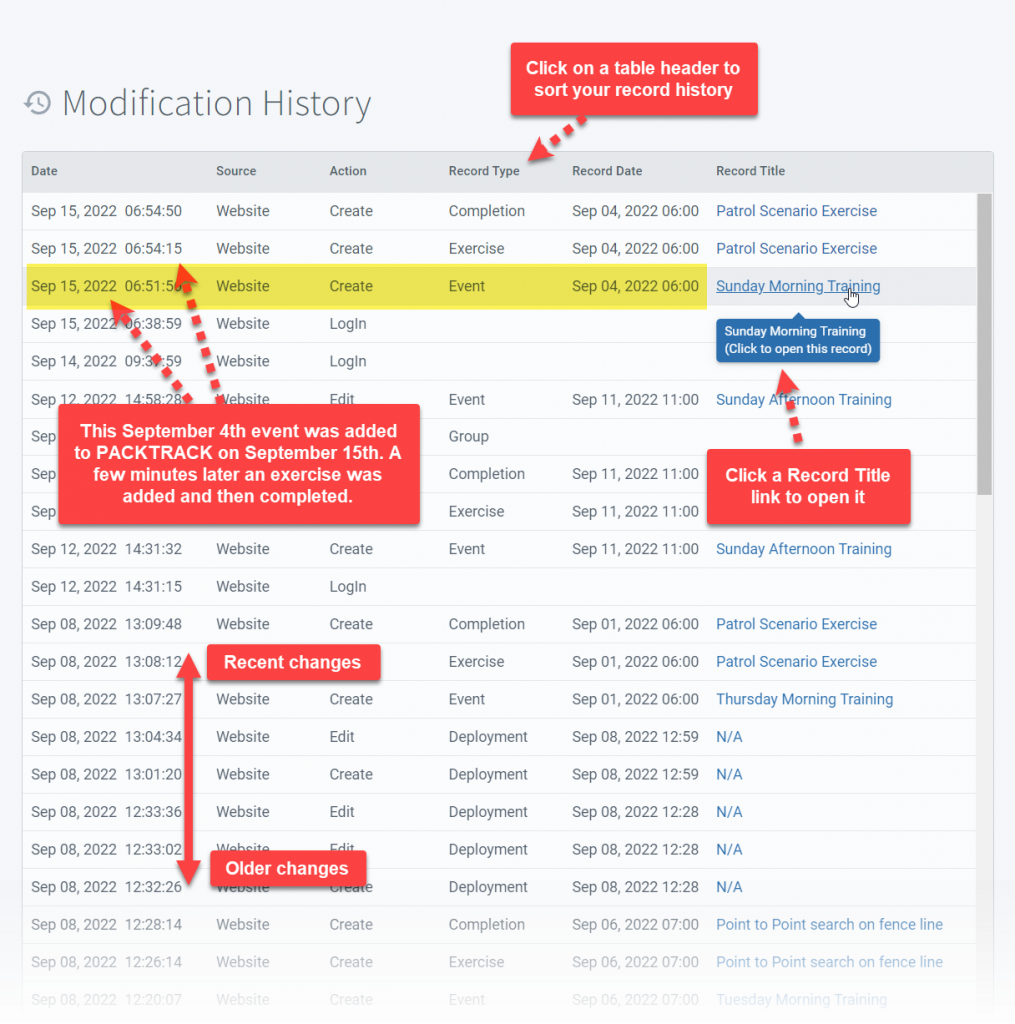
Today we're introducing a new feature to give you more insight into how your records change over time. This release includes a new History page with a table showing each record modification and when it occurred. You can open this page using the new History link in the left menu on desktop or in the mobile app. All of your record changes are shown in a table from newest to oldest in chronological order.
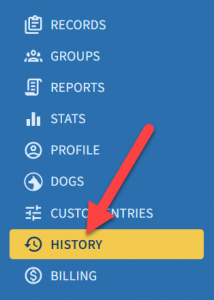
Today we're introducing a new feature to give you more insight into how your records change over time. This release includes a new History page with a table showing each record modification and when it occurred. You can open this page using the new History link in the left menu on desktop or in the mobile app. All of your record changes are shown in a table from newest to oldest in chronological order.
Use this page to get an overview of your activity in
PACKTRACK and track when your records were added, modified or deleted. The table also includes a link to the changed record so you can conveniently open it in one click.
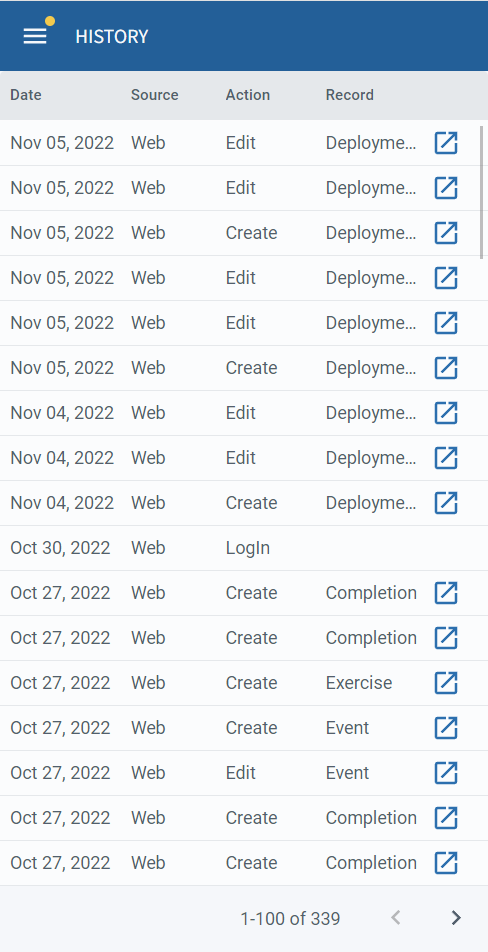
The same functionality is also available in the PACKTRACK mobile app for
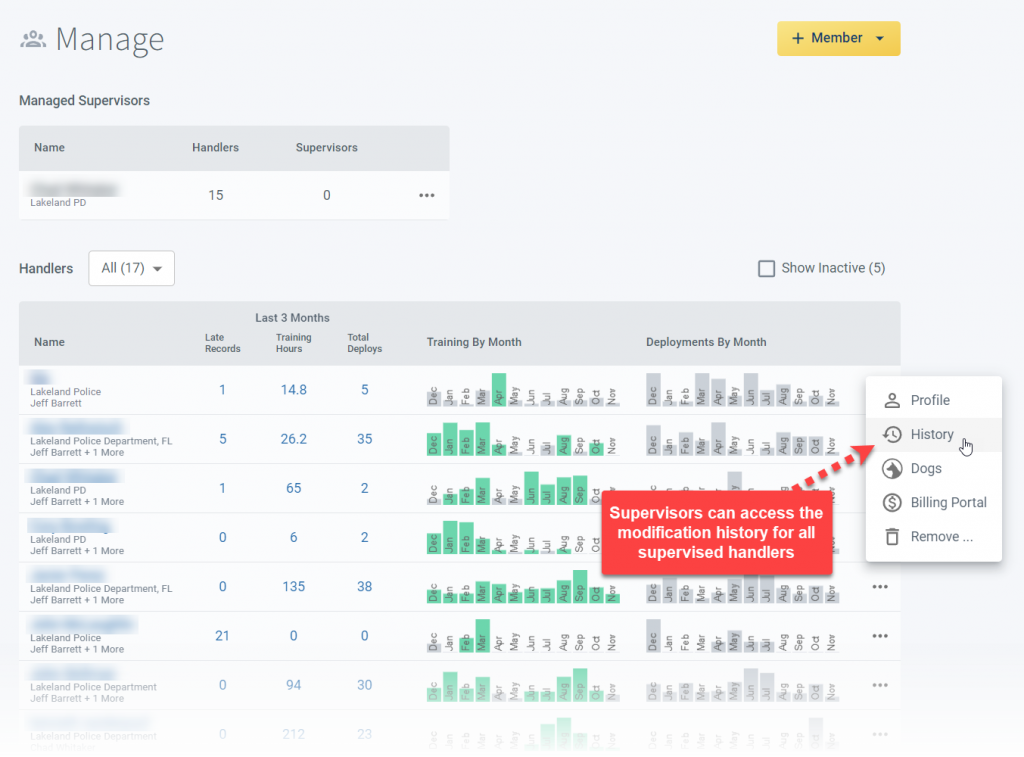
Supervisors can view the modification history of all supervised handlers using the new History link in the context menus of the Manage page.
Record integrity is core to PACKTRACK's mission and we hope you find this feature helpful. Got a comment or feedback for us? Login to the
PACKTRACK service and start a support chat or use the Contact Us form at the bottom of this page.
System Update
0
min read
Improved K9 Reporting System
A record keeping system should make it easy to put data in and reward you with the ability to pull out great reports. Our latest update includes a more integrated reporting system that adds several new features.
A record keeping system should make it easy to put data in and reward you with the ability to pull out great reports. Our latest update includes a more integrated reporting system that adds several new features. This new design brings all of the existing reporting functionality into one place. It also supports generating (and even printing!) reports right from your phone. In addition, you can create more advanced reports. For example, you can now create an exercise log report which only includes your tracking training exercises. Or generate a statistical summary report which only contains deployments from a specific requesting agency. If you're already familiar with reporting in
PACKTRACK then some of this will be review.
What is a report?
A report takes information that you've entered into PACKTRACK and displays it in a readable format that's easy to print or save as a PDF file. It might show a single record, such as a training exercise or deployment, or it could combine many records together in a long list or summarized view.
Where do I create reports?
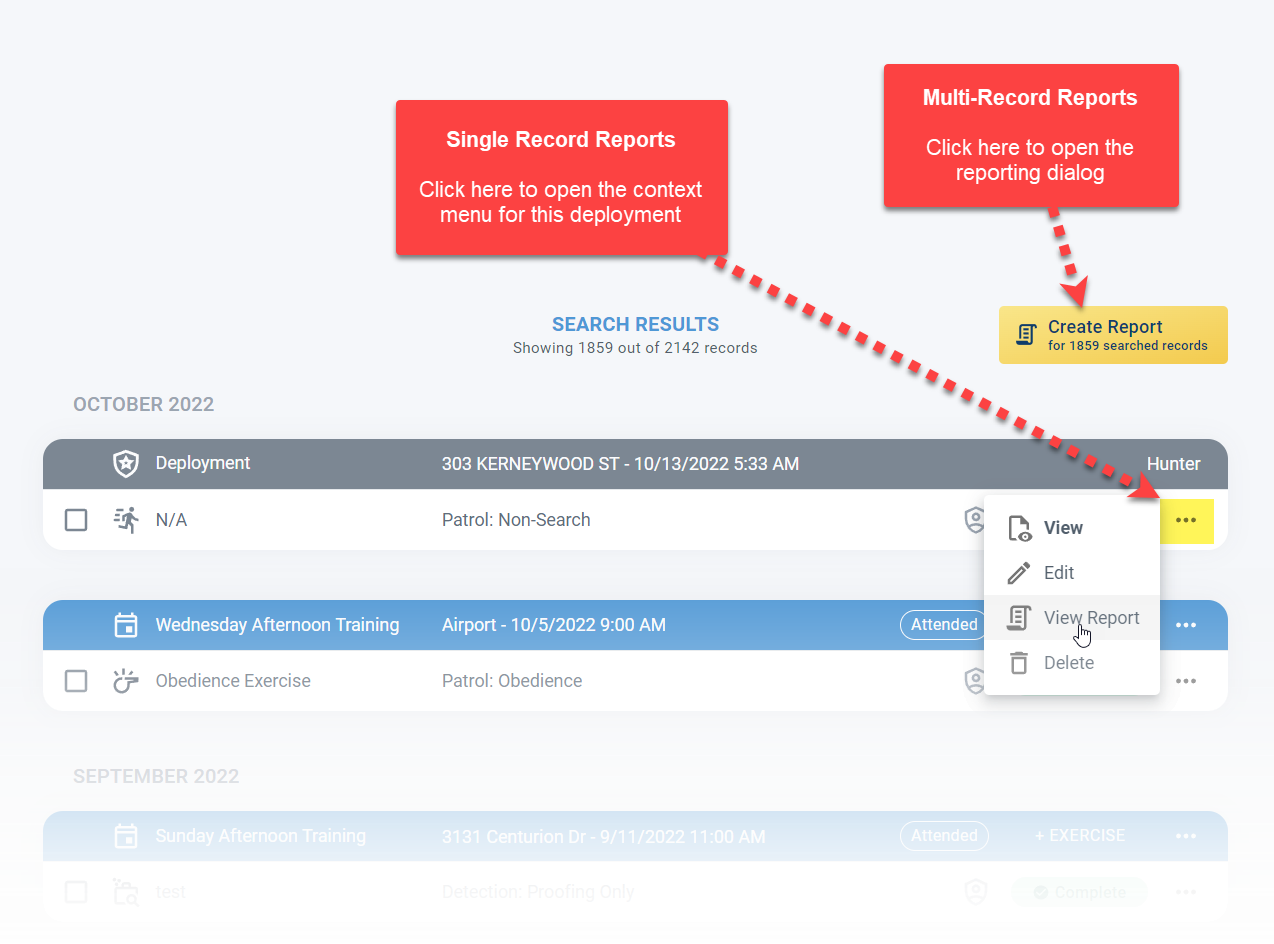
The first thing you'll notice is that all reports are now created in one place: the Records page. The old Reports page is no longer used. Click the context menu for one of the rows on your Records page to view a report for just that record. Click the new Create Report button to generate a report which combines multiple records together.
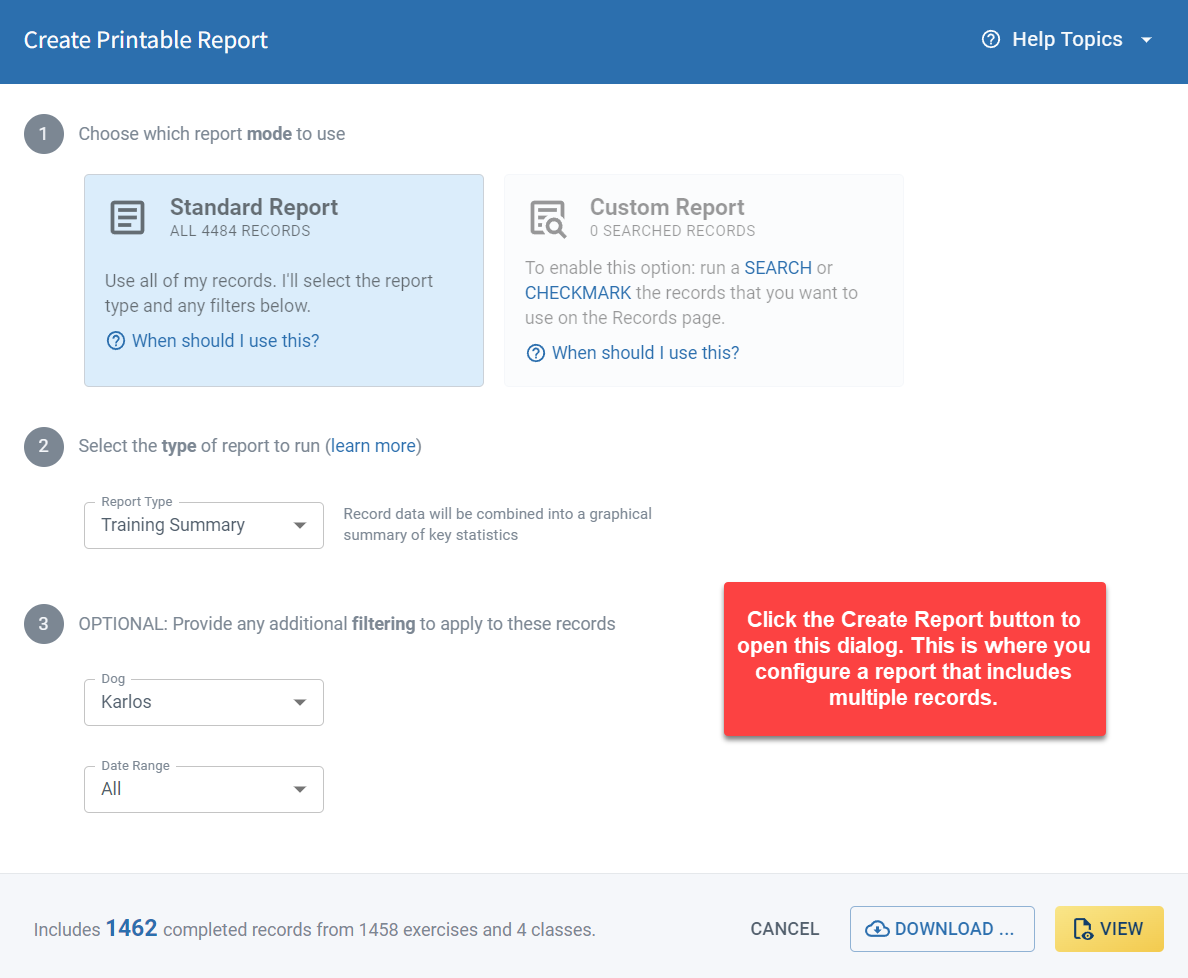
When you click the Create Report button you'll see this dialog where you can configure your report. You'll use this interface when you need to combine multiple records into one cohesive report.
What types of reports are available?
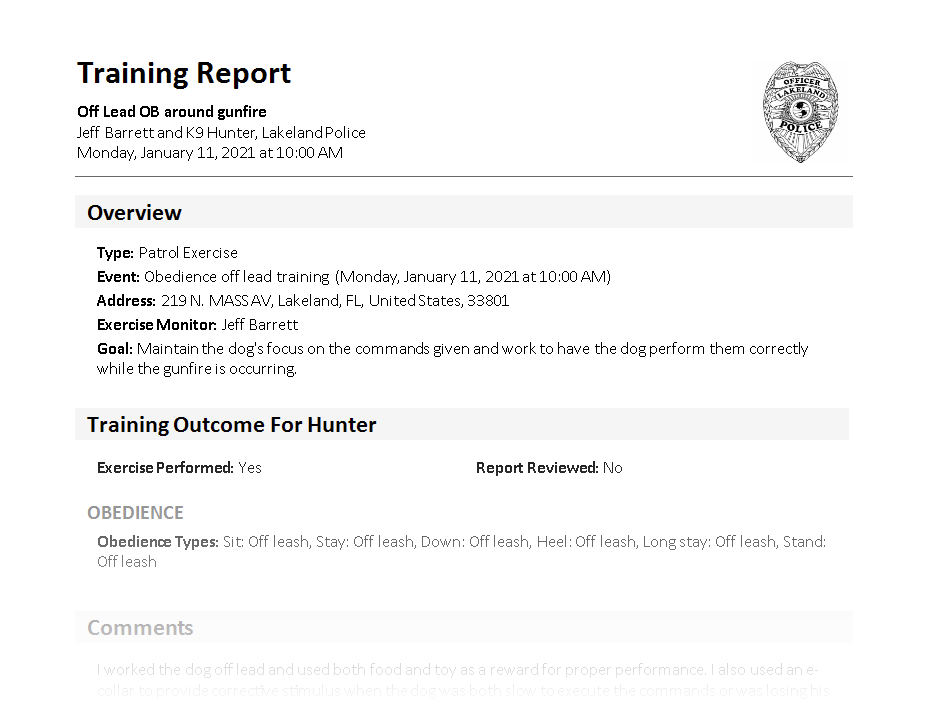
There are 2 main report categories: Full Record reports and Summary reports. A full record report includes all of the details about the included records including any attached images. The screenshot below shows part of a full record exercise report.
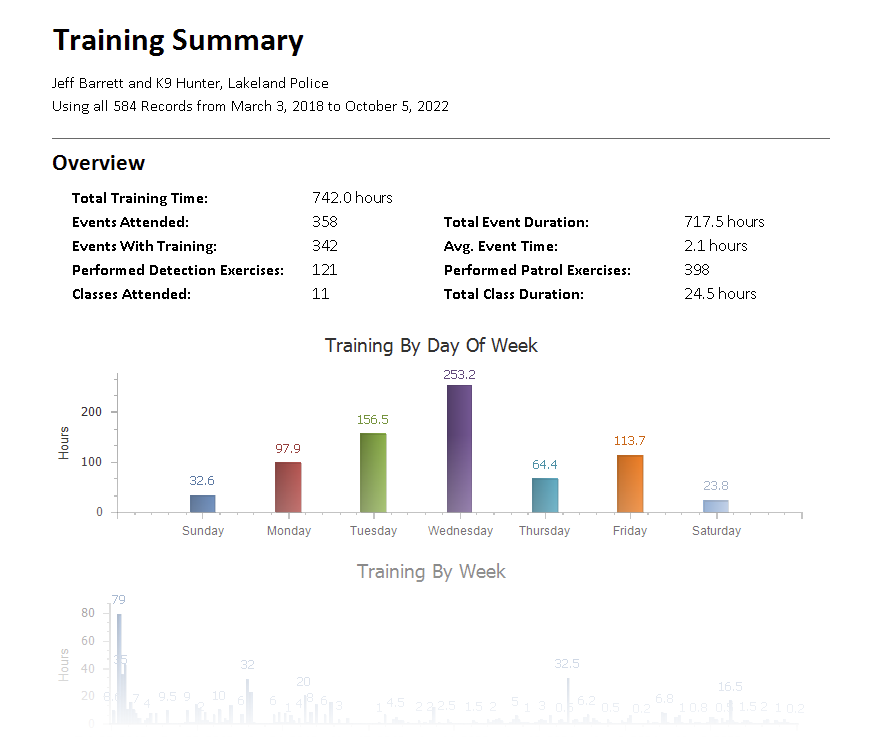
A summary report combines information from multiple records. For example, it might simply list the records or provide summary statistical information. The screenshot below shows the first part of a training summary report which collects information together from multiple records.
Feel free to read more about the different types of reports that you can create.
How do I set which records to use in the report?
PACKTRACK now allows you to specify exactly which records should be included in a report. The reporting dialog supports 2 modes of operation: Standard Reports and Custom Reports.
Standard reports use all of your records. In addition, the dialog allows you to specify the report type and a date range. This functionality work just like it always has.
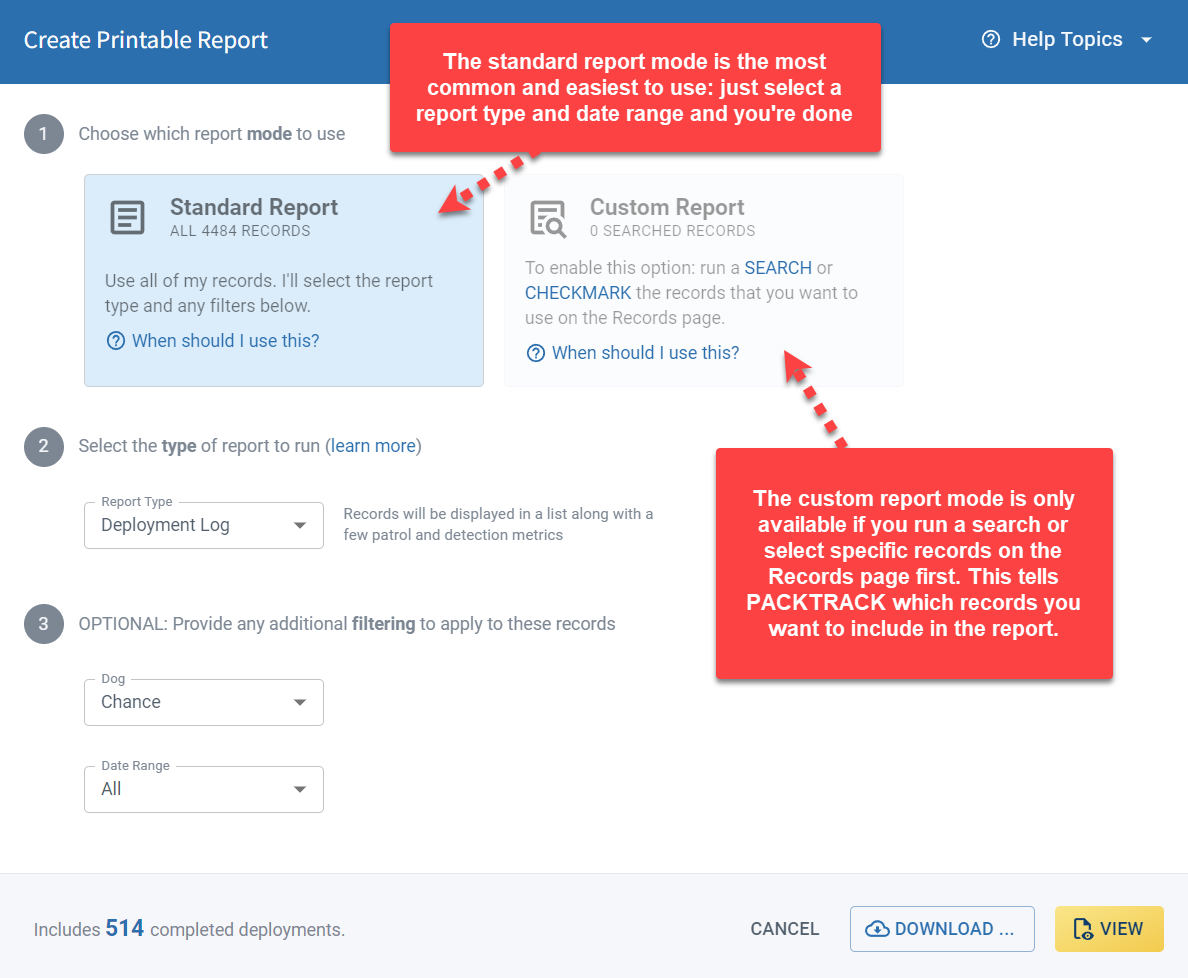
There may be times, however, when you want to use only a subset of your records in a report. For example, you might want a log report which lists all of your obedience exercises. Or, perhaps you need a report with statistics on every deployment where there was an arrest. In this case you'll need to create a custom report, which requires that you run a search on the Records page first. This feature is new and gives you more control of your reports. Learn more about
Can I run reports from my phone?
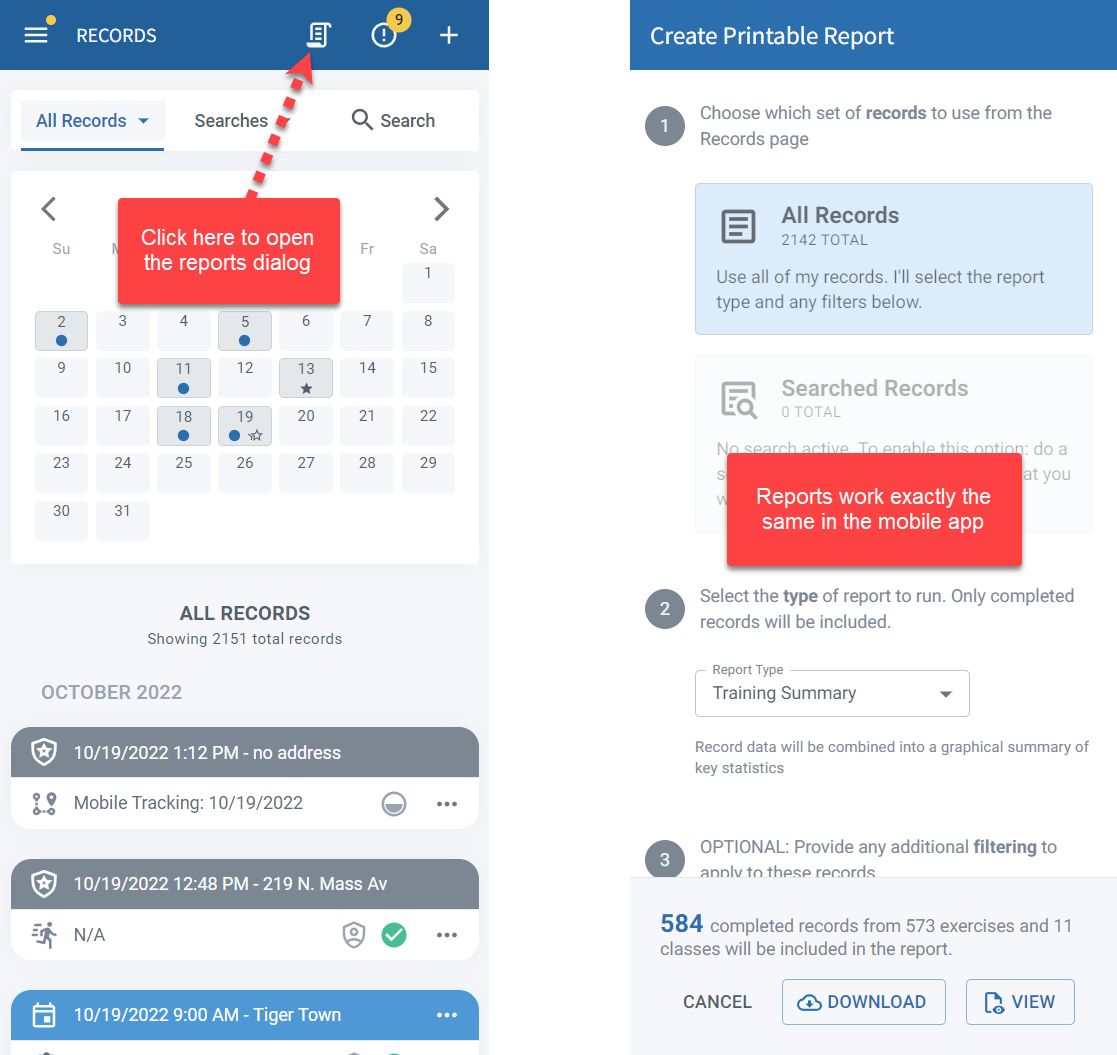
As of this release, reports also work great on the PACKTRACK mobile app. While it can be difficult to see reports on a small phone screen you can still save them or even print directly from your phone (if it supports this feature).
How do I run really large reports?
Some reports take a long time to generate. This is most common when trying to print the entire training history of a dog using the Exercise report type (which includes all record data). When reports are expected to take a long time to generate PACKTRACK will disable the View option in the reports dialog. In this case, you should click the Download button instead.
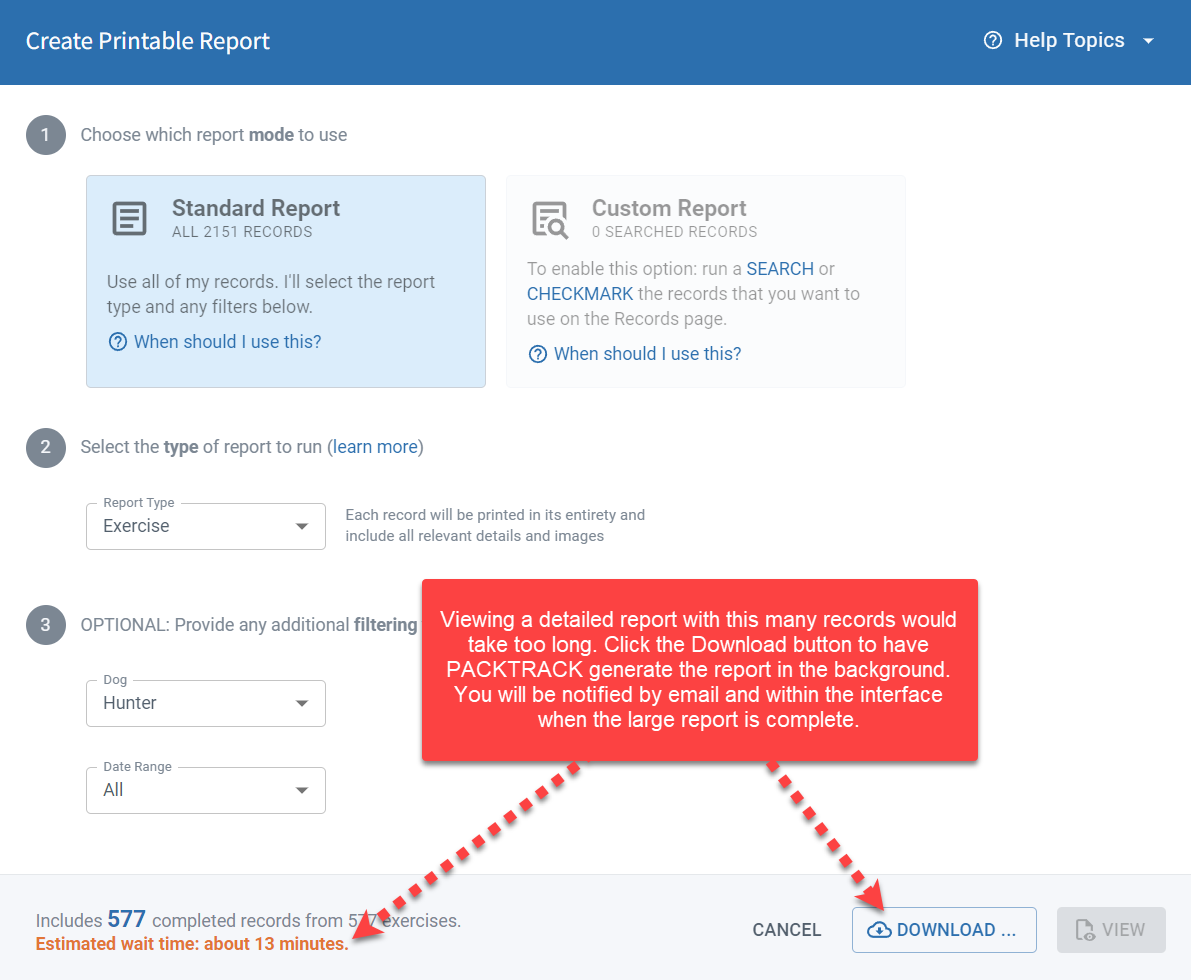
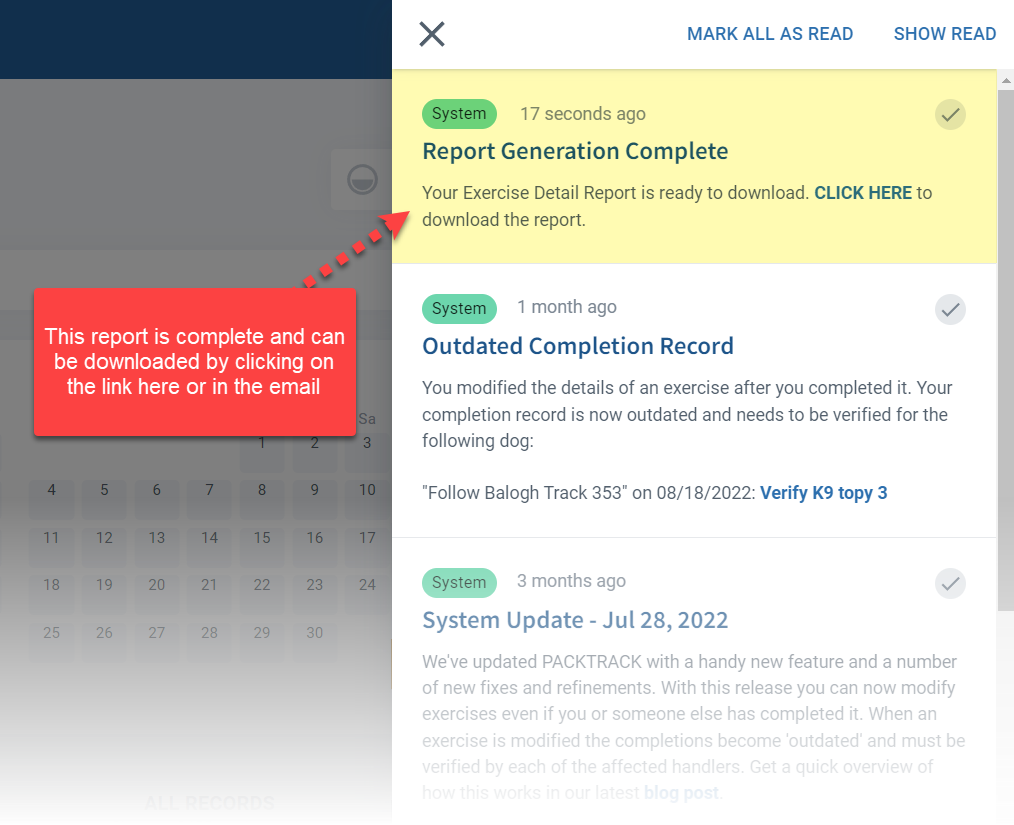
You will be notified when the report is ready by email and with a notification in the website or mobile app. You can then click the included link to download the report.
I have more questions
Feel free to review our knowledge base for more information. Here are some additional links to reporting help topics.
- What types of reports can I create? (includes samples)
- How do I create a report for just one record?
- How do I create a report that includes multiple records?
- How do I create a customized report that includes only the records I specify?
- How do I create a report for court with my dog's entire exercise history?
System Update
0
min read
Outdated Handler Records
We've reworked how exercise changes are handled to make records more robust, yet easier to modify.
We've reworked how exercise changes are handled to make records more robust, yet easier to modify.
How K9 Training Records Work
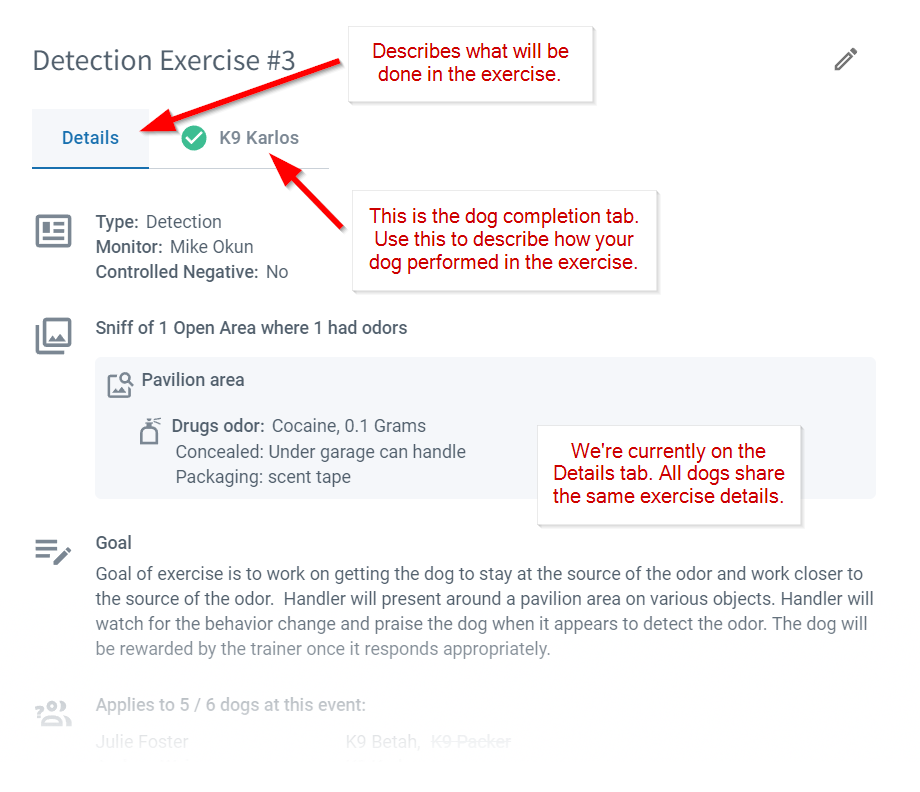
In PACKTRACK, exercises consist of 2 parts:
- The exercise Details describe what will be done in the training. All handlers with dogs at the training event share the same exercise details. This saves time and reduces errors.
- The Dog Completion is added when the exercise is over. This is where you describe how each of your dogs performed in that exercise. This information is specific to you and isn't shared with other handlers.
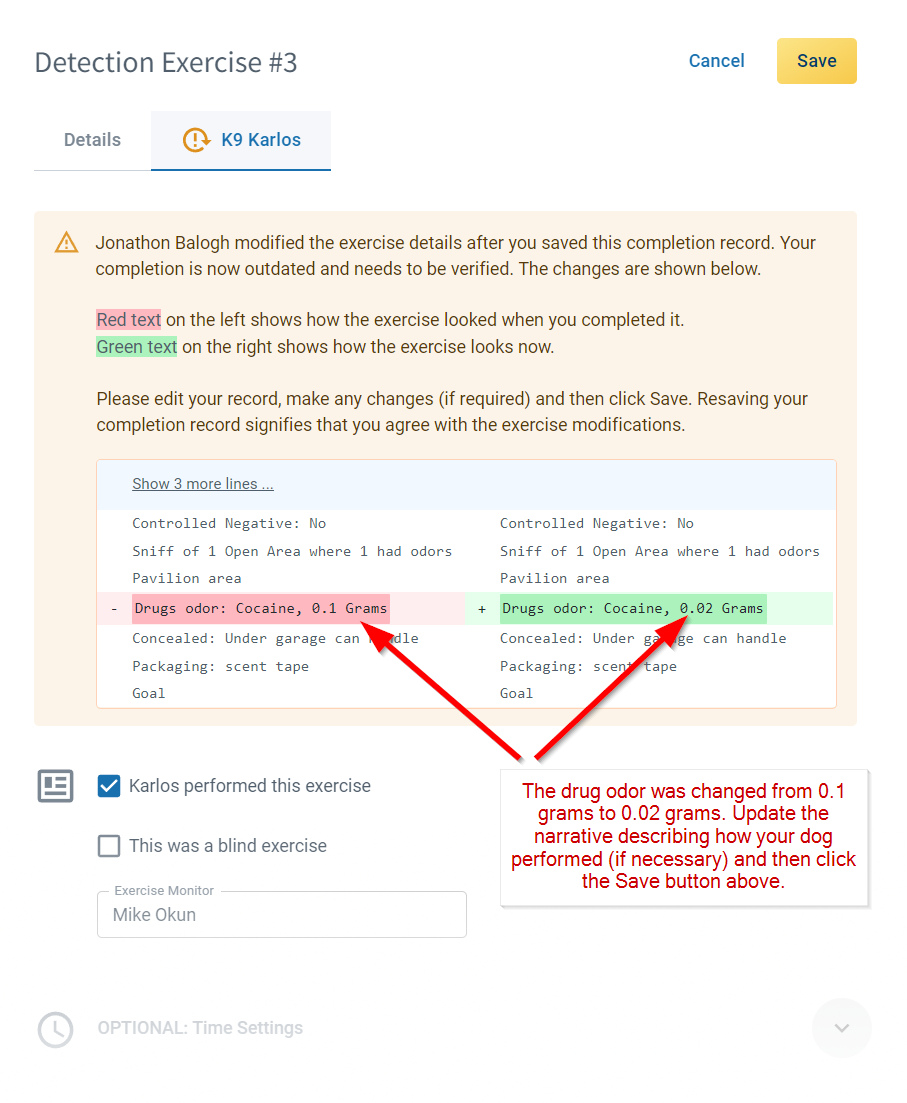
Sometimes, the shared exercise Details need to be updated after handlers have already recorded how their dogs did in that exercise. This creates a problem since changing the exercise can impact the correctness of the dog completion record. For example, an exercise might define a drug detection activity with 0.1 grams of cocaine. A handler at this event completes the exercise by describing how his dog performed. He explicitly mentions the 0.1 grams in his narrative. If the exercise details are later updated to reflect the actual amount of cocaine (say 0.02 grams) then the handler's completion record may no longer be accurate. In the past, PACKTRACK hasn't allowed changes to the exercise details if there are handlers who have completed it. This ensures that handler records aren't modified or invalidated without their knowledge. Updating the exercise details required that you ask the handlers to first delete their completion records since they were written based on an outdated exercise description. That can be quite a hassle, especially if you're only making a small change to the exercise details.
The New "Outdated Record" System
With this latest update, changing exercise details after handlers have completed the exercise is much simpler. A trainer or group leader can now modify the exercise details at any time. If a handler has completed the exercise then they will receive an email and site notification explaining that their completion record is now "outdated" and needs to be verified.
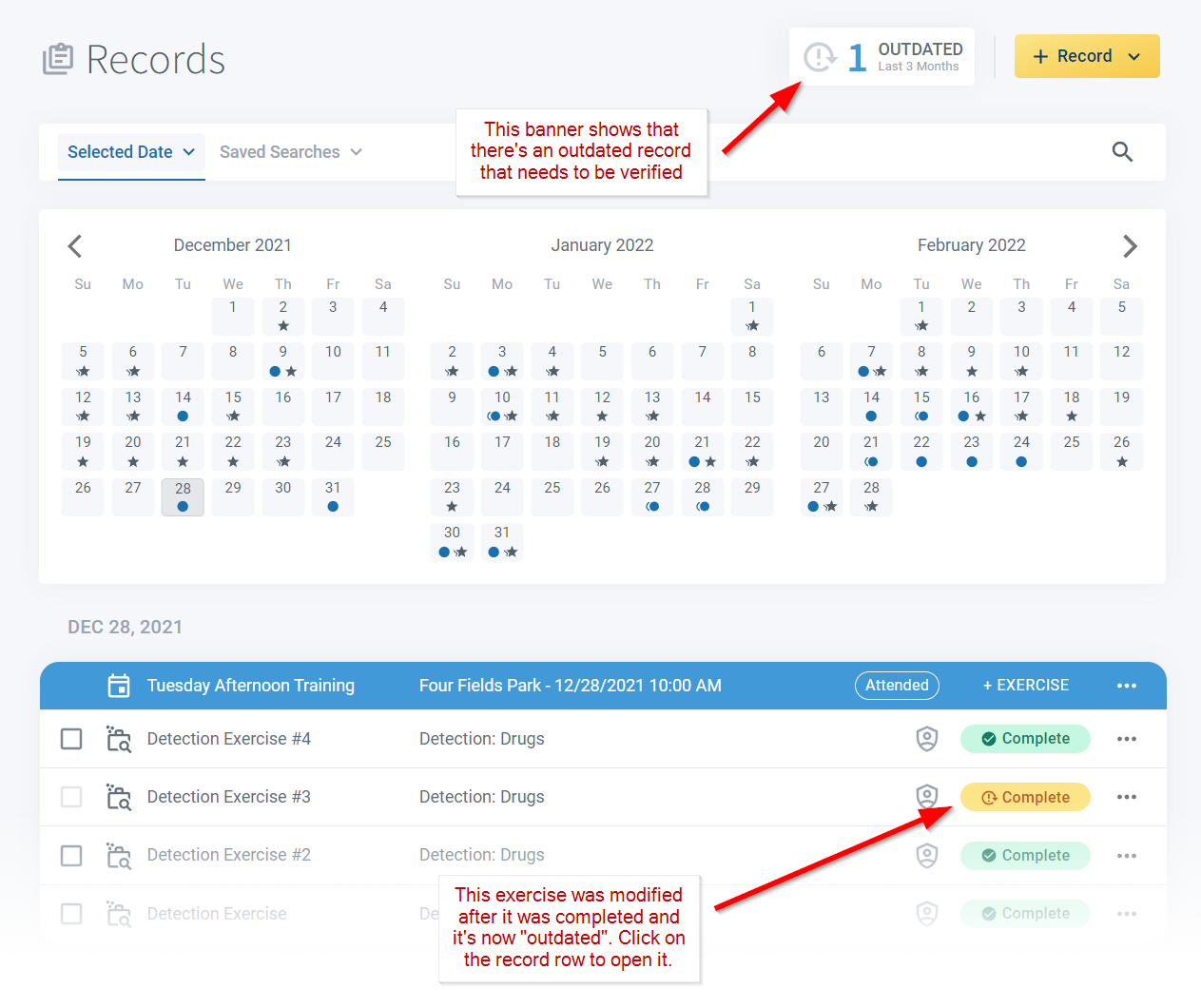
Clicking on an outdated exercise takes you to the completion record where the exercise detail changes are explained. You can now make updates to your completion based on the exercise changes or simply click Save to acknowledge and accept the modification. If there's a problem with the exercise detail changes then the handler should not resave their completion record and instead discuss the exercise modifications with the person making the update.
Maintaining robust records that you can trust is core to PACKTRACK's mission. This feature was targeted at making record modification easier without sacrificing record integrity. We thank you for your comments and feedback which ultimately led us to develop this functionality. Let us know what you think.
System Update
0
min read
Better Record Keeping for K9 Trainers
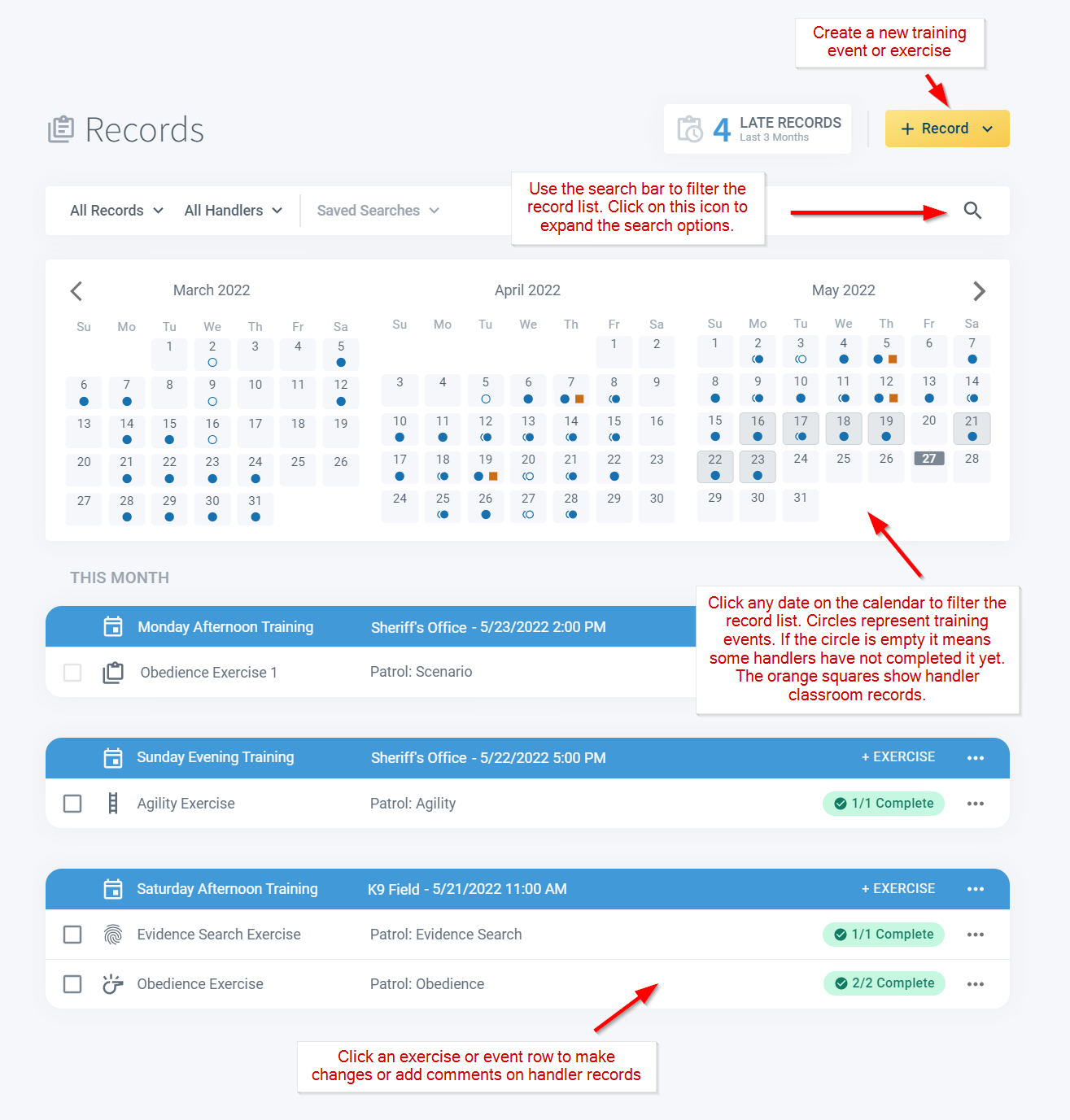
PACKTRACK has always provided a dedicated interface for police K9 trainers. With our latest release we've updated the Trainer UI to the newer design currently used for the handler and supervisor roles. Now all 3 roles share the same Records page layout with an intuitive calendar and record list view. Trainers often work with a group of K9 handlers and are responsible for creating and scheduling appropriate training exercises. To create a new training event just use the +Record button at the top right of the Records page. The search bar provides convenient record filtering capabilities. Click the search icon on the far right to expand the form for more filtering options. Click any date on the calendar to filter the record list to the selected day. Click a record row to open the K9 training event or exercise for editing.
PACKTRACK has always provided a dedicated interface for police K9 trainers. With our latest release we've updated the Trainer UI to the newer design currently used for the handler and supervisor roles. Now all 3 roles share the same Records page layout with an intuitive calendar and record list view. Trainers often work with a group of K9 handlers and are responsible for creating and scheduling appropriate training exercises. To create a new training event just use the +Record button at the top right of the Records page. The search bar provides convenient record filtering capabilities. Click the search icon on the far right to expand the form for more filtering options. Click any date on the calendar to filter the record list to the selected day. Click a record row to open the K9 training event or exercise for editing.
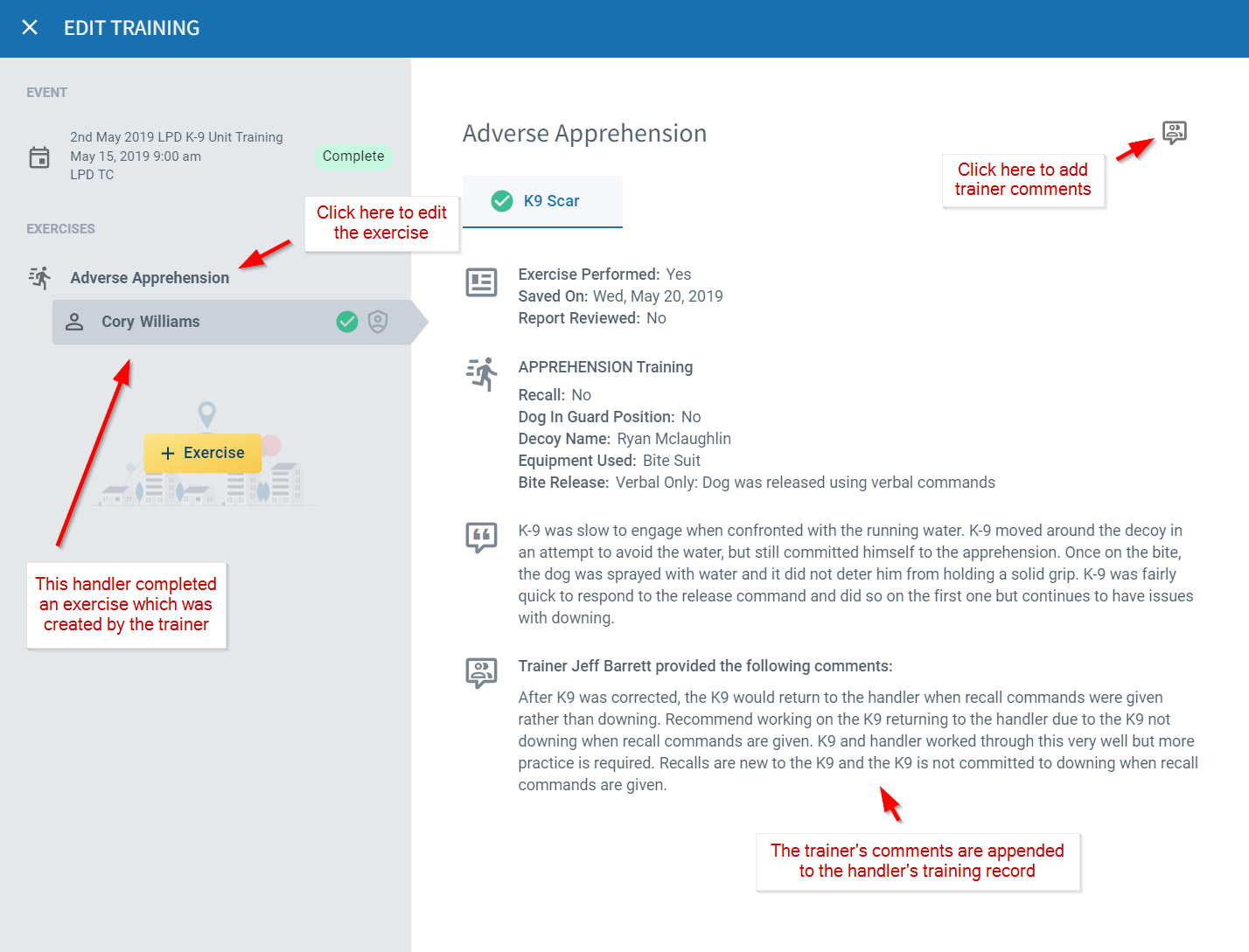
A K9 trainer may also add feedback when handlers complete an exercise record. To do this, simply click on the record row, select the exercise and handler in the left pane and then click the Trainer Comments button in the upper right. Comments are automatically appended to the handler record and will appear in printed reports. Handlers are notified within PACKTRACK and by email when trainers add comments to their exercises.
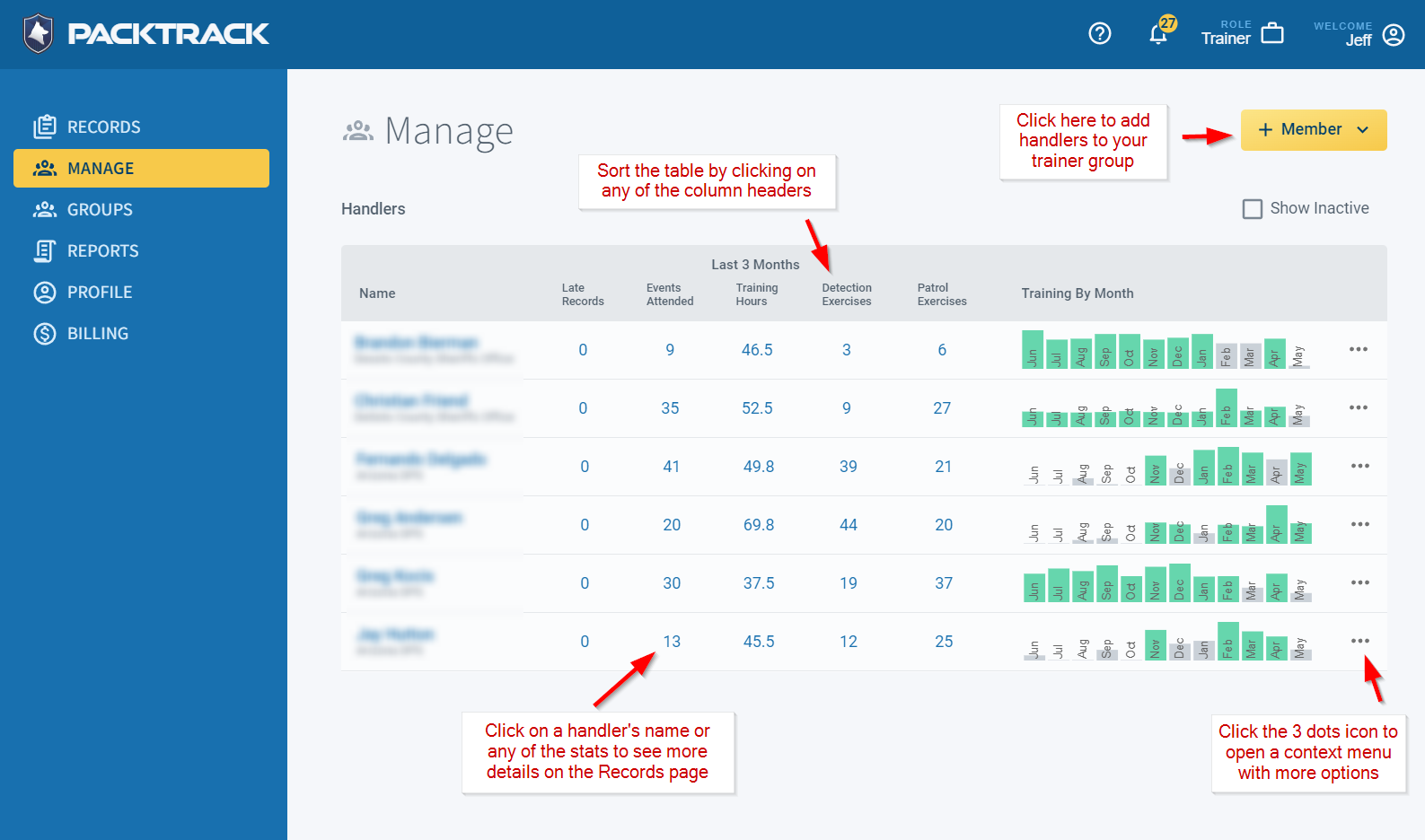
The new Manage page allows trainers to see an overview of each K9 handler's training activity. Convenient stats link directly to the associated data on the Records page. Click any of the numbers for more detail on a specific handler. The Training By Month graph makes it easy to see which handlers are training at least 16 hours each month (green bar). Click the icon with 3 dots on the far right of each row to open a context menu with additional options. Finally, you can invite more handlers to your trainer group using the +Member button in the upper right of the page.
We hope these changes make it a little easier for trainers to create training events, provide handler feedback and monitor training activity.
Log in at mypacktrack.com, give it a try and please let us know your thoughts on this update. We'd love to hear from you.
System Update
0
min read
Updated K9 Training Classes & Profile Page
We're continuing to update PACKTRACK to a modern, easier to use design. We now have K9 training class support in the Records page as well as a new handler profile page that works on the web and in the mobile app.
We're continuing to update
PACKTRACK to a modern, easier to use design. We now have K9 training class support in the Records page as well as a new handler profile page that works on the web and in the mobile app.
Training Classes
Create a training class record any time you want to document classroom work (which typically takes place indoors without your dog). This new record type is displayed on the records page just like any other police K9 record you may have for training or deployment activities.
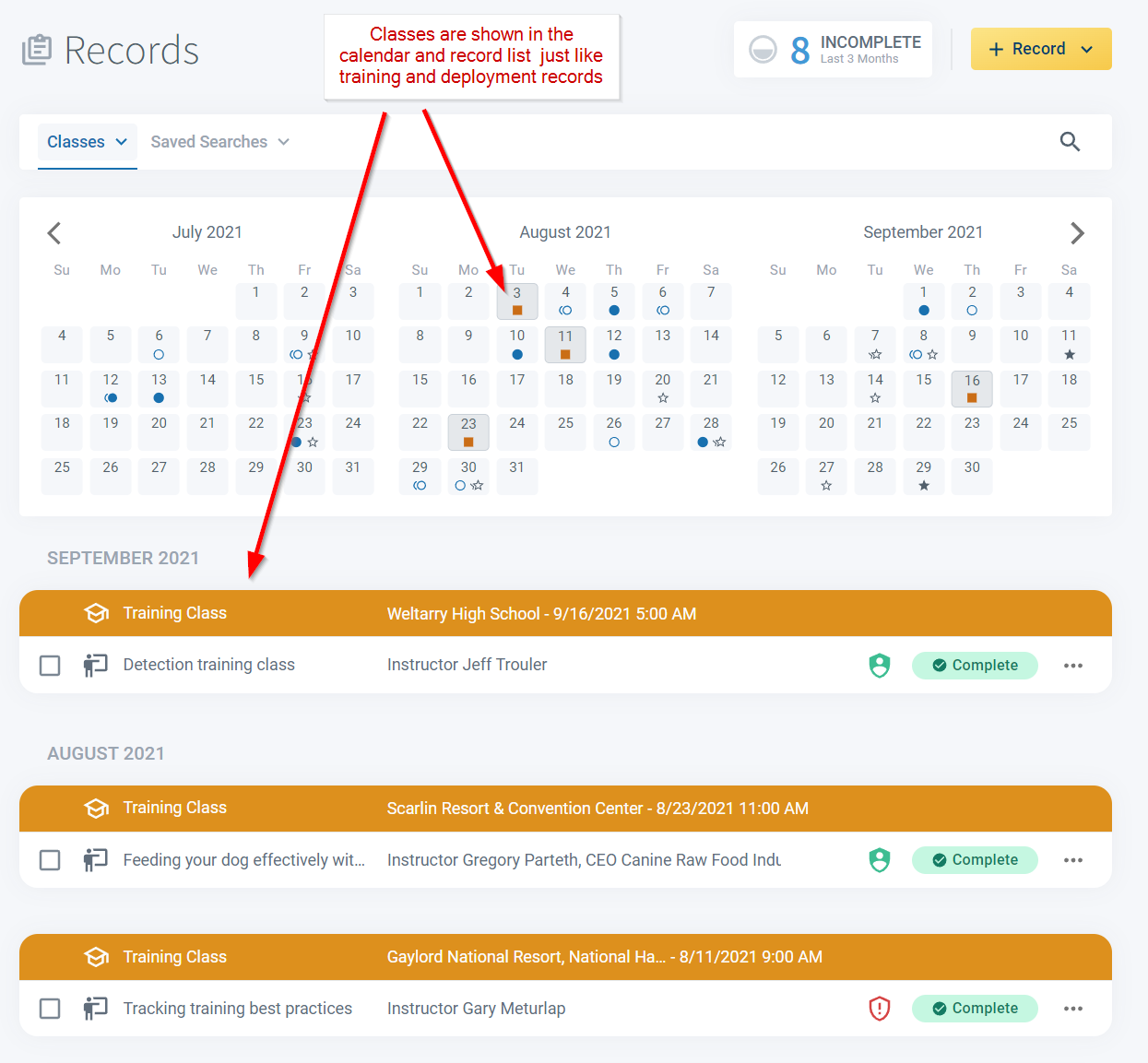
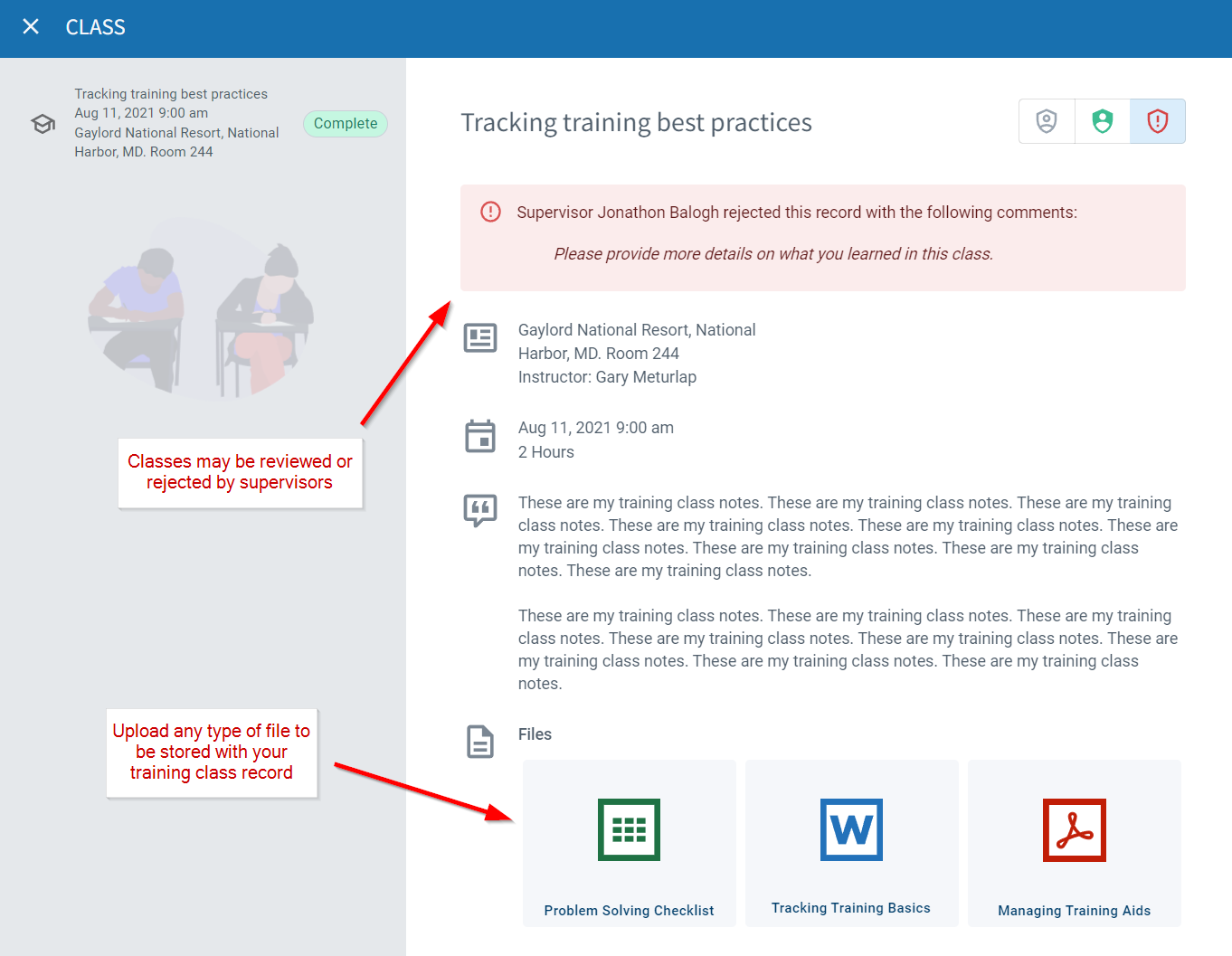
Click on a training class record row to open the record in the editor. From here you can view and edit any details. Classroom records support the new PACKTRACK record review system so supervisors can accept or reject records and the handler will be notified. Training class records are also a great place to store any K9 training documents you might have received at the class.
User Profile Page
The updated profile page is available on the web and in the mobile app. It provides a cleaner interface and additional statistical information including your total training hours and number of deployments. It's available for handlers (web and mobile app), trainers (web) and supervisors (web).
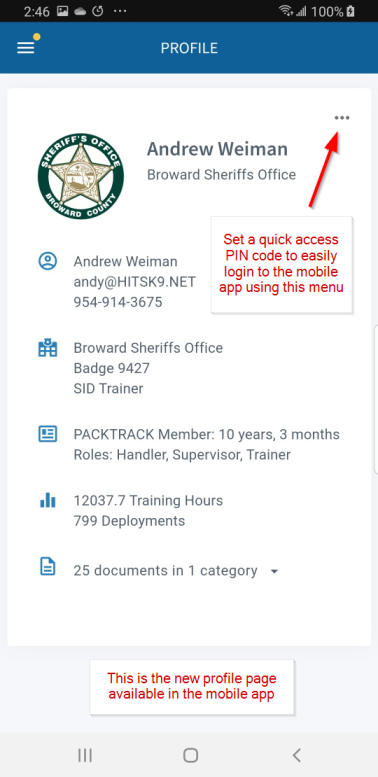
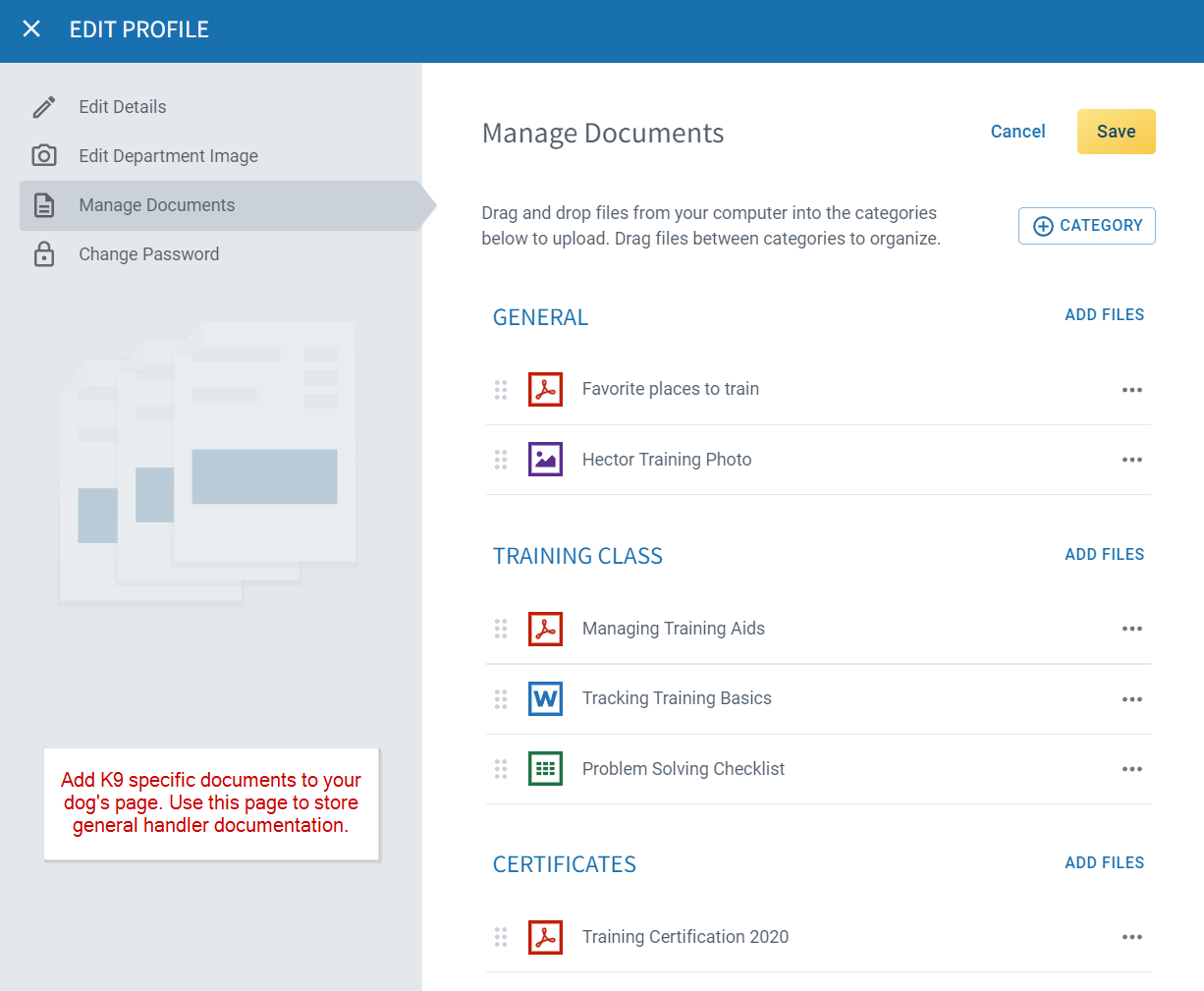
The new profile page borrows a feature from the Dogs page: you can organize all of your K9 record keeping documents into categories. Drag and drop files from your computer or select them from your phone. You can even rename files and move them between categories by dragging.
By the way, did you know that PACKTRACK has mobile apps for
Android and iOS/iPhone? Download them anytime from the mobile app stores. We hope these new updates improve your PACKTRACK experience. Got questions? Let us know.

System Update
0
min read
K9 Supervisor & Record Review Enhancements
As a K9 supervisor you have a lot to manage. PACKTRACK has always provided a dedicated supervisor role to assist you in overseeing the training and deployments of your K9 teams. Our latest update significantly extends this functionality with a new interface, more features and a new record review system. The most obvious change is that supervisors now see the same modern PACKTRACK interface that handlers have been using. This includes an expandable search bar at the top of the page, an intuitive calendar view summarizing the activities of all of your K9 teams and a detailed record list sorted into date groups.
As a K9 supervisor you have a lot to manage. PACKTRACK has always provided a dedicated supervisor role to assist you in overseeing the training and deployments of your K9 teams. Our latest update significantly extends this functionality with a new interface, more features and a new record review system. The most obvious change is that supervisors now see the same modern PACKTRACK interface that handlers have been using. This includes an expandable search bar at the top of the page, an intuitive calendar view summarizing the activities of all of your K9 teams and a detailed record list sorted into date groups.
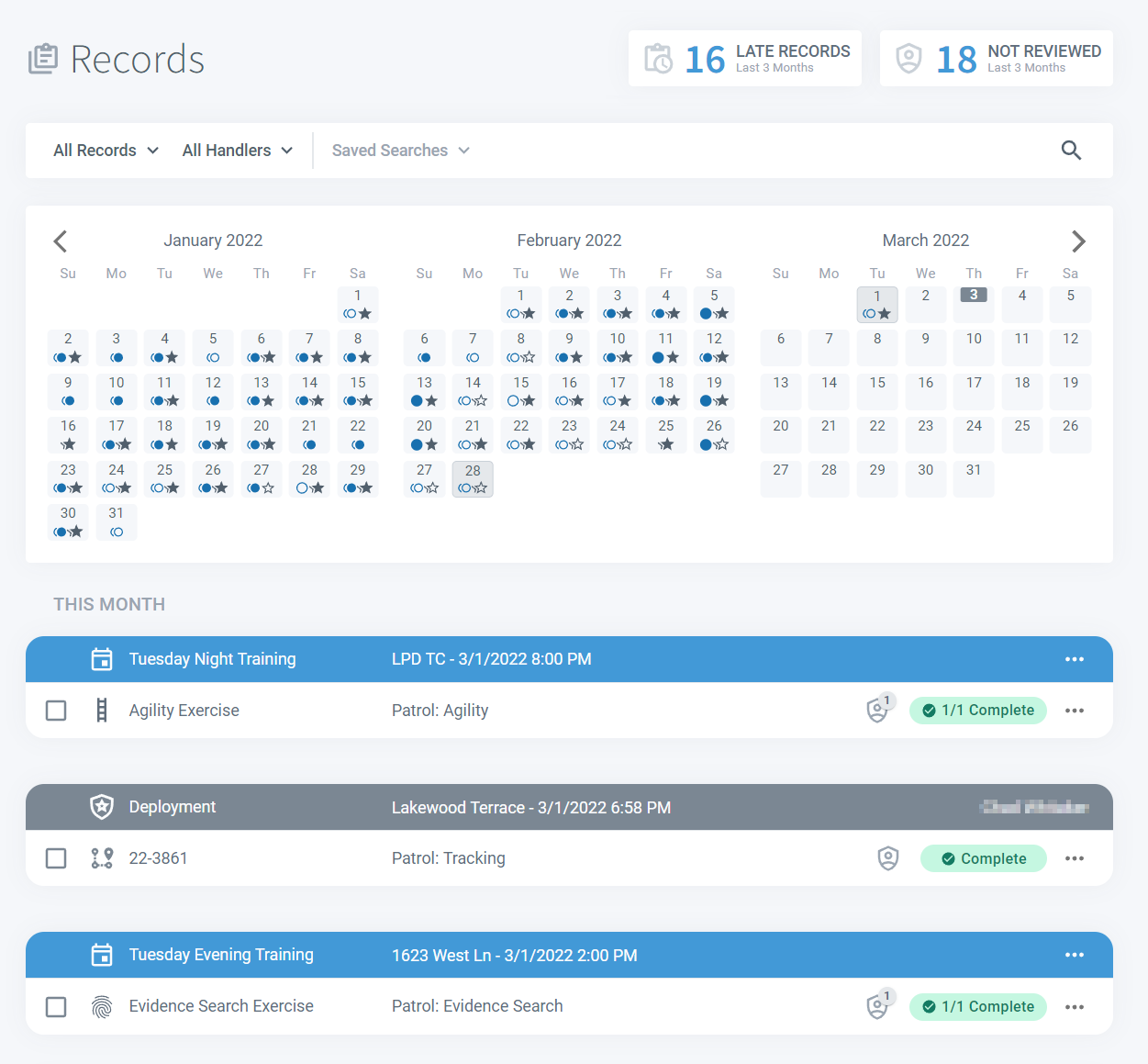
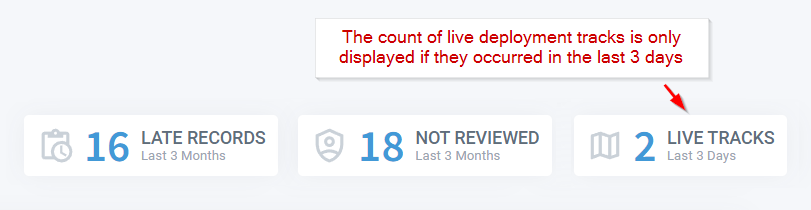
Key information is right at the top of the page. Click the Late Records banner to show any records that your handlers should have completed by now. Click the Not Reviewed banner to find all records that have been completed by your handlers but still need to be reviewed. Finally, select the Live Tracks banner to see all active tracking deployments as well as any that have occurred in the last 3 days.
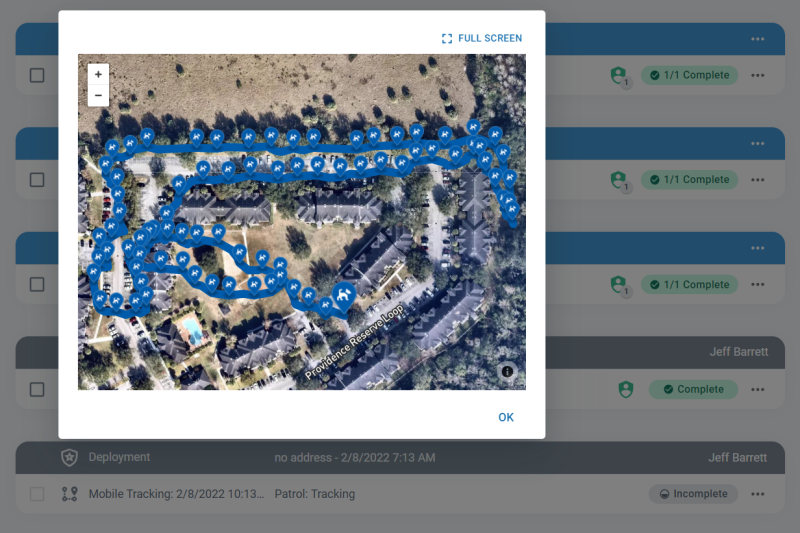
You can view the deployment track for any of your handlers in a fully interactive map by clicking the View Tracking Map button on the associated record row.
The same familiar Search Bar used by handlers is now available for supervisors as well. Filter the displayed records by type or handler using the dropdown fields or select one of your own custom Saved Searches. Expand the search form using the icon on the right to run a detailed record search. You can save any search to be used later by clicking the Save Search button.
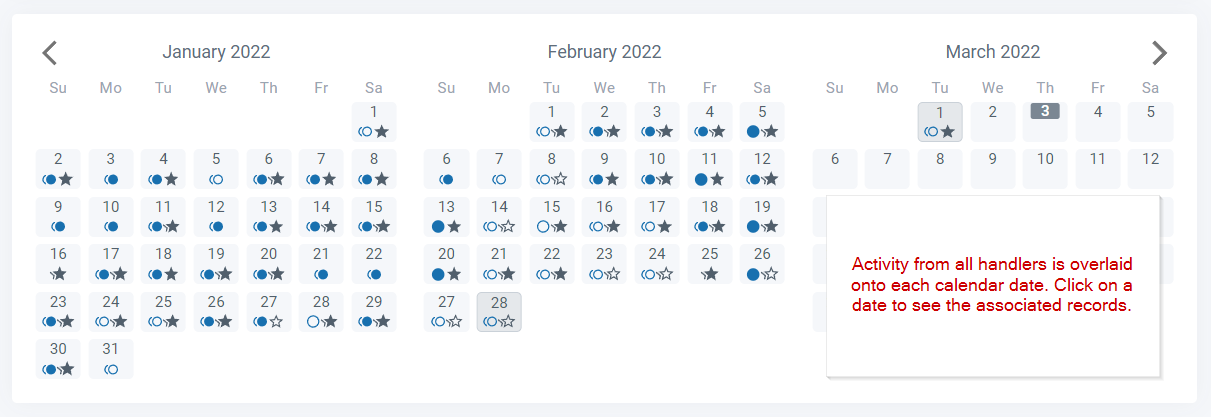
All activities performed by your handlers are overlaid in the calendar. Simply click a date and all training and deployments for that day will show below. Circle icons in the calendar show training while stars are deployments. An outlined icon means there are incomplete records on that date.
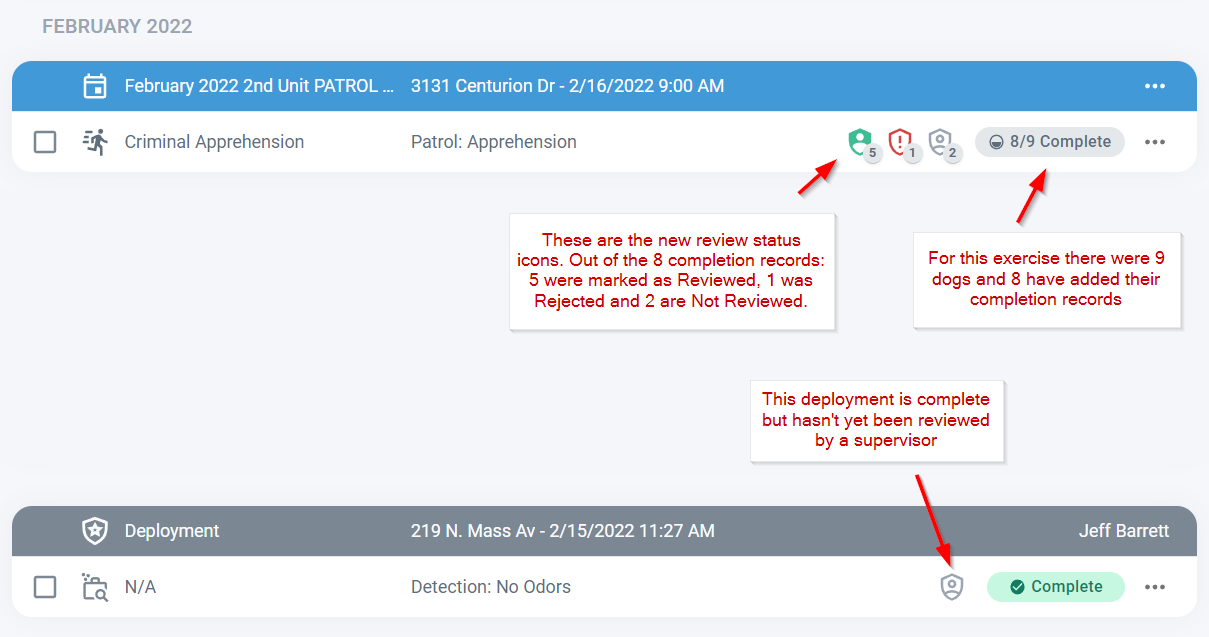
The records list summarizes each record as a row and the Completion and Reviewed status of each record are clearly marked. Click anywhere on a training or deployment row to open a detail view.
Reviewing records is fast and intuitive. Once a record is open just select an appropriate exercise, handler and dog and then click the Reviewed icon in the top right. Reviewing deployments works the same way.
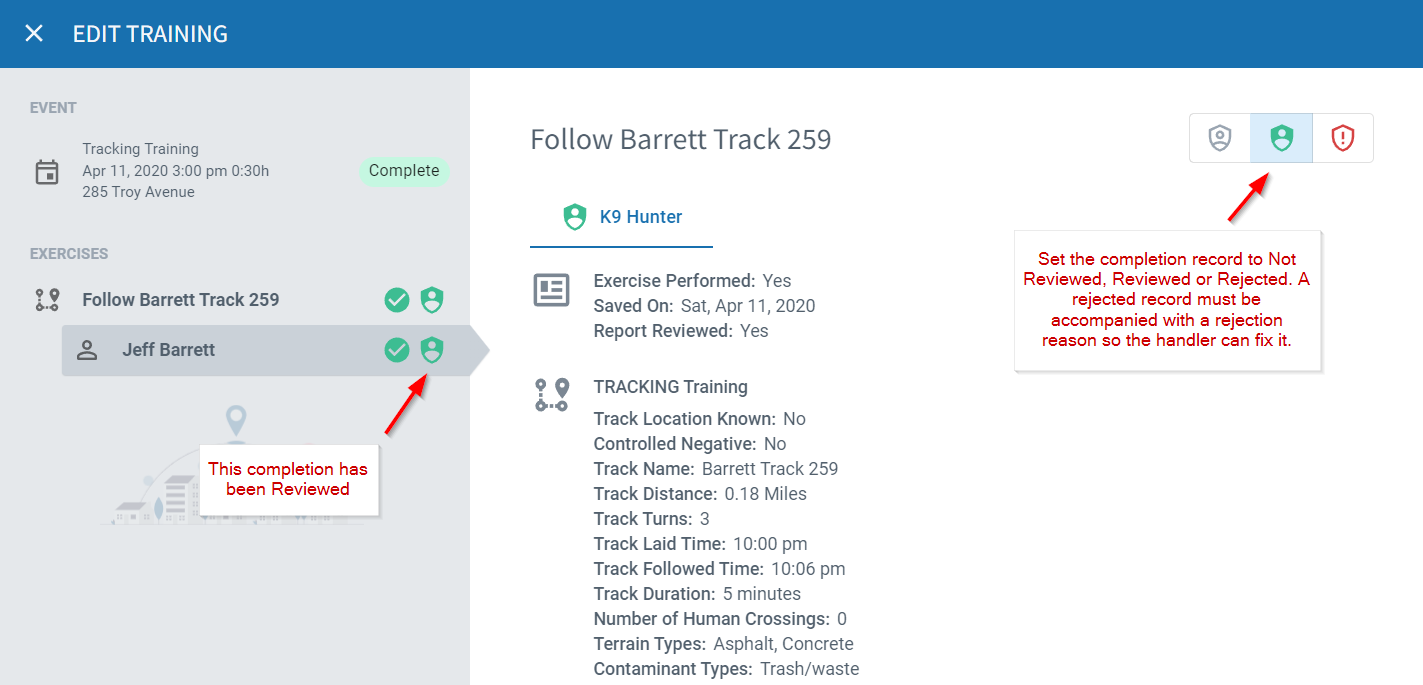
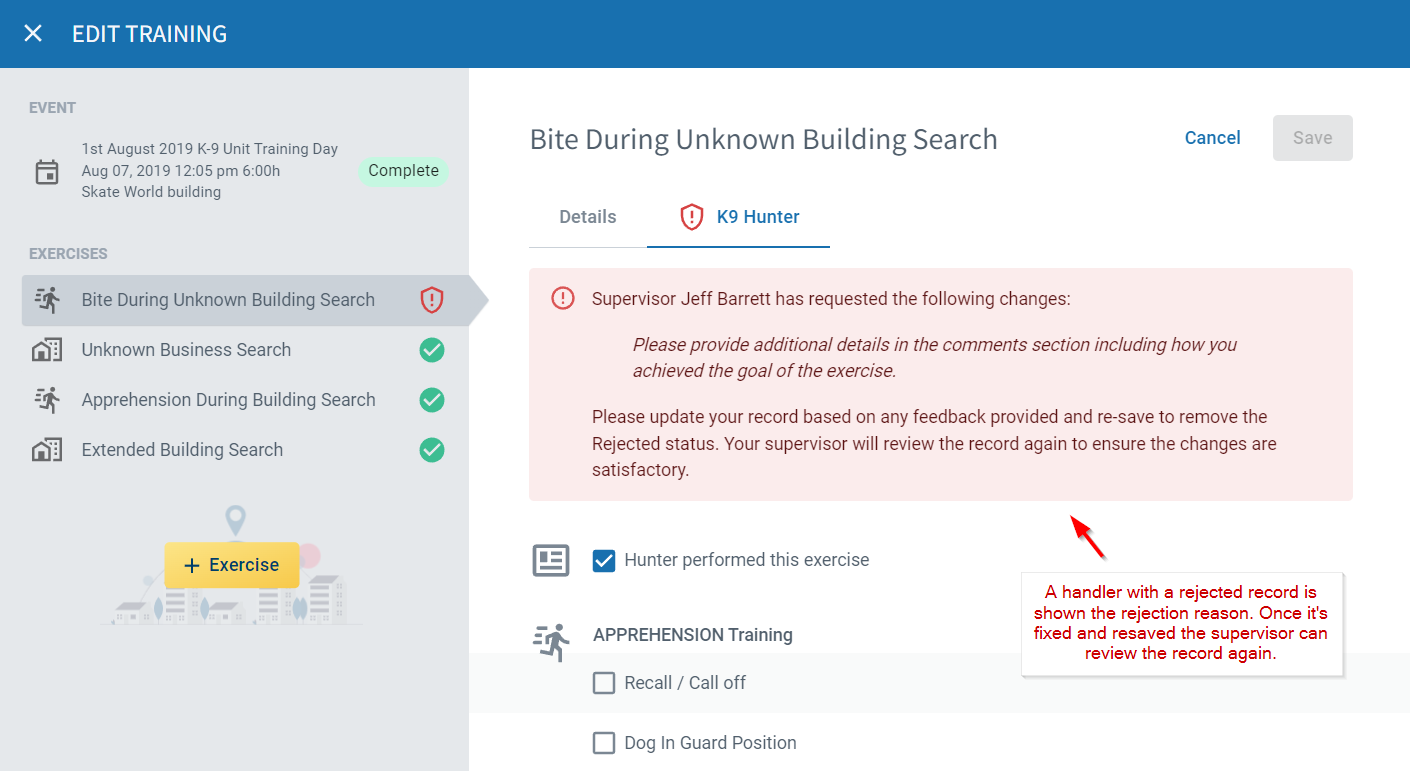
When rejecting records you'll need to enter a rejection reason. The associated handler will get a notification within PACKTRACK and by email that their record was rejected, along with the reason. Once they update and resave the record you'll be able to review it again.
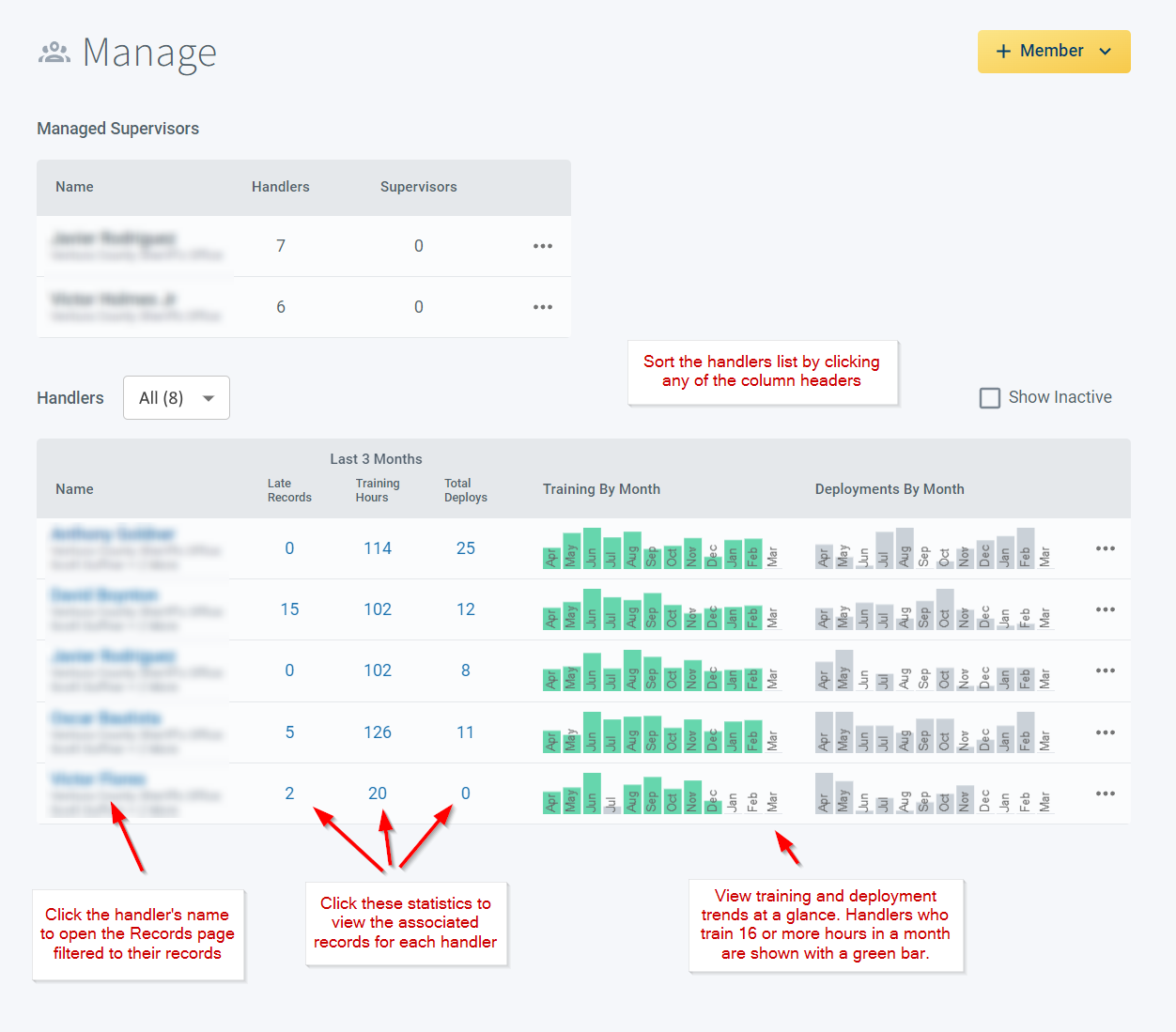
The new member management page provides a simple summary of each of your handler's activities. Invite or signup new members using the +Member button in the upper right. Use the Handlers table to review and compare performance. You can click on a column header such as Training Hours or Total Deployments to sort the table the way you want. Clicking on a handler's name or one of their statistics will open the Records page filtered to show those records. Lastly, the bar charts in this table offer a snapshot of training and deployment activity for each handler by month. This makes it easy to spot issues with things like training consistency. Green bars in the Training By Month column show months where the handler has trained for 16 or more hours.
We hope these updates help make your supervisory work just a little bit easier. Find a bug or have a suggestion to improve PACKTRACK? Let us know!
System Update
0
min read
K9 Training Exercise Scenarios
With our latest update you can now create scenario-based training exercises for your K9. A scenario exercise includes several types of patrol training in one focused exercise. The goal is teach the dog to transition back and forth between each skill within a short period of time. This helps you to more accurately replicate real life work as a K9 team. For example, you might switch from an area search to a building search and then to a track in one training scenario. Creating a scenario exercise is easy. Use the + PATROL TYPE button to add each type to the exercise definition.
With our latest update you can now create scenario-based training exercises for your K9. A scenario exercise includes several types of patrol training in one focused exercise. The goal is teach the dog to transition back and forth between each skill within a short period of time. This helps you to more accurately replicate real life work as a K9 team. For example, you might switch from an area search to a building search and then to a track in one training scenario. Creating a scenario exercise is easy. Use the + PATROL TYPE button to add each type to the exercise definition.
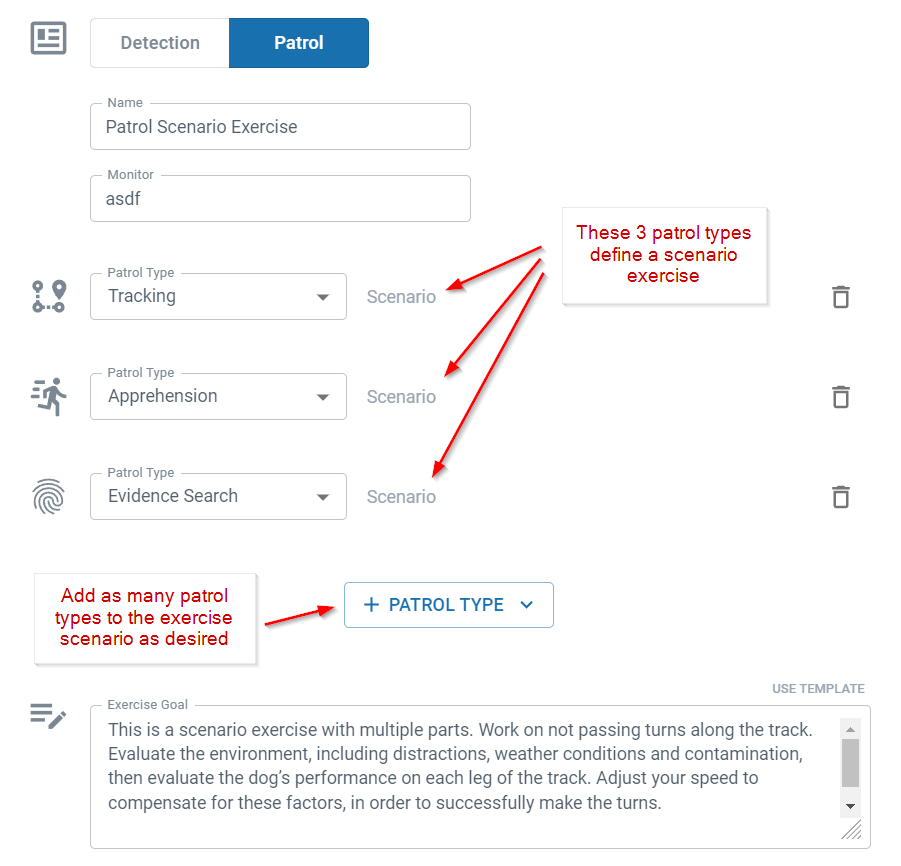
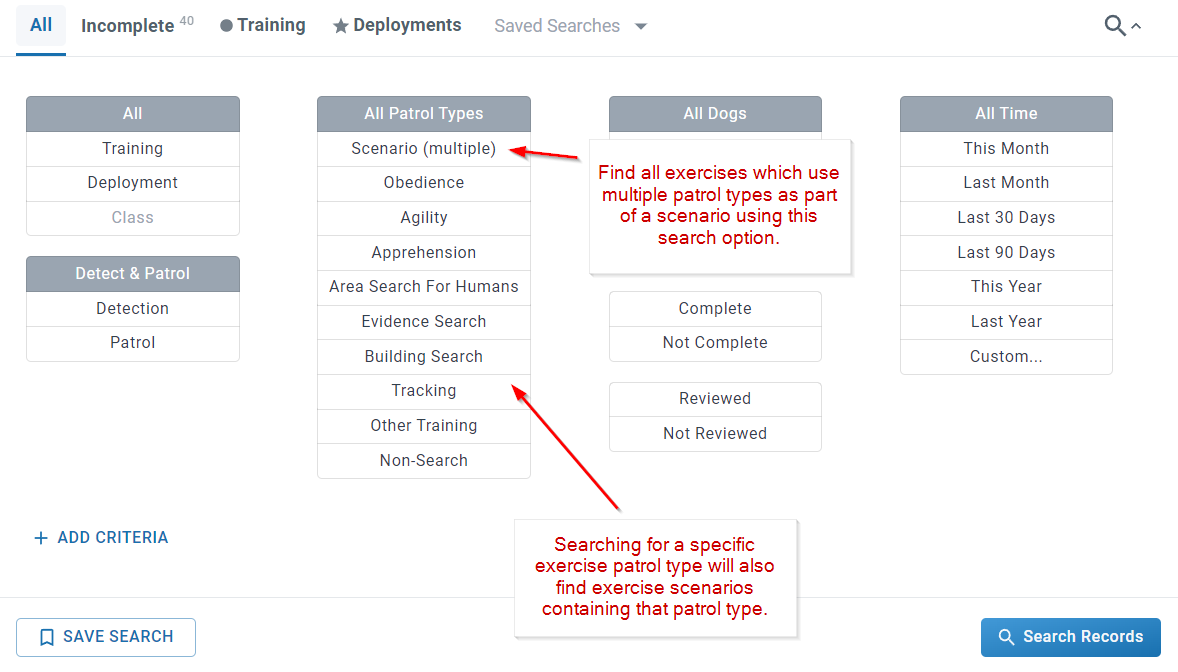
When handlers later complete this multi-part exercise they only need to write their comments on the training outcome in one place to summarize all activities.
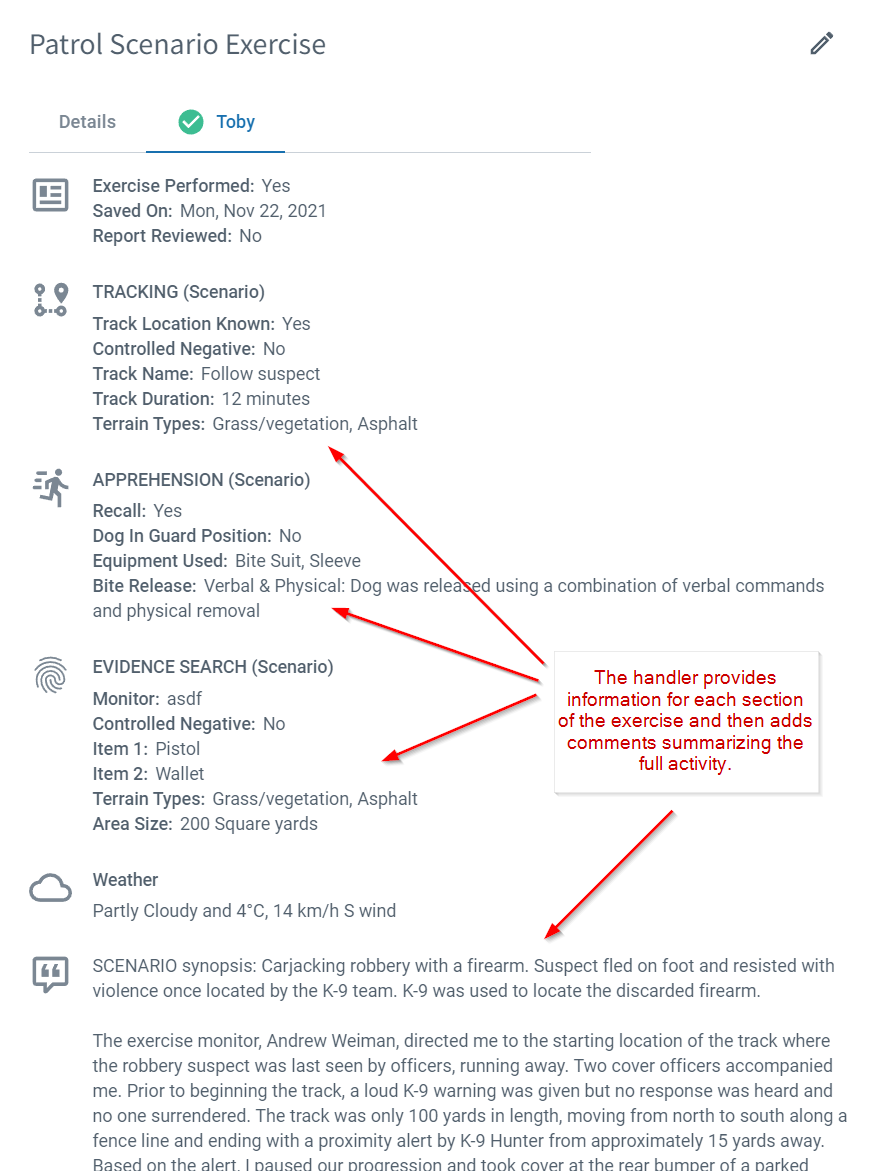
You can also specifically search for multi-type scenario records in the search form.
Here's an example of how you might write up your comments for a scenario exercise.
SCENARIO synopsis: Carjacking robbery with a firearm. Suspect fled on foot and resisted with violence once located by the K-9 team. K-9 was used to locate the discarded firearm.
The exercise monitor, Andrew Weiman, directed me to the starting location of the track where the robbery suspect was last seen by officers, running away. Two cover officers accompanied me. Prior to beginning the track, a loud K-9 warning was given but no response was heard and no one surrendered. The track was only 100 yards in length, moving from north to south along a fence line and ending with a proximity alert by K-9 Hunter from approximately 15 yards away. Based on the alert, I paused our progression and took cover at the rear bumper of a parked work truck and began to survey the immediate area for threats. I allowed K-9 Hunter to move forward to the end of his 20 ft tracking lead to cast for airborne odors. K-9 Hunter again began to bracket with his head up, cast along the soft air currents that were flowing into his direction from in front of us. K-9 Hunter targeted a garbage container and barked as an alert to the presence of the hiding suspect. Another K-9 warning was given to the unseen and still hidden suspect. The suspect ran from his hiding place at the opposite side of the garbage container and K-9 Hunter was released with the apprehension command. There were no issues with the dog’s tracking. K-9 Hunter chased the suspect down and bit the hidden sleeve on the decoy’s right arm, holding on until I ran up to aid in the apprehension. I ordered the suspect to stop resisting and to stop kicking the dog as I performed two knee strikes and a leg sweep on the left leg of the suspect to take him to the ground. I ordered my cover officers to take control of the suspect’s legs and left arm as I took control of K-9 Hunter. K-9 Hunter was given one verbal command to release the bite as I applied e-collar stimulus simultaneously to the voice command. K-9 Hunter responded instantly and affirmatively to the verbal and physical command to release. Once we moved back to the starting location of the track, I was informed by the monitor, Andrew Weiman, to walk across the street and meet with monitor Aaron Petermen. I was informed that the suspect had discarded a pistol and a wallet and I was to perform an area search for the evidence. I removed the tracking harness and long lead from K-9 Hunter, and gave him the command to search the open grassy area for evidence. K-9 Hunter was able to locate and move into a down position in front of the pistol in approximately 40 seconds. I called K-9 Hunter to a heel position and Monitor Aaron Peterman covered the pistol with a traffic cone. I commanded the K-9 to search the area again and he was able to locate the wallet in about 2 minutes of searching and about 20 yards from the pistol. K-9 Hunter moved to a down position with the wallet in front of him and he mouthed the wallet, throwing it up into the air, at which time I verbally corrected him and commanded him back into the down position at the wallet. The K-9 was called to a heel position and redirected to search again, to reinforce the down command on the article and to not molest the evidence. I verbally corrected the dog when he got too close to the article with his mouth and he avoided touching it. I called him to the heel position and leashed him. As we walked away, in a heel, I rewarded the dog with a toy and game of tug. We hope you find this new feature addition helpful. If you have any feedback on this update or anything else then please reach out and let us know.
System Update
0
min read
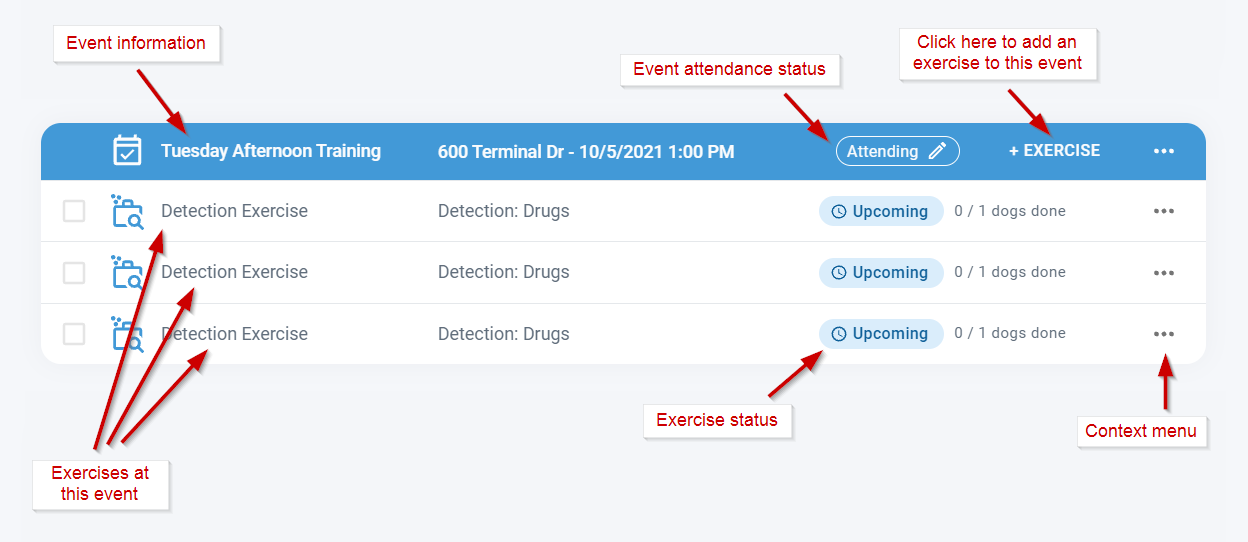
Optional K9 Training Events
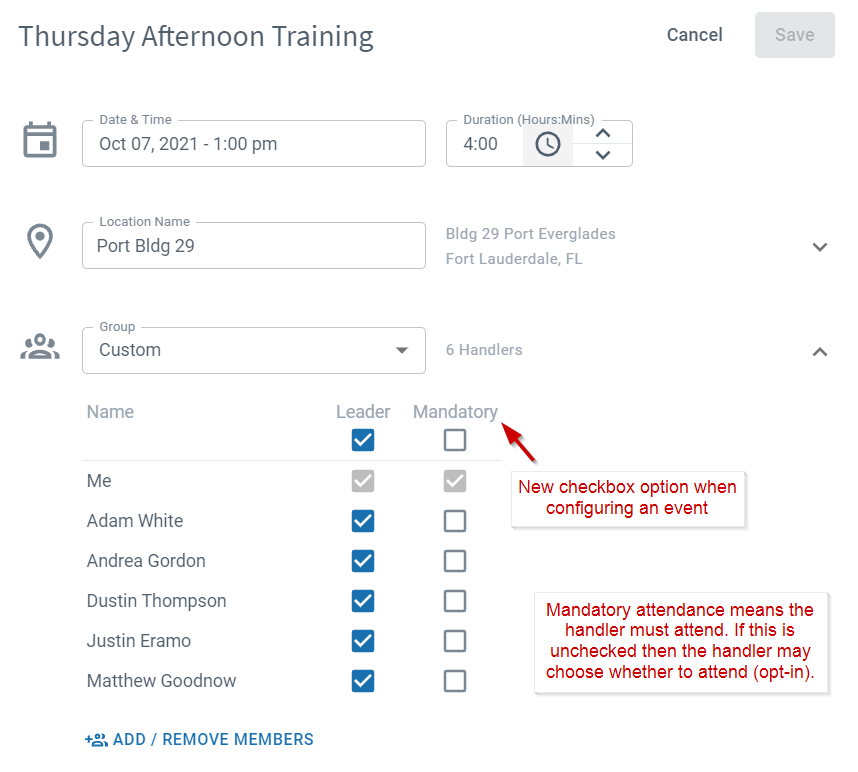
First of all, we'd like to thank everyone for their patience as we've migrated PACKTRACK to the new interface. All K9 training and deployment records now use a new modern design which works the same on the website and in the iOS and Android mobile apps. We'll continue to transition other areas of the interface to the new design over the coming months. Until now PACKTRACK has only supported mandatory event attendance. When creating an event you specify which handlers will train and it's expected that they will all be there. Our latest feature lets training event creators choose whether each member's attendance is optional or mandatory. You can now schedule an upcoming event with a list of optional handlers and allow them to decide whether they will attend.
First of all, we'd like to thank everyone for their patience as we've migrated PACKTRACK to the new interface. All K9 training and deployment records now use a new modern design which works the same on the website and in the iOS and Android mobile apps. We'll continue to transition other areas of the interface to the new design over the coming months. Until now PACKTRACK has only supported mandatory event attendance. When creating an event you specify which handlers will train and it's expected that they will all be there. Our latest feature lets training event creators choose whether each member's attendance is optional or mandatory. You can now schedule an upcoming event with a list of optional handlers and allow them to decide whether they will attend.
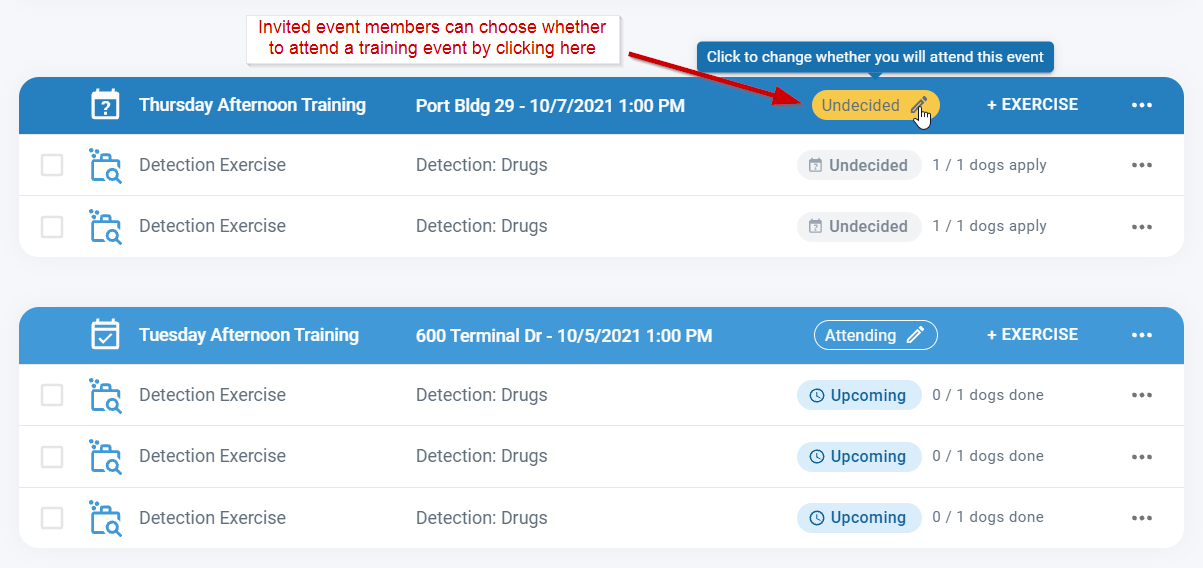
Members who are invited to an optional event will receive an email and notification asking if they'd like to attend. To respond to the invitation just click the yellow "Undecided" button in the event row or use the context menu. You can change your mind about attending any time using the same options.
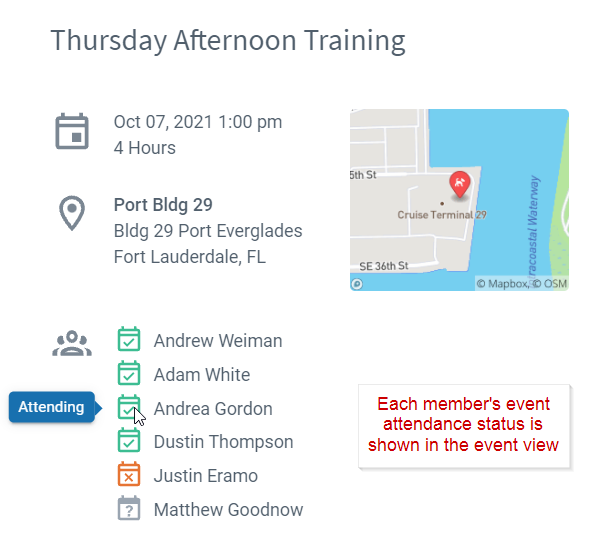
View each member's attendance status (whether they opted-in or declined) by opening the event. Note that Mandatory events will always show all members as attending.
You may have noticed that the record list layout has changed. While it looks a little different it still works the same way. This updated design better distinguishes between the training event and the exercises within each event. As before you can click on any row to open the Record Editor and the icon with 3 dots on the far right of each row provides context menu options.
We hope this update gives training groups a more flexible way to plan their training. This feature, like many others, was added based on your comments and suggestions. Please keep the feedback coming and let us know if you have any questions.
System Update
0
min read
New PACKTRACK Interface
It's been a while since our last blog post! We've been hard at work redesigning the PACKTRACK interface to make it even easier to enter K9 training and deployment records.
It's been a while since our last blog post! We've been hard at work redesigning the PACKTRACK interface to make it even easier to enter K9 training and deployment records.
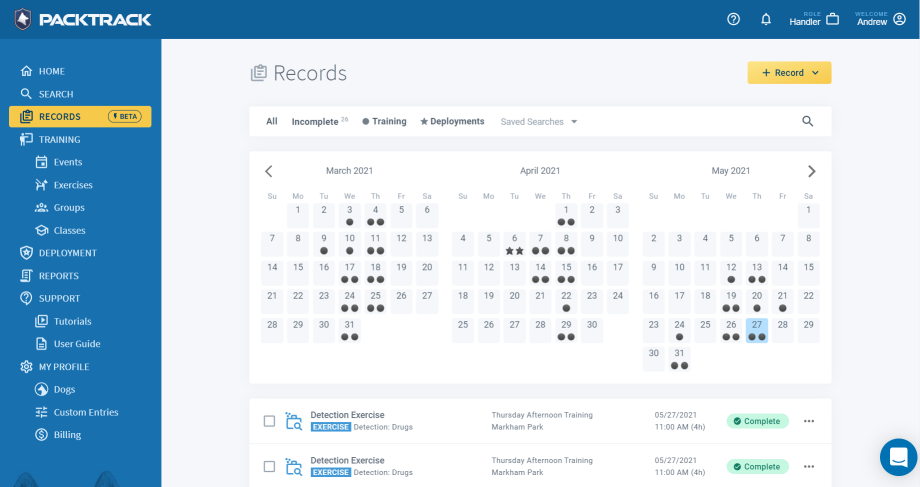
In the early spring we quietly introduced the new training interface as a Beta feature available in the Records page. Access to the old training interface was still available but we've been encouraging everyone to try the new design and give us feedback. This new interface is available on the website and in the app and provides numerous speed and usability improvements to make record keeping fast and accurate. We've been actively refining the new design with bug fixes and enhancements based on your comments.
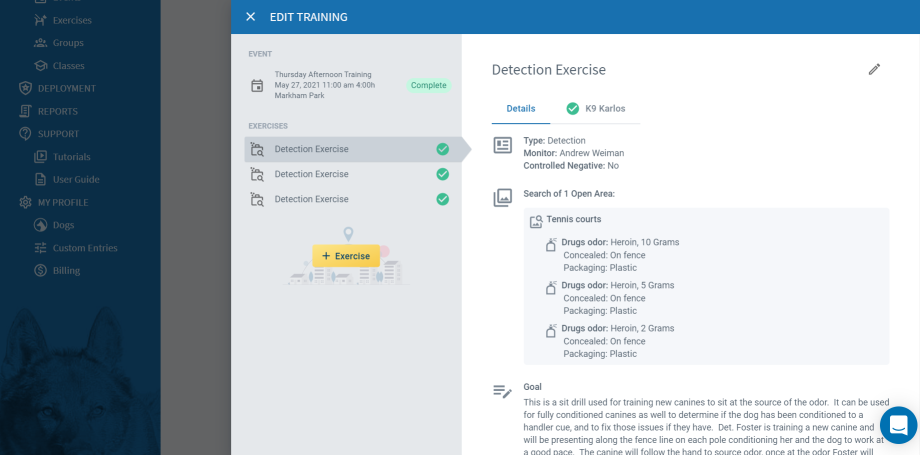
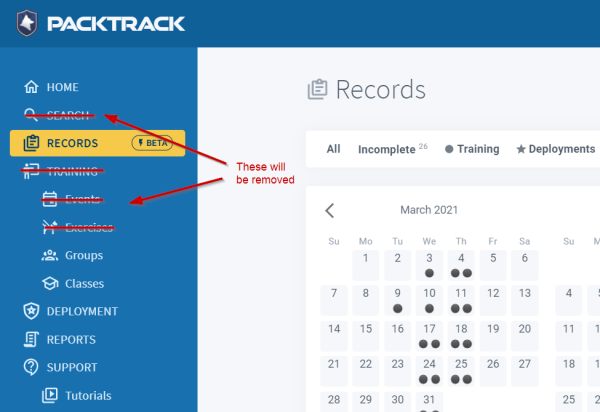
The majority of you now use the new interface to enter your training records. To simplify the system for everyone we're ready to remove the old interface from PACKTRACK on the website and in the mobile app. We recognize that some of you are still using the old system and that this will require learning a new interface. We feel the new system is much easier to use but that doesn't mean there won't be challenges in learning something new. We ask for your patience during this transition.
The new PACKTRACK UI will provide a streamlined experience with new features that works the same on the website and in the app. However this new technology won't work in the Internet Explorer web browser. If you're still using this browser then you'll need to upgrade to a modern browser such as Google Chrome, Mozilla Firefox, Microsoft Edge or Safari. Please feel free to reach out to us at any time using our new support system. You can ask questions and provide feedback in a convenient chat interface that's similar to text messaging. We'll do our best to answer your questions quickly so you can get back to your K9 records.
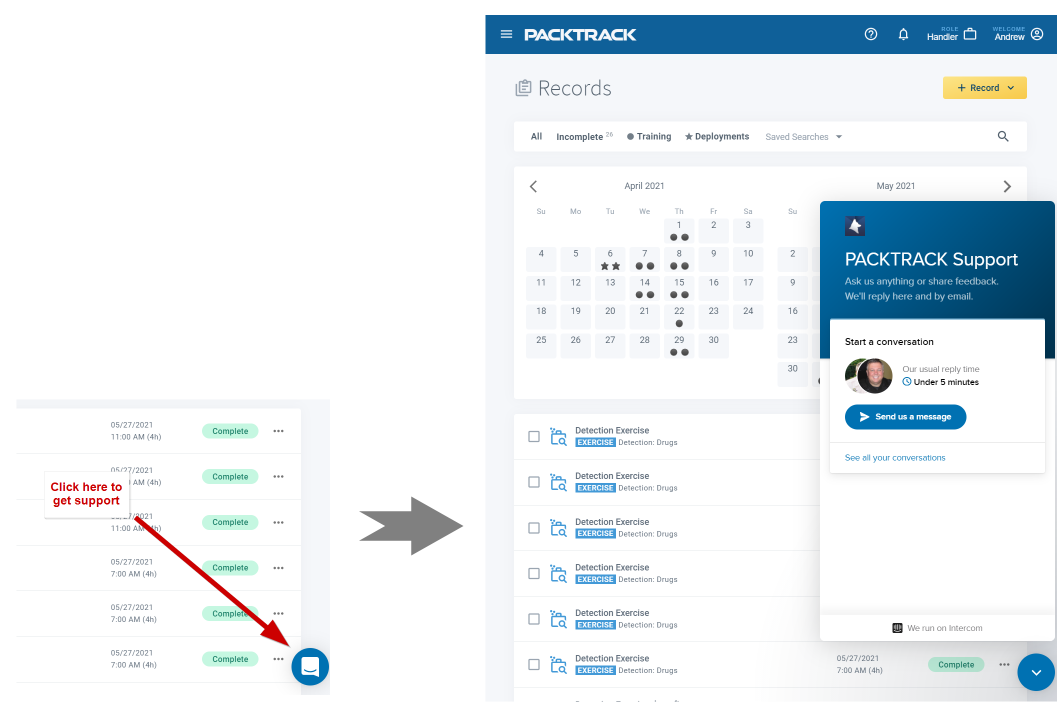
A few weeks after the transition to the new PACKTRACK training UI we will update the deployments UI to use the same design. Our goal is to have most if not all PACKTRACK pages running with the new design by the end of the year. We appreciate your patience and value your feedback during this process. If you have any comments or concerns about anything then please reach out.
Explore PACKTRACK
Get a closer look at record keeping, reporting, unit oversight, training groups, and integrated GPS track mapping, and see how it fits into your workflow.
